The Copilot Control System: Govern M365 Copilot & Agents
· AI Governance · 12 min read
By Juan Pedro Márquez
The first question a nervous CISO asks me about Copilot is never "how good is the model?" It is "who can build an agent in my tenant, and how do I find the ones already running?"
That is the right question. And until recently, the honest answer was a shrug and a list of six admin centers.
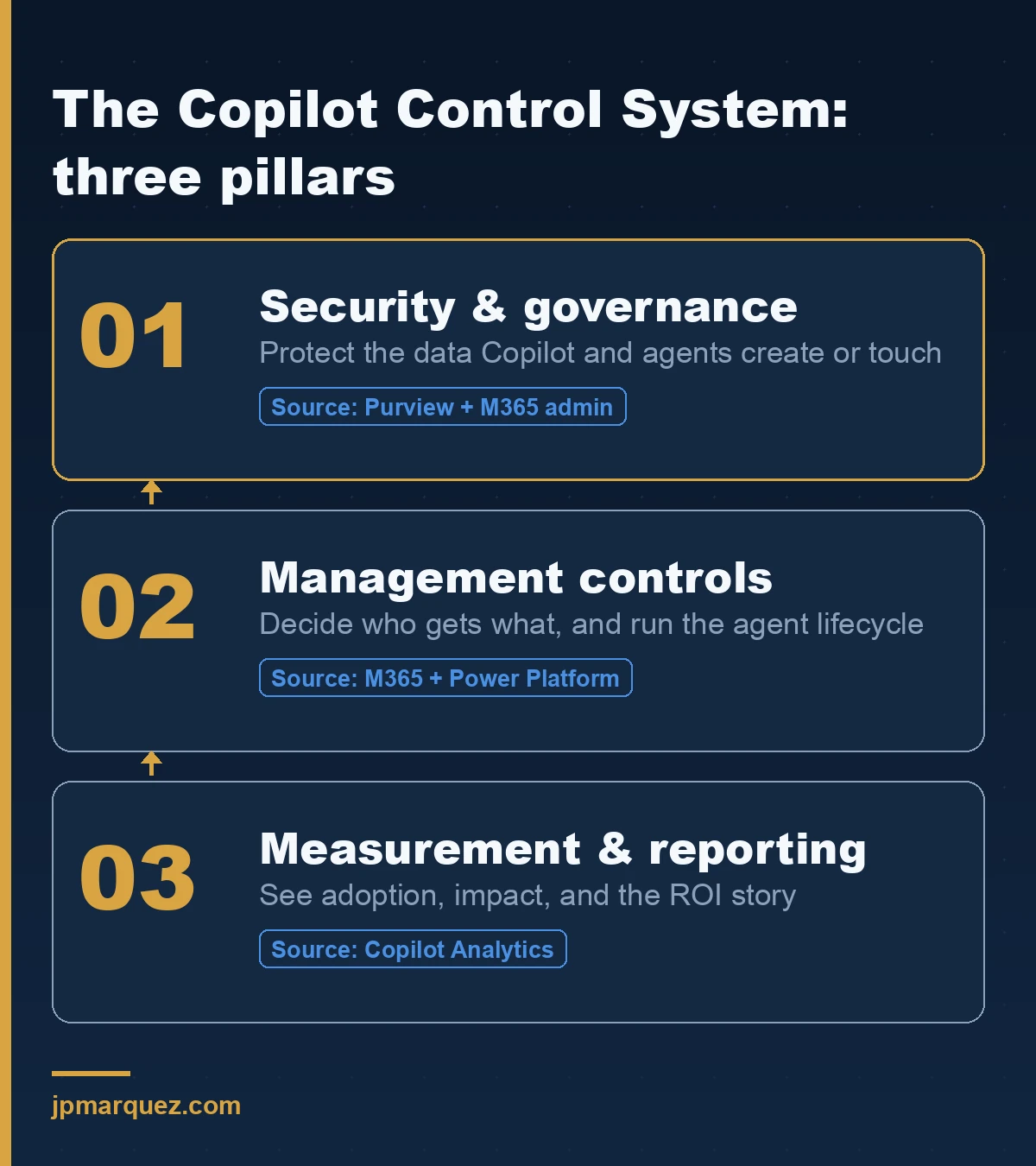
Microsoft's answer to that shrug is the Copilot Control System (CCS) — a framework that pulls the scattered controls for Microsoft 365 Copilot, Copilot Chat, prebuilt agents, and the agents your people build in Copilot Studio into three pillars: security and governance, management, and measurement. It is not a single new product you buy. It is a map of controls you already own but probably have not turned on.
This is the guide I wish existed the day I started auditing tenants that had switched Copilot on before anyone drew that map.
What is the Copilot Control System, exactly?
The Copilot Control System is Microsoft's governance framework for Copilot and agents, organized into three pillars: security and governance (protect the data Copilot touches), management controls (decide who gets what, and run the agent lifecycle), and measurement and reporting (see adoption and impact). It spans Microsoft 365 Copilot, Copilot Chat, Microsoft's prebuilt agents, and Copilot Studio agents published to Microsoft 365 channels.
The important word is framework. The CCS overview does not give you one dashboard that does everything. It tells you which existing surface — the Microsoft 365 admin center, the Power Platform admin center, Copilot Studio, Microsoft Purview — enforces each control, and how the pieces fit. If you have deployed Copilot and felt the controls were scattered, you were right. CCS is the effort to make them one thing conceptually, even when they are still several things operationally.
Here is the opinion I will defend on any call: the CCS is less a new capability than an admission. Microsoft shipped Copilot fast, the governance surfaces trailed, and CCS is the retrofit that ties them together. That is not a criticism — it is a reason to treat CCS as a checklist of things to switch on, not a magic layer that governs your tenant the moment you read about it.
Where do I actually manage Copilot agents day to day?
Agent inventory and lifecycle live in the Copilot Control System view inside the Microsoft 365 admin center. Go to Agents > All agents to see every agent available in your tenant, filter by availability, find agents missing an owner, and block or pin specific ones. This is the single list most organizations have never opened.
The agents admin guide walks the exact path. The filters are where the value is. Set Filters > Availability > All users and you see what everyone can reach. Set the Missing an owner filter and you find the orphans — agents whose builder left the team, changed roles, or forgot they published a thing that still answers questions with tenant data. Removing ownerless agents is the fastest governance win in the whole system, and it takes about ten minutes.
Agents arrive in your tenant three ways, and CCS treats them differently. Microsoft-installed agents (currently Researcher and Analyst) are pre-pinned for licensed users and, per the agent installation model, are not governed by the standard agent settings — they sit inside the core Copilot Chat experience. Admin-installed agents give you the full set of lifecycle tools. User-installed agents are the ones that keep CISOs up at night, and they are exactly where you want a Data Loss Prevention policy and a sharing limit in place before, not after.
To govern all three, the Microsoft 365 admin center controls let you enable, disable, assign, block, or remove agents for the whole tenant or specific groups. If you have already read the six-guardrail agent governance checklist, CCS is the surface where you enforce most of those guardrails.
How does the security and governance pillar protect Copilot data?
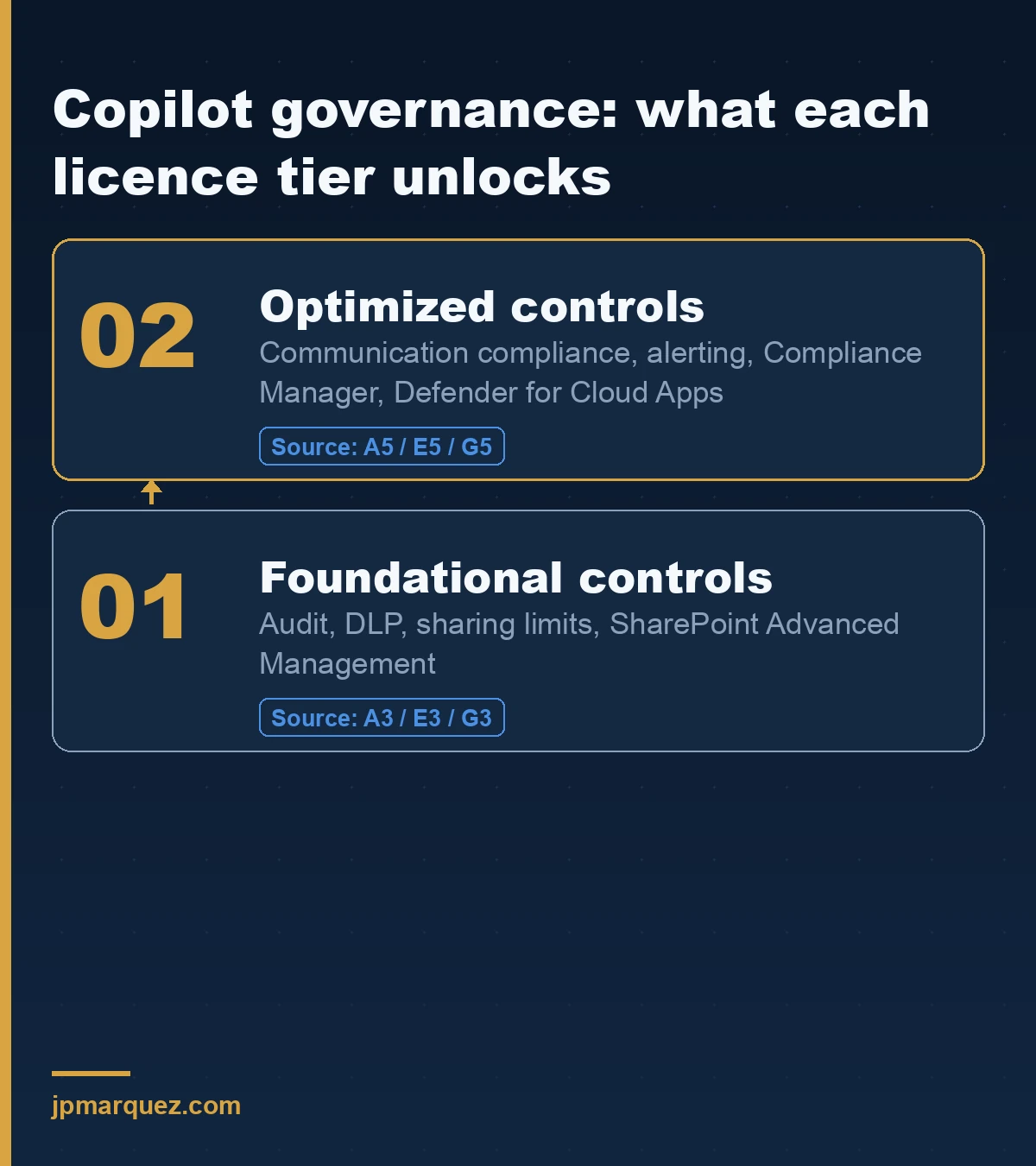
The security pillar splits into foundational controls (Microsoft 365 admin center, SharePoint Advanced Management, and Purview on an A3/E3/G3 license) and optimized controls (Purview and Defender for Cloud Apps on A5/E5/G5). The practical translation: with E3 you can audit and set basic guardrails; with E5 you get communication compliance, alerting, and Compliance Manager on top.
The security and governance pillar covers data security, AI security, and compliance. The one control I make every client turn on first is auditing. Microsoft Purview Audit for Copilot and AI applications logs the prompts and responses that flow through Copilot and agents. Without it, you cannot answer "what did the agent tell someone about the merger last Tuesday?" — and that is the exact question your legal team will ask the day it matters.
There is a data-readiness dependency here that CCS assumes and most tenants fail. Copilot answers using what a user can already see. If your SharePoint permissions are loose, CCS does not fix that — it faithfully surfaces the oversharing at conversational speed. Getting the substrate right is a prerequisite, which is why I treat SharePoint AI data readiness as step zero, not a later optimization.
For the deployer-facing compliance obligations that sit next to all of this — the EU AI Act deadline being the loud one this year — the audit logs and Purview eDiscovery holds CCS points to are the same evidence you will need for a Copilot compliance plan.
Which controls run the agent lifecycle from build to retirement?
The management pillar owns licensing, the agent lifecycle, and customization, mostly through three surfaces: the Microsoft 365 admin center for inventory and pinning, the Power Platform admin center for sharing controls, and Copilot Studio for Data Loss Prevention on publishing.
Three moves matter most, and the management controls pillar documents each:
- Limit agent sharing. Editor and Viewer roles in the Power Platform admin center decide who can co-author and who can only run an agent. You can block or cap sharing at the managed environment or environment-group level — so a citizen developer cannot quietly share an HR agent with the whole company.
- Block risky publishing channels with DLP. Data Loss Prevention policies for agents stop agents from being published to channels you have not approved. If you only do one thing this quarter, make it this one.
- Delegate connector management. Rather than routing every connector request through a global admin, you can grant AI Administrators rights over connectors through Entra roles. Governance that depends on one overloaded admin is governance that quietly stops happening.
The lifecycle piece people skip is retirement. An agent with no owner and no traffic is not harmless — it is an unmonitored door into tenant data. Build a recurring review off the Missing an owner and No users filters. That review, not the launch, is where governance is actually done.
Where does identity fit — is it a separate layer?
Identity is not a separate layer bolted on at the end. In a recent multi-day agent-architecture workshop, the strongest lesson was that governance and identity work as overlays across the entire stack — the data, the orchestration, the tools — rather than as a final "layer 8" you add before go-live. When we redrew the architecture that way, the customer's auditor stopped asking follow-up questions. That is the tell: when identity threads through every tier, the review gets short.
CCS reflects this. Each agent should have an owner, an identity, and an access boundary that travels with it. Microsoft's direction of travel — Microsoft Agent 365 as a control plane for all agents regardless of where they were built, and per-agent identity through Entra Agent ID — assumes agents are principals you manage, not features you toggle. If you are drawing your Copilot governance model this quarter, draw identity as a vertical that crosses every pillar, not a box at the bottom.
How do I prove Copilot is worth the money?
The measurement pillar surfaces adoption, productivity impact, and business value, mostly through Copilot Analytics. It tells you who is using Copilot, where, and whether behavior is changing — the raw material for a return-on-investment case.
The measurement and reporting pillar is the pillar most teams ignore until a CFO asks the uncomfortable question. Do not wait for that meeting. Usage data is necessary but not sufficient — "seat activation is 74%" is not an ROI story, it is a login count. The number that survives scrutiny is a business metric that moved, tied back to a behavior change you can see in the data. I walk through how to build that argument in the Copilot ROI metrics framework, and CCS measurement is where the underlying numbers come from.
In what order should I turn these on?
Turn on visibility and auditing first, containment second, and measurement last. You cannot govern what you cannot see, you cannot prove what you did not log, and an ROI story built before the controls are in place is a story built on sand.
Here is the sequence I walk clients through, and I have yet to find a reason to reorder it:
- Enable Purview audit for Copilot and AI applications. Logging is retroactive-proof — without it, everything after the fact is guesswork. This is the one control that gets more valuable the earlier it exists, because it cannot capture what happened before you switched it on.
- Open the agent inventory and clear the orphans. In the Microsoft 365 admin center, filter Agents > All agents by Missing an owner and by No users, then reassign or remove. Ten minutes, large risk reduction.
- Put a DLP policy on agent publishing in Copilot Studio, so nobody ships an agent to an unapproved channel while you are still writing the policy document.
- Cap sharing at the environment or environment-group level in the Power Platform admin center, and delegate connector management to AI Administrators so governance does not bottleneck on one global admin.
- Fix the data substrate — SharePoint permissions and sensitivity labels — because Copilot inherits every oversharing mistake underneath it.
- Only now, open the measurement pillar and start building the adoption and ROI picture on top of a tenant you can actually see into.
The order matters because each step makes the next one safe. Measurement before containment is a dashboard of a situation you do not control.
The honest bottom line
The Copilot Control System does not govern your tenant. You govern your tenant, and CCS is the map that tells you which switches to flip and where they live. Turn on Purview audit. Open the agent inventory and clear the orphans. Put a DLP policy on publishing. Cap sharing at the environment level. Draw identity as an overlay, not a layer. Then, and only then, look at the measurement pillar and start building the ROI story.
Key point: The organizations that get burned are not the ones that lack CCS. They are the ones that read about it, felt reassured, and never opened the admin center.
Frequently asked questions
Is the Copilot Control System a product I need to buy separately?
No. CCS is a framework that organizes controls you already have across the Microsoft 365 admin center, Power Platform admin center, Copilot Studio, and Microsoft Purview. Some capabilities depend on your licensing tier — foundational controls come with E3, optimized controls with E5 — but there is no separate CCS SKU.
Does the Copilot Control System govern agents built outside Copilot Studio?
CCS focuses on Microsoft 365 Copilot, Copilot Chat, Microsoft's prebuilt agents, and Copilot Studio agents published to Microsoft 365 channels. For agents built or acquired elsewhere, Microsoft points to Microsoft Agent 365 as the broader control plane. The two are complementary: CCS for the Copilot family, Agent 365 as the wider net.
What is the single most valuable control to turn on first?
Microsoft Purview Audit for Copilot and AI applications. Without prompt-and-response logging, you cannot investigate anything after the fact — and every serious governance conversation eventually becomes a "what did it say, and to whom?" conversation.
How do I find agents nobody owns anymore?
In the Microsoft 365 admin center, go to Agents > All agents, then use the Missing an owner filter. Ownerless agents still run against tenant data, so removing or reassigning them is one of the fastest risk reductions available.
Do Researcher and Analyst fall under agent governance settings?
No. Researcher and Analyst are Microsoft-installed, first-party experiences inside Copilot Chat and are not governed by the standard agent settings. You can block them at the tenant level in the Microsoft 365 admin center, but the granular per-agent controls do not apply to them.