Microsoft 365 Agent Governance Checklist: 6 Guardrails
· AI Governance · 12 min read
By Juan Pedro Márquez
📋 Quick Reference
Audience: IT Architects, CISOs, and Power Platform leads deploying Microsoft 365 Copilot Studio agents in enterprise environments
Time to read: ~10 minutes
What you'll get: Six concrete governance guardrails, the Microsoft tooling that implements each one, and the EU AI Act articles they address
The most dangerous Copilot Studio agent in your organization is probably the one your HR team built last quarter — without telling IT.
That is not a hypothetical. In every enterprise I've worked with on AI governance, I find the same pattern: a well-intentioned business team discovers Copilot Studio, builds an agent to solve a real problem, connects it to production data, and deploys it to 200 people — all before IT governance is involved. Not because they're reckless. Because the tools are genuinely accessible now, and the governance process hasn't caught up.
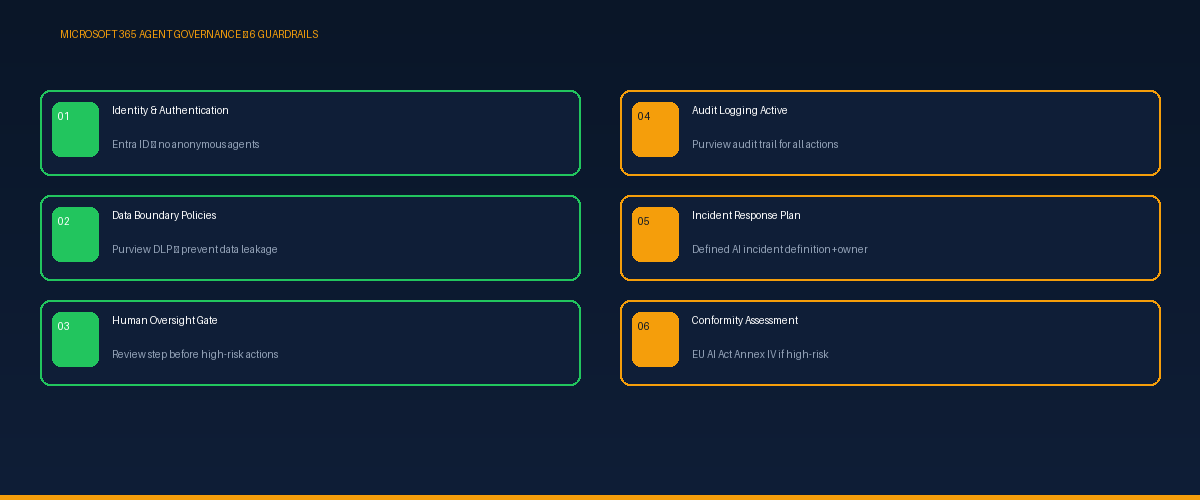
This guide is about closing that gap. Specifically: the six governance guardrails that must be in place before any Copilot agent goes to production — and the Microsoft tooling that implements each one.
Why Agents Need a Different Governance Framework
Traditional AI tools — a recommendation engine, a classification model — are passive. They analyze and respond. Copilot Studio agents are different: they can take actions. They can send emails, create calendar invites, update records, query HR systems, and trigger workflows. The risk profile is categorically higher than a passive AI tool.
Under the EU AI Act, an agent that makes or directly informs consequential decisions about employees, customers, or access to services may qualify as a high-risk AI system — requiring the full set of Annex III obligations. But even below the high-risk threshold, agents need governance that standard AI tools don't require: clear identity boundaries, data access controls, human checkpoints, and operational oversight.
The question that determines your governance level: Can this agent take an action that is difficult or impossible to reverse — sending a communication, modifying a record, denying access, triggering a payment? If yes, you need all six guardrails. No exceptions.
Guardrail 1: Identity and Authentication Controls
What it means: Every agent must operate under a defined, auditable identity — not under a user's credentials, not anonymously. The agent's identity determines what it can access, and every action it takes must be traceable to that identity.
How to implement it: Use Microsoft Entra ID to create a dedicated service principal for each agent, scoped to the minimum permissions required. Never deploy an agent using a user's personal account credentials — when that person leaves, the agent breaks, and the audit trail is compromised.
EU AI Act alignment: Article 14 (human oversight) requires that AI systems be attributable. An agent without a dedicated identity cannot be audited. This is foundational.
Red flag: If the person who built the agent is the only one who knows what credentials it uses, you have a single point of failure and a compliance gap.
Guardrail 2: Data Boundary Policies
What it means: The agent should only be able to access the data it needs for its specific function — and nothing else. Copilot Studio agents connected to SharePoint or Microsoft Graph can, by default, access anything the calling user can access. In an enterprise environment, that scope is almost always too broad.
How to implement it: Define explicit data connectors scoped to specific sites, libraries, or datasets. Use Microsoft Purview Data Loss Prevention policies to prevent the agent from surfacing, transmitting, or exfiltrating sensitive content. Apply sensitivity labels to data sources and configure the agent to respect label-based access controls.
EU AI Act alignment: Article 10 (data governance) requires that high-risk AI systems operate with documented data access controls and bias mitigation. Broad data access makes Article 10 documentation practically impossible.
Guardrail 3: Human Oversight Gate for High-Risk Actions
What it means: Any action with significant, difficult-to-reverse consequences requires a human review step before execution. Not a notification after the fact — a checkpoint before the action is taken.
How to implement it: In Copilot Studio, design agent flows with explicit approval steps using Power Automate approval workflows. Define the threshold for what constitutes a "high-risk action" in your context — it will be different for an IT helpdesk agent versus an HR agent. Document the threshold, the approver role, and the expected response time.
EU AI Act alignment: Article 14 is explicit: high-risk AI systems must enable humans to "disregard, override, or intervene." A human oversight gate operationalizes this requirement. Without it, you cannot claim Article 14 compliance for any consequential agent action.
Guardrail 4: Audit Logging Active
What it means: Every significant agent action — every query, every data access, every external call, every user interaction that led to a consequential output — must be logged with sufficient detail to reconstruct what happened and why.
How to implement it: Enable Copilot Studio audit logging through Microsoft Purview Audit. Configure log retention to align with your compliance requirements — the EU AI Act does not specify a retention period, but best practice for regulated AI is a minimum of 2 years for high-risk systems. Connect to Azure Monitor for operational telemetry.
EU AI Act alignment: Articles 12 and 72 require logging sufficient to enable post-market monitoring and incident investigation. Audit logging is also essential evidence for demonstrating that human oversight procedures were actually followed — not just documented.
Common mistake: Enabling logging but never reviewing it. Audit logs that no one reads provide compliance evidence but not operational governance. Assign someone to review agent activity logs at a defined cadence — weekly for high-frequency agents, monthly for lower-volume deployments.
Guardrail 5: Incident Response Plan for AI Agents
What it means: A defined procedure for what happens when an agent produces a harmful, incorrect, or unexpected output — covering immediate containment, root cause investigation, affected party notification, and regulatory reporting if applicable.
How to implement it: Draft an AI-specific incident response runbook that extends your existing IT incident response process. Define what constitutes an "AI incident" for your organization (a discriminatory output, a data exfiltration event, an incorrect consequential decision). Define severity tiers with response time targets. Identify who has authority to suspend an agent immediately if needed.
For Microsoft environments, Microsoft Sentinel can trigger automated alerts on anomalous agent behavior. Microsoft Defender for Cloud provides security posture monitoring for AI workloads.
EU AI Act alignment: Article 73 requires deployers to report serious incidents to national authorities within 15 days of becoming aware of them. Without a defined incident response process, the 15-day clock starts running before you know it's running.
Guardrail 6: Risk Classification and Conformity Assessment
What it means: Before production deployment, every Copilot Studio agent must be formally classified against EU AI Act risk tiers. If it falls in the high-risk category, Annex IV technical documentation must be completed and a conformity assessment conducted before deployment — not after.
How to implement it: Build a lightweight agent intake process that includes a mandatory EU AI Act risk classification question: does this agent touch any of the 8 Annex III categories? For Category 4 (employment) and Category 5 (essential services access), require a formal risk assessment before IT approval.
Use Microsoft Compliance Manager to track compliance posture across your agent estate. Maintain Annex IV documentation for each high-risk agent in a centralized governance repository.
EU AI Act alignment: Article 43 requires conformity assessment before market placement or putting high-risk AI into service. Retroactive compliance — classifying and documenting agents already in production — is significantly harder than building the assessment into the deployment process from the start.
Implementing the Six Guardrails: A Deployment Checklist
| Guardrail | Gate | Microsoft Tool | EU AI Act Article |
|---|---|---|---|
| 1. Identity & Auth | Before build | Entra ID service principal | Art. 14 |
| 2. Data Boundaries | Before build | Purview DLP + Sensitivity labels | Art. 10 |
| 3. Human Oversight Gate | Before production | Power Automate approvals | Art. 14 |
| 4. Audit Logging | Before production | Purview Audit + Azure Monitor | Arts. 12, 72 |
| 5. Incident Response Plan | Before production | Sentinel + Defender for Cloud | Art. 73 |
| 6. Risk Classification | Before build | Compliance Manager | Art. 43 |
The Agent Already in Production Without These Guardrails
If you're reading this and you already have agents in production that weren't put through this process — you're not alone, and this is fixable. The priority sequence for retroactive governance is: audit logging first (you need the evidence trail immediately), risk classification second (determines your full obligations), human oversight procedures third, then documentation and incident response.
The goal is not perfection before August 2. The goal is a defensible governance posture: evidence that you assessed the risk, implemented proportionate controls, and have an operational oversight process in place.
Regulators understand that enterprises are in transition. What they don't accept is the absence of any governance program — which is different from an imperfect one.
*Related reading: [Build Your First Copilot Studio Agent in One Day](/blog/copilot-studio-first-agent) · [The Microsoft Copilot for M365 Governance Framework](/blog/copilot-m365-governance-framework)*