Agent Governance Toolkit: Runtime Policy Enforcement for Microsoft AI Agents
· AI Governance · 11 min read
By Juan Pedro Márquez
Every agent you've deployed this year can call tools, query databases, and send messages on someone's behalf. Identity governance tells you which agent did it. It says nothing about whether the action itself should have been allowed. That gap — between "this agent is who it claims to be" and "this specific action, right now, was permitted" — is what the Agent Governance Toolkit closes, and it closes it in application code, not in a prompt.
Microsoft published the Agent Governance Toolkit (AGT) on GitHub in March 2026. It's MIT-licensed, in public preview, and — as of this week — sitting at 5,700+ stars with 144 open issues and commits landing daily. It is not a Microsoft 365 product. There's no admin center blade, no SKU, no seat count. You pip install it, or dotnet add package it, and it runs inside your agent's process.
What does the Agent Governance Toolkit actually do?
AGT intercepts every tool call, message send, and delegation an agent attempts and evaluates it against a YAML policy before the action executes. If the policy says no, the call never reaches the tool. That's the entire pitch, and it's a narrower one than it sounds — deliberately.
The project's own framing is blunt about why this exists instead of relying on a well-written system prompt: OWASP's LLM01 entry on prompt injection states there is no proof-of-fool method for preventing it, and a 2025 ICLR paper (Andriushchenko et al.) reports a 100% attack success rate against GPT-4o, GPT-3.5, Claude 3, and Llama-3 using adaptive suffix-optimization attacks on the JailbreakBench benchmark. Asking a model nicely to stay in bounds is a probabilistic control. AGT's position is that governance belongs in deterministic code the model can't argue with — a govern() wrapper around the tool function itself, not a paragraph in the system message.
Here's what that looks like in Python:
from agentmesh.governance import govern

safe_tool = govern(my_tool, policy="policy.yaml")   # every call checked, logged, enforced
And the policy it's checking against:
apiVersion: governance.toolkit/v1
name: production-policy
default_action: allow
rules:
  - name: block-destructive
    condition: "action.type in ['drop', 'delete', 'truncate']"
    action: deny
    description: "Destructive operations require human approval"

  - name: require-approval-for-send
    condition: "action.type == 'send_email'"
    action: require_approval
    approvers: ["security-team"]
Call safe_tool(action="drop", table="users") and you don't get a hallucinated refusal — you get a GovernanceDenied exception, raised by application code, logged to an audit trail, before the drop ever reaches your database driver. That's the difference the project is selling: not "unlikely," but structurally impossible.
Key point: Microsoft's own benchmark numbers for the policy engine: sub-millisecond evaluation (under 0.1ms) at roughly 47,000 operations per second with 1,000 concurrent agents. Whatever you think of the toolkit conceptually, it isn't going to be the latency bottleneck in your agent pipeline.
Where does this fit next to Microsoft Agent 365?
It fits underneath it, not instead of it. Agent 365 is Microsoft's control plane for observing, governing, and securing agents across a tenant — the registry, the sponsor model, the Entra Agent ID identity layer, the Purview and Defender wiring. What it governs is access: which agent exists, who's accountable for it, what conditional access policy gates its sign-in. AGT governs behavior: once an agent has that access, what is it actually allowed to do with it, action by action.
The project's own A365 reference architecture doc draws the line cleanly, and it's worth quoting because it doesn't oversell itself: "A365's conditional access operates at the identity level. AGT adds action-level authorization where agents declare intent before acting, with drift detection when behavior deviates from the plan." A365 gates whether the agent gets in the room. AGT gates what it's allowed to touch once it's there.
That split matters for Entra Agent ID specifically. Entra Agent ID gives an agent a first-class identity — an object ID, a sponsor, a blueprint it inherits credentials from. None of that tells you whether the specific send_email call an agent just made, with those specific parameters, should have gone through. Identity answers "who." AGT answers "should this have happened."
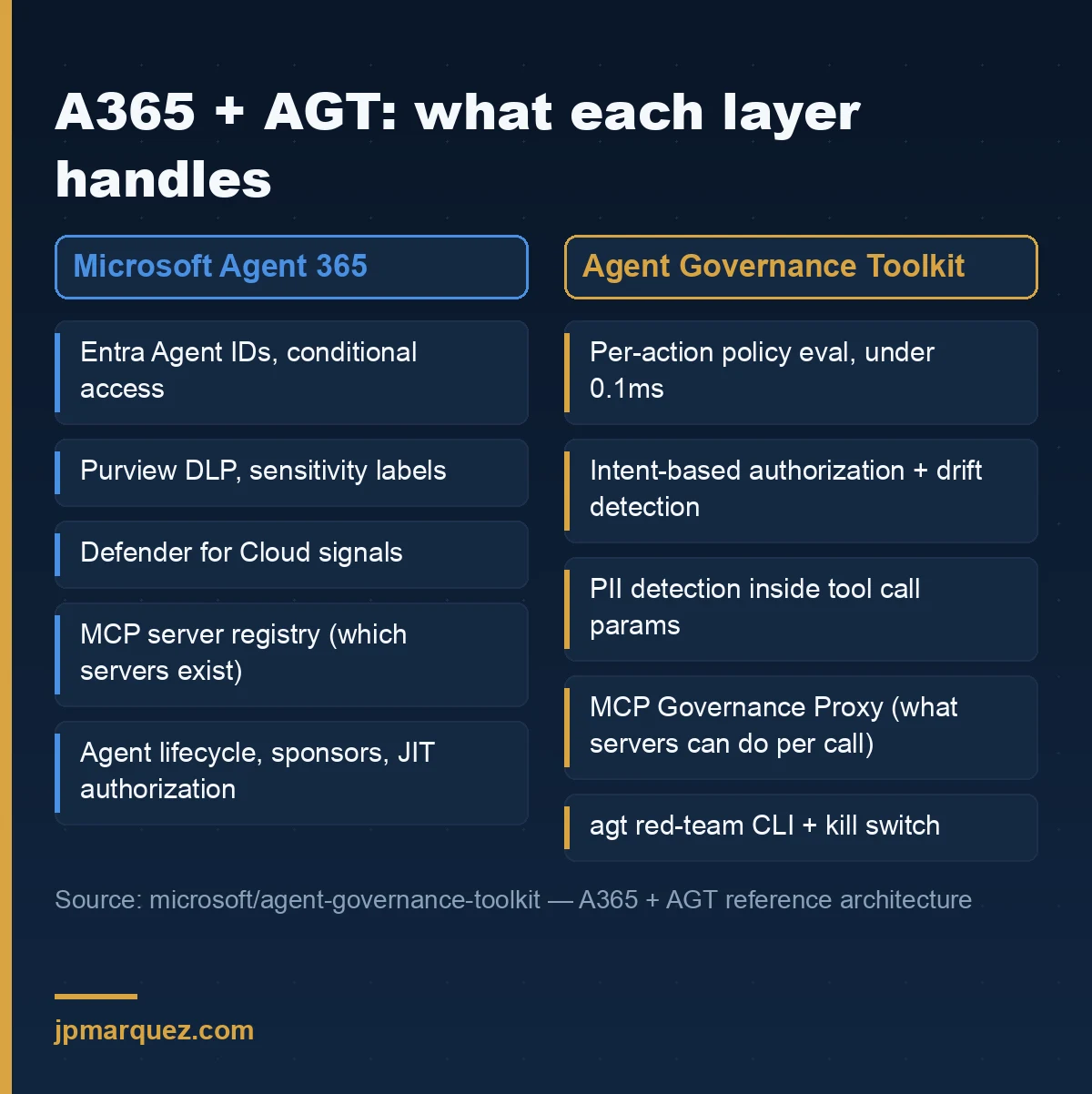
| Concern | Agent 365 | AGT |
|---|---|---|
| Identity | Entra Agent IDs, conditional access | Per-action policy evaluation on top of that identity |
| Authorization | JIT on-behalf-of access at the identity level | Intent-based authorization with drift detection, per action |
| Data protection | Purview DLP, sensitivity labels | PII detection inside tool call parameters |
| Threat detection | Defender for Cloud signals | 7 prompt-injection strategies, ring-breach detection |
| Security testing | None built in | agt red-team CLI: scan, attack, report |
| MCP governance | MCP server registry (which servers exist) | MCP Governance Proxy (what those servers can do per call) |
The one line in that table I'd flag for anyone running more than a single agent: multi-agent policy evaluation. As of this writing, A365 doesn't have an equivalent for governing what happens between agents when one delegates to another. If you're building orchestration on Microsoft Agent Framework or Azure AI Foundry's connected-agent pattern, that's the gap AGT was built to fill, and right now it's the only thing in this comparison that fills it.
When is this worth adopting, and when is it overkill?
Here's my opinion, and it's the one I'd defend on a call: installing AGT on an internal FAQ bot is a waste of an afternoon; skipping it on an agent with send_email and delete_row in its tool list is a decision someone will have to explain after an incident. The toolkit itself publishes a risk-based adoption table, and it's a good one — I use a version of it in scoping calls already:
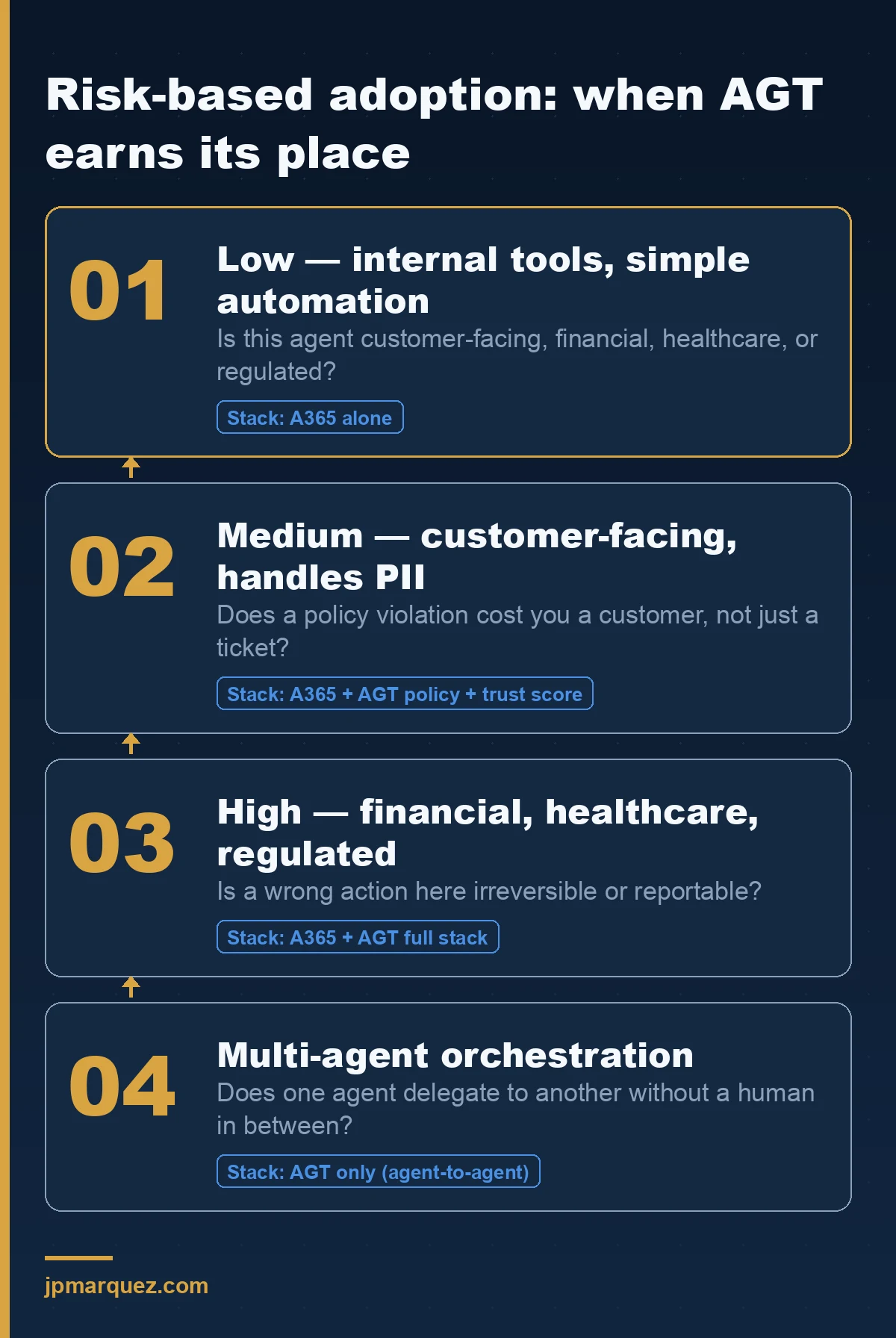
| Agent criticality | Recommended stack |
|---|---|
| Low — internal tools, simple automation | A365 alone is sufficient |
| Medium — customer-facing, handles PII | A365 + AGT policy enforcement + trust scoring |
| High — financial transactions, healthcare, regulated | A365 + AGT full stack (intent auth, red-team, kill switch) |
| Multi-agent orchestration | A365 + AGT — only AGT evaluates policy across agent-to-agent delegation today |
Notice what's absent from that table: Copilot Studio's no-code canvas. That's deliberate, and it's the distinction I see people get wrong most often. Copilot Studio agents are governed at the platform level — Purview DLP, connector permissions, the Copilot Control System, Entra Agent ID for the identity. AGT wraps code — a Python or .NET function, a tool call in your own agent process. There's no govern() call to insert into a declarative Copilot Studio topic, because there's no function to wrap. If your agent estate is entirely Copilot Studio makers building in the maker portal, AGT isn't the tool you're missing; the governance checklist for that surface is. AGT earns its place when you're building custom — Azure AI Foundry Agent Service, Microsoft Agent Framework, or a framework-agnostic agent calling into MCP servers.
The other honest caveat, and the project says this about itself rather than making me dig for it: governance runs in the same process boundary as the agent. It's application middleware, not an OS-level sandbox. Microsoft's own recommendation is to run each agent in a separate container for real isolation — AGT decides what's allowed, the container decides what's physically reachable if a decision goes wrong anyway. Treat it as one layer of defense, not the whole wall.
What does adopting it actually involve?
For a Python agent, the whole toolkit is a pip install "agent-governance-toolkit[full]" and a policy file. For a .NET agent already built on Microsoft Agent Framework, it's a NuGet package and one method call:
dotnet add package Microsoft.AgentGovernance.Extensions.Microsoft.Agents
using Microsoft.AgentGovernance.Extensions.Microsoft.Agents;

var governedAgent = agent.WithGovernance(options =>
{
    options.PolicyPath = "policies/";
    options.EnableTrustScoring = true;
    options.EnableAuditLog = true;
});
Four CLI commands are worth running before anything reaches a production tenant:
agt doctor                                        # check installation
agt verify --evidence ./agt-evidence.json --strict # fail CI on weak evidence
agt red-team scan ./prompts/ --min-grade B         # prompt injection audit
agt lint-policy policies/                          # validate policy files
agt red-team is the one I'd push hardest on, because it's the piece nothing else in the Microsoft governance stack currently ships: an automated adversarial scan of your own prompts before deployment, not after an incident report. Wire agt scan into the same GitHub Action that already runs your unit tests, and policy violations get caught at pull-request time instead of at 2am.
What should you check before you adopt it?
Three things, in order, before this goes anywhere near a production tenant:
- Confirm it's actually the official repo. The project's own README is unusually direct about this: the only official sources are
github.com/microsoft/agent-governance-toolkit, the PyPI useragentgovtoolkit, and the@microsoft/agent-governance-sdknpm package. It explicitly states the maintainers don't endorse third-party sites or forks using the name. Worth a five-second check before anyone on a team runspip installfrom a link in a Slack message. - Read
docs/LIMITATIONS.mdbefore you read the marketing copy. A project that publishes its own known limitations is telling you something useful. AGT does — take it at its word on what it doesn't cover, and layer accordingly. - Decide who owns the policy files.
policy.yamlis now a security control, not a config file. It needs the review process you'd give a firewall rule, not the one you'd give a linter config.
Where this lands for enterprise governance work
I advise Microsoft enterprise customers on exactly this seam — where platform governance (A365, Purview, Entra) stops and application-level control has to pick up the rest — and AGT is the first open-source project I've seen that names the seam accurately instead of pretending platform controls cover everything. It won't replace the identity and compliance work Microsoft already sells you, and if you're still scoping what Agent 365 licensing actually buys you, start there first. AGT fills the part of the stack that work was never designed to reach: the individual action, evaluated in under a millisecond, before it runs. If you're building on Microsoft Agent Framework or custom Azure AI Foundry deployments and you're not sure where AGT ends and your existing Microsoft licensing begins, that's a conversation worth having before the first agent with write access ships — get in touch and we can map your actual risk tier against the stack above.
Frequently asked questions
Is the Agent Governance Toolkit a Microsoft product I can buy support for?
No. It's an MIT-licensed open-source project in public preview, maintained on GitHub with a Discord community and standard OSS issue triage — not a licensed Microsoft product with an SLA. Treat it the way you'd treat any critical open-source dependency: pin versions, watch the changelog, and don't assume commercial support exists.
Does AGT work with Copilot Studio agents?
Not directly. AGT wraps function calls in code you control — Python, .NET, or the other supported SDKs. Copilot Studio's low-code canvas doesn't expose that level of hook, so its agents are governed at the platform layer instead: Purview DLP, connector permissions, and Entra Agent ID. AGT is built for custom agents on Azure AI Foundry Agent Service, Microsoft Agent Framework, or any framework-agnostic setup calling MCP servers.
Does AGT replace Microsoft Entra Agent ID or Microsoft Agent 365?
No, and the project doesn't claim to. Entra Agent ID and Agent 365 handle identity, lifecycle, and tenant-wide visibility. AGT handles what happens after an agent is authenticated and inside your system: per-action policy evaluation, intent-based authorization, and red-team testing. Most teams running anything above low-criticality agents will end up running both.
What happens to performance when you add AGT to an existing agent?
Published numbers put policy evaluation under 0.1ms per action at roughly 47,000 operations per second across 1,000 concurrent agents, with about 15MB memory overhead per agent instance and zero added network overhead — evaluation happens locally, and telemetry export is asynchronous. It's not the layer that will slow your pipeline down.
Is this only for Python?
No. Python has the full stack (policy, runtime sandboxing, SRE tooling), but TypeScript, .NET, Rust, and Go SDKs all implement the core governance layer — policy evaluation, identity, trust, and audit. The .NET SDK includes native middleware for Microsoft Agent Framework agents specifically.