Microsoft Agent 365 Licensing: What You Actually Buy (2026)
· AI Governance · 11 min read
By Juan Pedro Márquez
Open the Power Platform admin center inventory in most enterprise tenants and the same thing tends to turn up by the third tab: a Copilot Studio agent running in an environment one hop away from production. No owner. No DLP review. Nobody on the governance team knew it existed, even though knowing is the team's whole job.
That agent has usually been there for months. It isn't malicious, and it isn't even badly built. It's simply invisible, because no system in that tenant was ever asked to keep a list.
Microsoft Agent 365 is the answer to that specific failure. It is Microsoft's control plane for AI agents: a single registry that inventories every agent in your tenant, Microsoft-built or not, and hangs governance and security controls off it. Before you put it in a budget, though, you need to separate three things that get sold as one: what Agent 365 does, what your tenant already governs without it, and what the license actually gates.
What does Microsoft Agent 365 actually do?
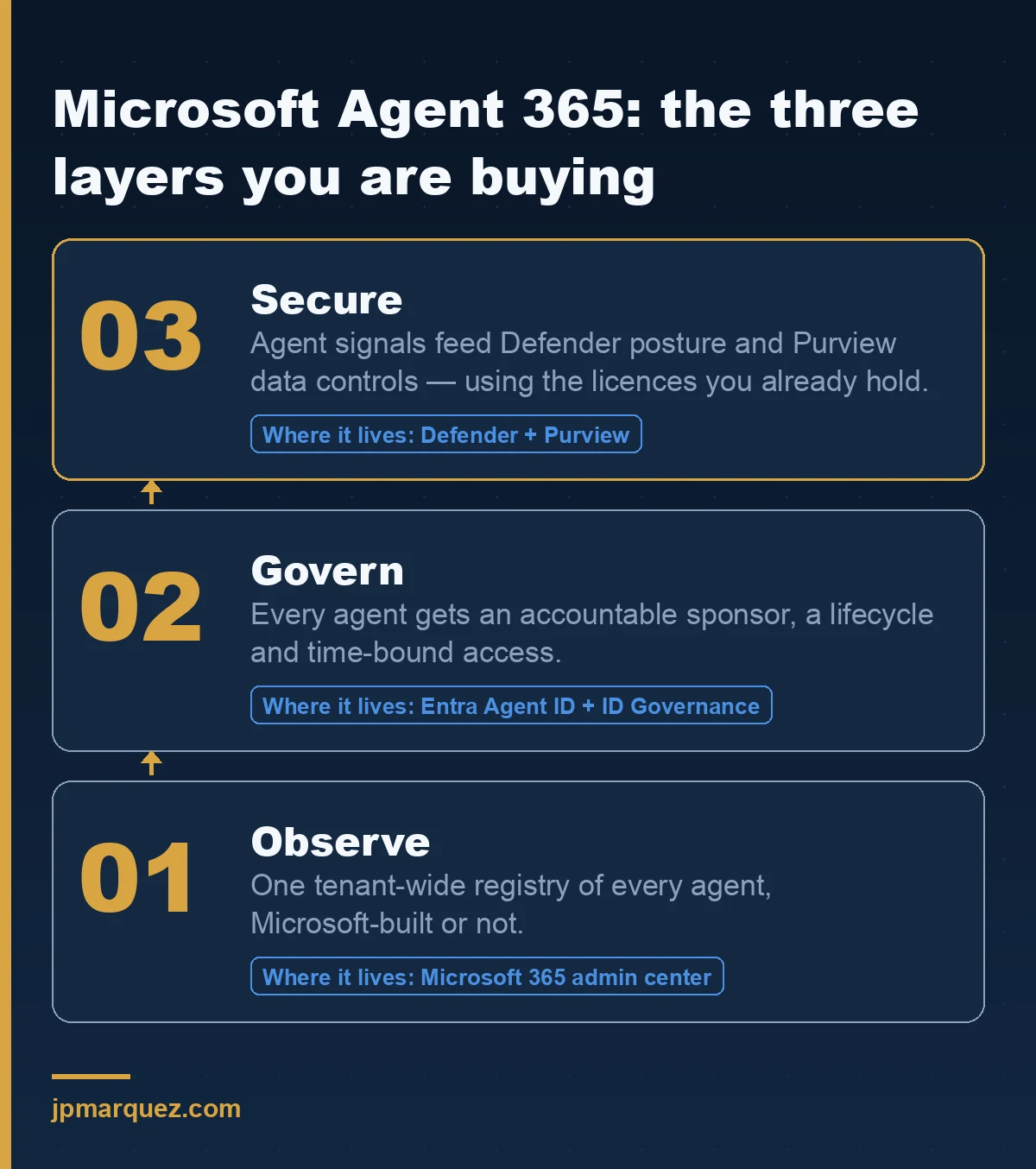
Agent 365 does three things: it observes agents through a tenant-wide registry, it governs them through lifecycle and access controls, and it secures them by wiring agent signals into Defender and Purview. It is a control plane, not a build tool — you don't create agents in it, you find and constrain the ones that already exist.
The overview documentation organises the product around exactly those three pillars, and the split matters more than it looks. Most teams evaluating Agent 365 are buying the first pillar — visibility — and quietly assuming the other two arrive with it. They partly do, and partly don't, depending on what else is in your agreement.
The registry itself lives in the Microsoft 365 admin center under Agents. It covers four categories of agent: Microsoft-built, external partner-built, agents published by your organisation, and agents shared by individual creators. That last category is where the interesting problems live. The registry documentation surfaces three tenant-wide counters at the top of the page, and two of them are governance alarms rather than statistics: agents without owners, and unmanaged agents — agents created or managed outside Agent 365, without its risk protection and observability.
Those two numbers are the reason to run the inventory before you decide anything else.
Coverage is broader than Copilot Studio. The agent management overview lists Copilot Studio, SharePoint, Agent Builder, Microsoft Foundry, Agents Toolkit and Microsoft agents such as Researcher, plus non-Microsoft agentic platforms detected through connected platforms. One caveat worth knowing before the first demo disappoints someone: draft agents are currently only visible from Copilot Studio. Drafts from Agent Builder, Foundry and SharePoint aren't surfaced yet.
There's a second registry change in flight. Agent visibility used to appear in both Microsoft Entra and the Microsoft 365 admin center, and Microsoft is converging those experiences under Agent 365. Agent 365 becomes the unified registry; Entra keeps providing the identity foundation through Agent ID. If your architecture diagram from six months ago shows the Entra portal as the agent inventory, redraw it.
Do you need an Agent 365 license, or does Entra Agent ID already cover it?
They are different layers and you need both, but only one of them costs extra. Microsoft Entra Agent ID is available to all Microsoft Entra customers and provides the identity foundation — agent identities, blueprints, sponsors. Microsoft Agent 365 requires a per-user license and provides the registry, the control plane, and the operational integration with Purview and Defender.
That sentence is the one I end up repeating in every scoping call, so it's worth reading twice.
Entra Agent ID is an identity framework for non-human identities. An agent identity has an object ID, a display name, a sponsor, and a blueprint it was created from. It has no credentials of its own — agent identities authenticate through federated identity credentials issued by the blueprint, and the blueprint holds the keys. That design choice is the single most useful thing in the whole model: revoke at the blueprint and you revoke an entire class of agents in one operation.
Entra also refuses to let agents become administrators. High-privilege roles and permissions are blocked for agent identities, and neither users nor admins can consent to them. That's a platform-level guardrail you get without buying anything.
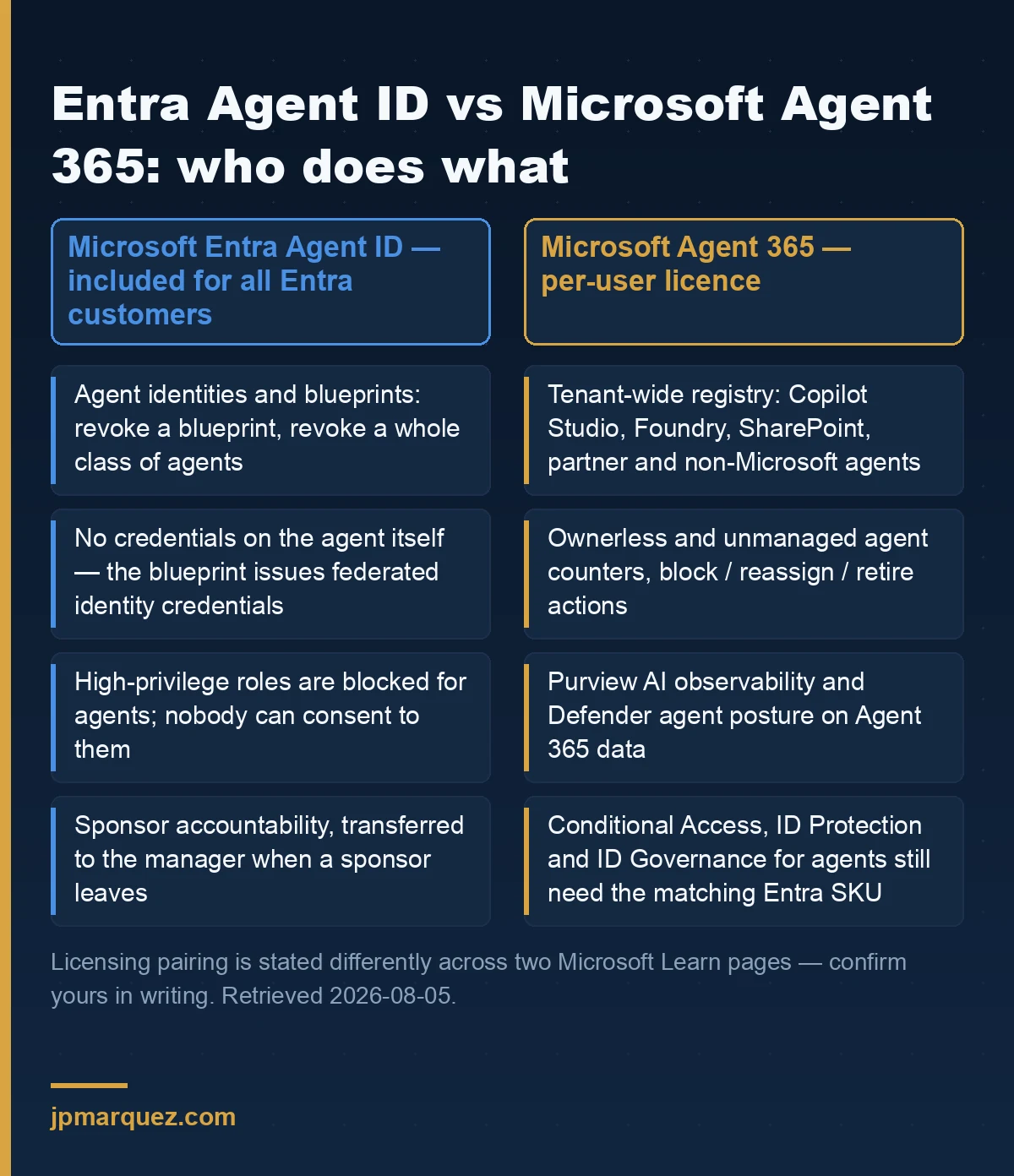
Now the part that trips up budget conversations. Microsoft's own platform documentation states that extending Entra security features to agents requires Microsoft 365 E7 — which bundles Agent 365 and the Entra Suite — or Microsoft 365 E5 paired with a Microsoft Agent 365 license. Customers without E5 or E7 can reach individual capabilities with an Agent 365 license plus the matching standalone SKU: Conditional Access for agents needs Entra ID P1, ID Protection needs P2, ID Governance needs P1, and network controls need Entra Internet Access.
Key point: Read that carefully and you'll notice Agent 365 is not a replacement for your identity licensing. It is a multiplier on it. If you don't own P2 today, buying Agent 365 does not give you risk detection for agents.
One honest wrinkle: the ID Governance sponsor documentation describes the same requirement slightly differently — M365 E7, or an Agent 365 license paired with at least Entra ID P1 or Microsoft 365 E3. The two pages don't state the pairing identically. Before you commit a number to a business case, put both pages in front of your licensing desk and get the answer in writing. I've seen the gap between "what the product page implies" and "what the agreement actually grants" derail a go-live twice this year.
What does Microsoft Agent 365 cost?
Microsoft sells Agent 365 both as a standalone per-user license and bundled inside Microsoft 365 E7. Current per-user prices are published on the Microsoft Agent 365 plans and pricing page, and I'd rather send you there than quote a figure that expires.
I mean that literally, not as a hedge. Agent licensing in the Microsoft estate has changed shape more than once in the last eighteen months, and a blog post with a hard number in it becomes a liability the week it changes. Model your business case against the pricing page on the day you build it, and put the retrieval date in the spreadsheet.
What I will commit to is the shape of the decision. The per-user model means your cost scales with the number of people who interact with, manage, or sponsor agents — not with the number of agents. That inverts the intuition most teams walk in with. Ten agents used by three thousand people is expensive. Three hundred agents used by forty people is not.
Count the humans, then count the agents. In that order.
Which breaks first: the license, or the sponsor?
The sponsor. Every agent identity requires an accountable human, and the governance model collapses without one long before it collapses for lack of a license. The registry can inventory a thousand agents perfectly and still leave you exposed if nobody has attested that any of them should still be running.
This is where the opening example ends up. The agent that turns up in that third tab isn't a licensing problem. It's an ownership problem that no dashboard was ever configured to notice.
Microsoft's model addresses it structurally. Every agent identity requires a sponsor — a human user or supported group accountable for the agent's purpose, lifecycle decisions and access reviews. Critically, if a sponsor leaves the organisation, sponsorship transfers automatically to their manager. That single behaviour eliminates the most common way agents go orphaned in real tenants: someone changes jobs and their side project keeps running.
Sponsor is also distinct from owner, and the distinction is worth enforcing in your own process. The sponsor holds business accountability — deciding the agent is no longer needed, approving access extensions, authorising suspension during an incident. The owner handles technical operations and incident response. Merging them into one field feels tidier and gives you nobody to call at 2am when the owner is on leave.
Lifecycle Workflows automate the handover with three tasks: notify the manager about sponsorship changes, notify co-sponsors, and transfer agent identity sponsorships to the manager. All three are mover and leaver category tasks — they only appear under mover or leaver workflow templates, never joiner. If you built your agent onboarding as a joiner workflow and wondered why the sponsor tasks weren't in the list, that's why.
Here is my opinion, and it's the one I'd defend on a call: the registry is not the product — the sponsor field is. A list of agents tells you what exists. A sponsor tells you who decides when it stops. Most organisations buy Agent 365 for the first and get value from the second, and the ones that treat sponsorship as a data-entry chore end up with an inventory that is accurate, complete, and useless.
Microsoft's own best practices for Agent ID land in the same place: register every agent regardless of where it was built, enforce a naming convention, include agents in periodic access reviews where sponsors attest every 6–12 months that the agent is still needed, and run a quarterly sweep for agents with missing sponsors or no recent activity. None of that is exotic. All of it is the thing that doesn't get done.
How does this land on the Purview and Defender you already pay for?
It reuses them rather than replacing them. Agent instances are treated much like users: Purview automatically enables audit, sensitive-data classification and AI regulatory assessments for a new agent instance, and you extend everything else — sensitivity labels, DLP, Insider Risk Management, eDiscovery, retention — by including the agent in policies exactly as you would a person.
That "exactly as you would a person" is the design decision that makes the rest of it tractable. Your existing DLP policy language doesn't need a parallel agent dialect.
A few specifics that matter operationally. Purview's supported-capability table for Agent 365 marks nearly everything as supported, with one clear exclusion: encryption without sensitivity labels is not supported. If your protection strategy leans on standalone encryption rather than labels, that gap needs a plan before agents touch the data.
For visibility, the entry point is the Purview portal under DSPM > AI observability, which ranks agents by risk level from Insider Risk Management and breaks down the risky activity into oversharing, exfiltration and unethical behaviour. Note the wording in the docs: the current Data Security Posture Management is what supports Agent 365, and DSPM for AI (classic) does not. Two similarly named blades, one of which won't show you what you came for. If you rolled out DSPM for AI earlier this year, check which one you're in.
On the security side, Microsoft Defender provides discovery and posture assessment for agents onboarded to Agent 365, including local AI agents running on endpoints. The queryable surface is the AgentsInfo table in Advanced Hunting — which, worth flagging for anyone with saved queries, replaces the earlier AIAgentsInfo table as part of the Agent 365 transition. Rename it in your workbooks before someone reports an empty dashboard as a security incident.
I'd draw identity and governance as overlays across the whole agent stack rather than as a layer sitting on top of it. Everyone diagrams them as layer eight. They aren't a layer — they cut through every one of the others, and drawing them that way is what stops an auditor's follow-up questions.
What should you do in the next 30 days?
Run the inventory before you run the business case. You cannot size an agent governance programme against agents you haven't counted, and the counting is free.
A sequence that has worked:
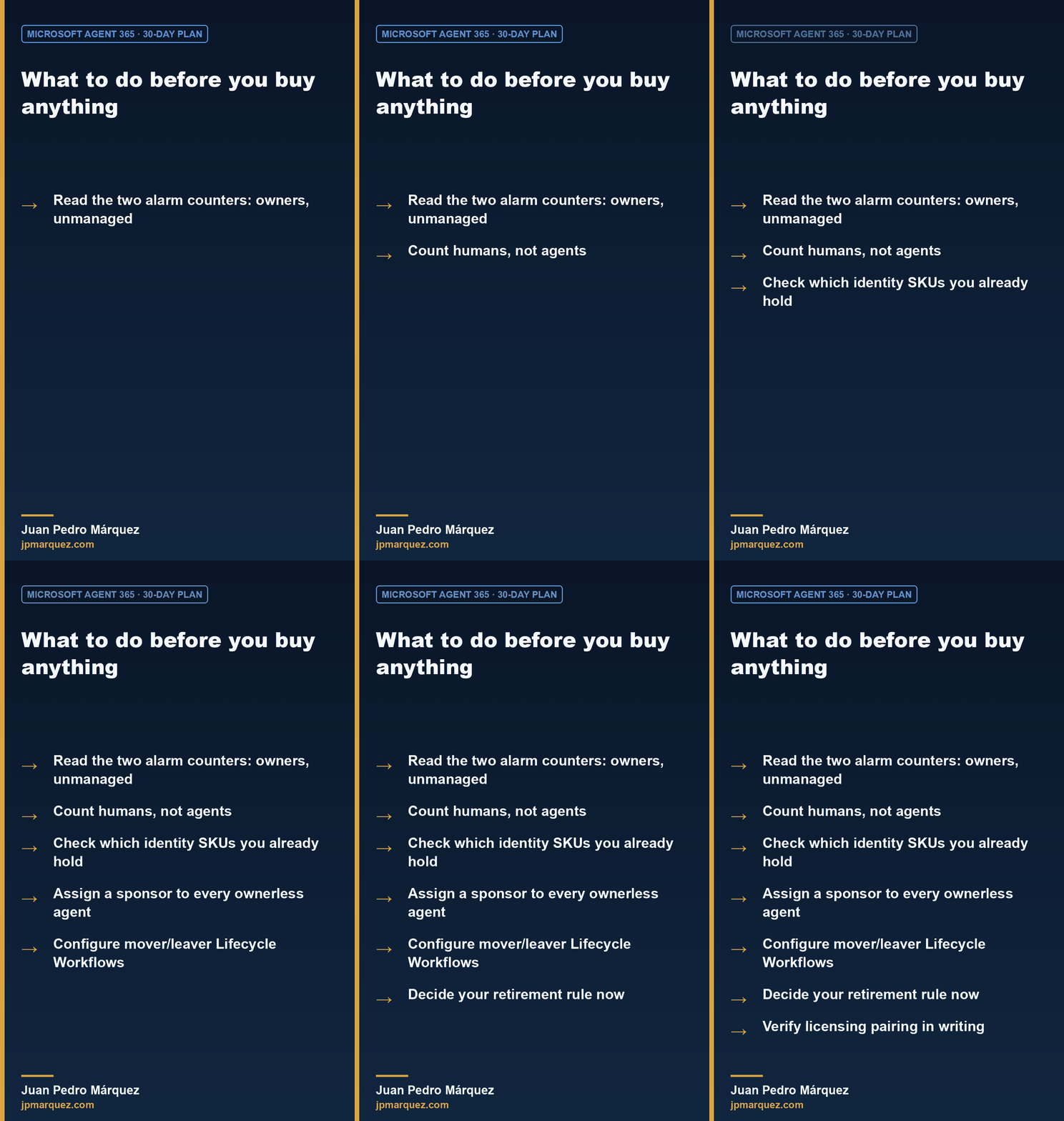
- Open the registry and read the two alarm counters. Agents without owners, and unmanaged agents. Those two numbers are your actual risk position. Everything else is context.
- Count humans, not agents. Agent 365 licensing follows the people who interact with, manage or sponsor agents. Build the model on that number.
- Check which identity SKUs you already hold. P1, P2, Entra Suite, E5, E7. This determines how much of Agent 365's security value you can actually switch on, and it's the step most business cases skip.
- Assign a sponsor to every ownerless agent before you buy anything. This costs nothing and removes the largest category of risk in most tenants.
- Configure the mover and leaver Lifecycle Workflows. Sponsorship transfer on departure is the control that stops the problem recurring.
- Decide your retirement rule now. An agent with no activity for a quarter and no sponsor attestation gets disabled. Write it down while the programme is small enough that nobody argues.
- Verify licensing in writing. Two Microsoft pages describe the pairing requirement differently. Get your answer from your licensing desk, dated.
If you've already worked through the Copilot Control System, much of step 3 will feel familiar — Agent 365 extends that control surface to agents built outside Microsoft 365 entirely. And if oversharing is your live concern rather than agent sprawl, the Purview DSPM for AI rollout is the higher-priority piece of work; agents will only find what your permissions already expose.
The honest summary: Agent 365 is a real answer to a real problem, and the problem it solves is one most organisations can partially solve this month for free by assigning sponsors and reading the two counters at the top of a page they already have access to. Do that first. The purchase decision gets much easier once you know whether you're governing eleven agents or four hundred.
Frequently asked questions
Is Microsoft Entra Agent ID included with Agent 365, or licensed separately?
Entra Agent ID is available to all Microsoft Entra customers as the identity foundation for agents. Agent 365 is a separately licensed per-user control plane built on top of it. Extending Entra's security features to agents — Conditional Access, ID Protection, ID Governance — requires additional Entra SKUs alongside the Agent 365 license.
Does Agent 365 cover agents built outside Microsoft?
Yes. The registry includes Microsoft agents, external partner-built agents, line-of-business agents published by your organisation, and non-Microsoft agentic platforms detected through connected platforms. Entra Agent ID additionally supports third-party agents from platforms such as AWS Bedrock and n8n through the Entra Auth SDK or workload identity federation.
What happens to an agent when its sponsor leaves the company?
Sponsorship transfers automatically to the sponsor's manager, so there is always an accountable human. Lifecycle Workflows can additionally notify the manager and any co-sponsors. These tasks are only available under mover and leaver workflow templates, not joiner templates.
Can I see draft agents in the registry?
Only from Copilot Studio at present. Draft agents from Agent Builder, Microsoft Foundry and SharePoint aren't currently surfaced in the registry, so treat the inventory as a view of published and discoverable agents rather than an exhaustive list of everything under construction.
Do I need Purview or Defender licenses on top of Agent 365?
Agent instances get audit, data classification and AI regulatory assessments automatically. Extending the rest of Purview — DLP, Insider Risk Management, eDiscovery, retention — means including agents in policies you already license. Defender's agent discovery and posture assessment activate when you enable your Agent 365 license and the Microsoft 365 connector.