EU Data Boundary and Microsoft 365 Copilot: What Actually Stays In
· 12 min read
By Juan Pedro Márquez
📋 Quick reference
Audience: CIOs, IT Directors, DPOs and Microsoft partners who have to answer "where does our Copilot data go?" in writing
Read time: ~12 minutes
What you'll get: What the EU Data Boundary actually commits to for Microsoft 365 Copilot, the four settings inside your own tenant that send data out of it, why Copilot Studio needs a second check nobody runs, and a review you can hand an auditor
If your tenant signed up in the EU or EFTA, Microsoft 365 Copilot is an EU Data Boundary service: prompts, responses and the grounding data behind them are stored and processed inside the boundary by default. The word doing all the work in that sentence is default. There are at least four things your own organisation can switch on that move Copilot data outside it, and three of them are one click in an admin center.
That gap between "the product is compliant" and "our configuration is compliant" is where most data-residency answers fall apart under questioning.
I saw the cleanest version of this problem on a recent engagement with a manufacturing group headquartered outside the EU. The architecture review was about a real-time voice agent, and the region choice looked settled: the nearest Azure region was roughly 60 to 80 milliseconds faster on round-trip time, which matters a great deal when a human is waiting for a sentence to come back. They picked the slower European region anyway. The stated reason in the design document was data protection. The actual reason, once you asked privately, was geopolitical — they did not want the workload hosted in a specific country, full stop.
Both reasons were legitimate. Recording only the first one would have been a mistake, because the two predict completely different things about which arguments will ever change the decision. And it taught me the question I now ask first on every residency conversation: is this a commitment you have bought, or a property you have configured?
What is the EU Data Boundary, and is Microsoft 365 Copilot inside it?
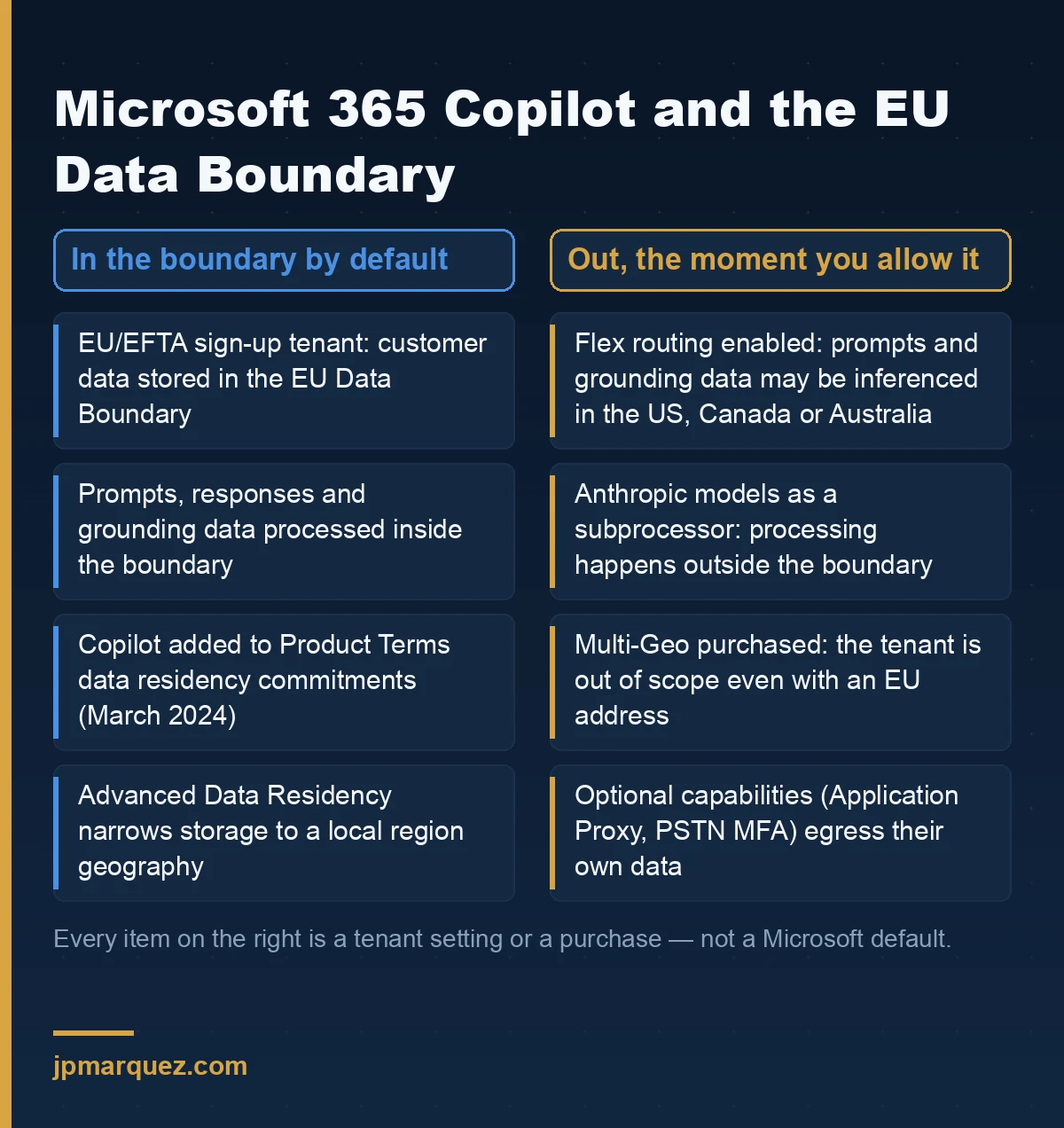
The EU Data Boundary is a commitment by Microsoft to store and process customer data for in-scope online services within the EU and EFTA. For Microsoft 365, a customer whose sign-up country is in the EU or EFTA is in scope. Microsoft 365 Copilot is an EU Data Boundary service for those customers, and it was added to the data residency commitments in the Product Terms in March 2024.
So the short answer is yes. Copilot is inside.
The longer answer is that "inside" is a state your tenant can be in or out of, and Microsoft documents both the entry conditions and the exits with unusual precision. Most enterprises read the entry conditions and stop. The exits are where the interesting work is.
Does the boundary cover the model inference, or only data at rest?
It covers both, with a caveat worth reading twice. Microsoft's own data, privacy and security documentation for Microsoft 365 Copilot states that Copilot calls to the large language model are routed to the closest data centres in the region, and can call into other regions where capacity is available during high-utilisation periods. For EU users, additional safeguards keep EU traffic within the EU Data Boundary — while worldwide traffic can be sent to the EU for processing.
That is a genuinely strong commitment, and stronger than most people assume. Inference is the part everyone worries about, and for an in-scope EU tenant, inference stays in.
Where it gets specific is storage. The Product Terms cover data at rest for core online services; Advanced Data Residency narrows that further to a local region geography rather than a macro region, and the Copilot data residency page spells out which artefacts are covered — including the content of interactions, meaning the user's prompt, the response, and the citations to whatever grounded that response.
If your commitment to a regulator is "Spanish data stays in Spain", the EU Data Boundary alone does not get you there. Advanced Data Residency does part of it. Know which of the two you actually bought.
Which of our own settings send Copilot data out of the EU Data Boundary?
Four, and I would check all four before signing anything. Microsoft publishes them openly, in two pages most people never open: services that transfer a subset of data out on an ongoing basis and optional capabilities that transfer data out.
1. Flex routing. This is the big one. To keep the Copilot experience consistent at peak demand, prompts, responses and grounding data may be processed outside the boundary for AI inferencing — including in the United States, Canada and Australia. Pseudonymous user IDs may be stored in those locations for security and operational purposes. This applies to tenants that allow flex routing. It is a tenant decision, it trades residency for throughput, and it is the single setting most likely to contradict a statement your legal team has already made in writing.
2. Models from a subprocessor. Anthropic models are currently excluded from the EU Data Boundary. When they are used in Copilot experiences in Word, Excel or PowerPoint, data processing for those models happens outside the boundary. Anthropic operates as a Microsoft subprocessor under the Product Terms and the Data Protection Addendum, and the setting lives in the Microsoft 365 admin center under Copilot → Settings → AI providers operating as Microsoft subprocessors. Microsoft documents which providers act as subprocessors and how to scope them to specific users or groups. Note the scoping caveat: once the setting is enabled for all users or for specific groups, the per-app control is no longer independently changeable.
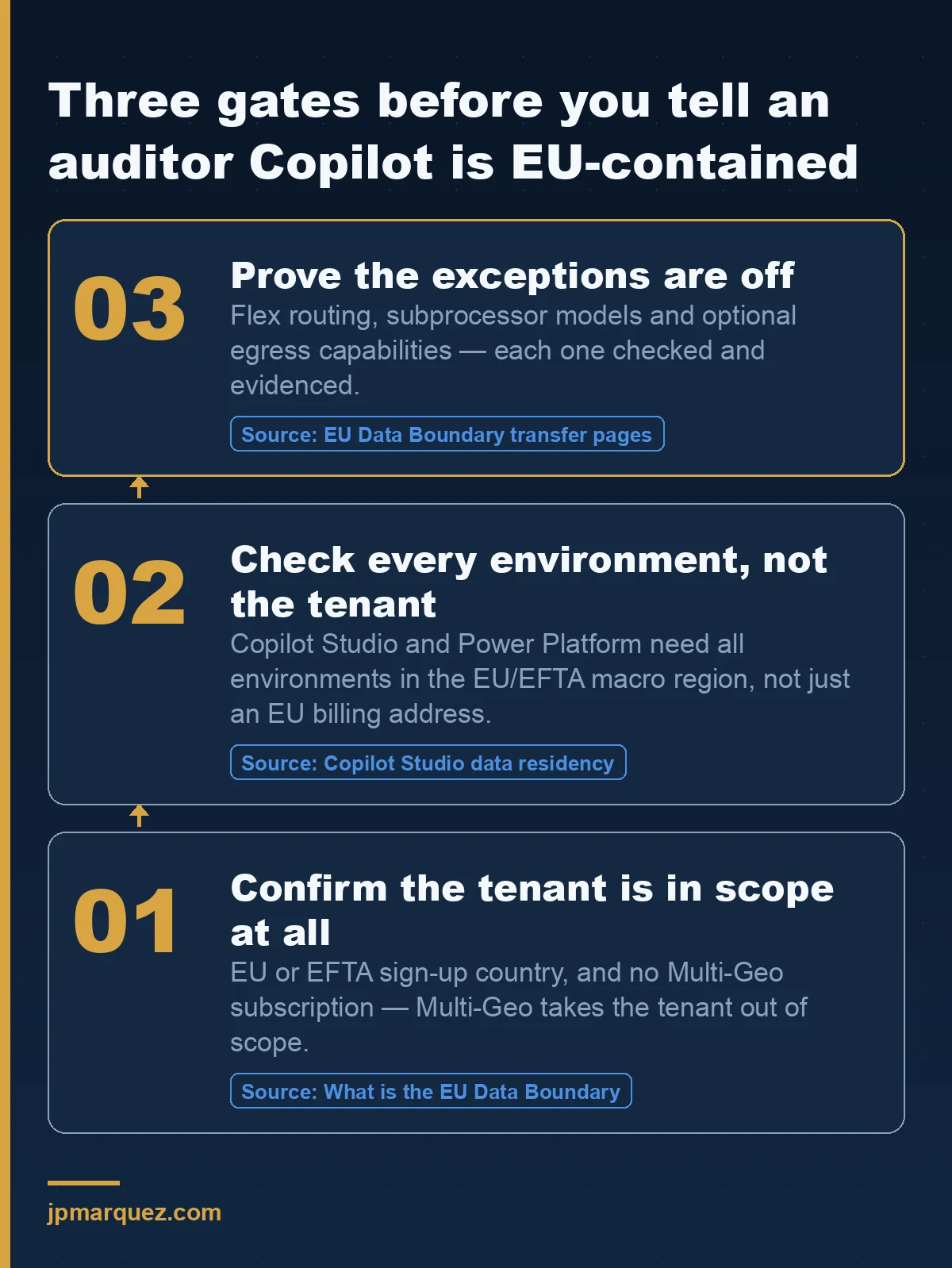
3. Multi-Geo. This one catches people, because it looks like the more sophisticated choice. Customers who have purchased Multi-Geo Capabilities are not in scope for the EU Data Boundary, even if their tenant is listed as being in an EU or EFTA country. You bought finer-grained residency control and, in exchange, left the boundary programme. Both can be the right answer. Only one of them can be true at a time.
4. Optional capabilities elsewhere in the stack. Application Proxy with advanced routing configurations can egress user account, usage and application configuration data. Phone-based multifactor authentication runs over networks and push services that global providers operate, so PSTN numbers and Authenticator sign-ins may be processed outside the boundary — administrators can configure OATH tokens to keep that inside. Neither is a Copilot feature. Both show up in the same audit.
Does the EU Data Boundary cover Copilot Studio agents and Power Platform?
Only if two conditions hold at the same time, and the second one is per-environment rather than per-tenant. This is the check I see skipped most often.
For Copilot Studio, Microsoft's data residency documentation is explicit: a tenant provisioned with a billing address in the EU or EFTA is in scope for the EU Data Boundary if the customer also creates all of its environments in a geographic region inside the boundary. The EU Data Boundary page repeats the same rule for Dynamics 365 and Power Platform — provision the tenant and all environments in the EU and EFTA macro region geography, and maintain a billing address in an EU Data Boundary country. Meeting only one of the two does not place your environments inside.
Read that as an operational risk, not a legal one. Tenants are configured once by people who care. Environments get created on Tuesdays by whoever needed a sandbox, and a maker choosing a region from a dropdown is not thinking about a data-boundary attestation. One environment in the wrong geography and the sentence "all our agents run inside the EU Data Boundary" stops being true — without anything failing, alerting, or looking wrong in a dashboard.
Is data residency the same thing as the EU Data Boundary?
No, and conflating them is the most common error in enterprise documentation I review. They are related commitments with different shapes.
| Commitment | What it constrains | How you get it |
|---|---|---|
| EU Data Boundary | Storage and processing of in-scope services stays within the EU and EFTA | Sign-up country in the EU or EFTA, no Multi-Geo, exceptions not enabled |
| Product Terms data residency | Location of customer data at rest for core online services | Included, for sign-up countries on the covered list |
| Advanced Data Residency | Narrows data at rest to a local region geography | Paid add-on covering all users in the tenant |
| Multi-Geo | Per-user data location across satellite geographies | Paid add-on — and it removes the tenant from the EU Data Boundary |
A useful way to hold it: the EU Data Boundary is about a region of the world, Advanced Data Residency is about a country, and Multi-Geo is about a user. Pick the one that matches the promise you have made, not the one with the best-sounding name.
What breaks the boundary that no contract can fix?
Your own architecture. This is the part I care about most, and it comes straight from delivery rather than documentation.
On that same voice-agent engagement, the design had a third-party text-to-speech service in the request path. It was chosen on perceived voice quality, which is a reasonable thing to optimise for. But a real-time voice agent is a serial chain — telephony to voice-activity detection to speech-to-text to the orchestrator to the model to text-to-speech and back — and every hop that leaves the cloud boundary adds two things at once: latency, and data-residency surface. The residency cost is the one that never appears in a demo.
Microsoft's commitment is about Microsoft services. The moment you put a plugin, a connector, an API call to a niche SaaS vendor, or a "just for the pilot" component into the grounding or generation path, the boundary you are describing to your regulator is the one your own architecture defines — not the one on the Product Terms page. No amount of EU Data Boundary documentation covers a component Microsoft does not operate.
So the connector inventory is a residency document. Treat it as one. If you are formalising this alongside agent governance more broadly, the Microsoft 365 agent governance checklist is the place to attach it, and the Copilot Control System is where the tenant-level switches now live.
How do I evidence this before an audit?
Here is the review I run. It takes an afternoon and it has changed the answer at more than one organisation that was confident going in.
- Confirm the sign-up country. Not the head-office country, not the billing entity your finance team uses — the tenant's country or region as recorded in the Microsoft 365 admin center. These diverge more often than you would expect after an acquisition.
- Check for a Multi-Geo subscription. If it exists, stop writing "EU Data Boundary" in your documentation and start writing what Multi-Geo actually gives you. Both are defensible. Only one is accurate.
- Check the flex routing setting and record the date you checked it. This is a tenant posture that can change, so a point-in-time screenshot with a date beats a paragraph of prose.
- List every environment in Power Platform and Copilot Studio, with its region. Every single one, including the sandbox somebody spun up for a proof of concept. One outlier invalidates the statement.
- Check the subprocessor model setting and its scope. Enabled for all users, for specific groups, or off — and which apps that covers.
- Inventory the non-Microsoft components in the grounding and generation path. Connectors, custom plugins, third-party APIs. For each, the vendor, the data it sees, and where it processes. This is the step that gets skipped and the step that matters.
If you are running this as part of a broader regulatory push, it sits naturally next to the EU AI Act compliance plan for Microsoft 365 Copilot — different regulation, overlapping evidence, and the same two questions about who owns the answer.
My honest opinion
The EU Data Boundary is a serious engineering commitment and Microsoft documents its own exceptions more transparently than most vendors document their features. I would not spend a governance cycle arguing about whether it is real.
I would spend that cycle on this instead: the EU Data Boundary is a configuration state you have to prove, not a property of the product you have bought. It can be switched off from your own admin center, by your own staff, for entirely reasonable operational reasons, without anybody intending to change a compliance posture. Any organisation treating it as a permanent attribute of Microsoft 365 will eventually be wrong about it — and will find out in the worst possible setting.
Write the check into a quarterly control with an owner's name on it. That is the whole job.
Frequently asked questions
Is Microsoft 365 Copilot GDPR compliant?
Microsoft 365 Copilot carries broad compliance offerings and certifications, including GDPR, ISO 27001 and the ISO 42001 standard for AI management systems, as set out in the Copilot privacy documentation. GDPR compliance is shared, though: Microsoft's certifications cover the service, and your configuration, permissions and lawful basis remain yours.
Where are Copilot prompts and responses processed for an EU tenant?
Inside the EU Data Boundary by default. Traffic is routed to the closest data centres in the region, with EU traffic kept within the boundary. That default changes if your tenant allows flex routing, or if models from an excluded subprocessor are in use.
Does buying Multi-Geo improve our data residency position?
It gives you per-user control across satellite geographies, which can be exactly what a multinational needs. It also takes the tenant out of scope for the EU Data Boundary. Decide which commitment you need to make before you buy, because you cannot claim both.
Do Copilot Studio agents inherit the tenant's EU Data Boundary status?
No. The tenant needs an EU or EFTA billing address and every environment provisioned in a geographic region inside the boundary. A single environment created in the wrong region takes those environments out of scope, and nothing in the product will flag it for you.
How often should we re-check all of this?
Quarterly, and after any tenant migration, acquisition or add-on purchase. Environments and admin-center settings drift; attestations do not. The point of a dated check is to make the drift visible before somebody else finds it.