Copilot Studio vs Microsoft Foundry: How to Choose
· 11 min read
By Juan Pedro Márquez
Pick the governance plane before you pick the tool. If the agent's work lives inside Microsoft 365 and a business maker will own it, build it in Copilot Studio. If it needs your own code, your own virtual network, or a model you chose yourself, build it in Microsoft Foundry. Everything else in this decision is detail.
That sounds obvious written down. It is not how the decision usually gets made.
What I see repeat is a team that picks the platform first — normally whichever one somebody already had a licence for — and discovers the governance model six months later, when security asks who can see the agent's audit trail and the answer turns out to live in a different admin centre than anyone expected. By then the agent is in production and the rebuild is a project, not a change request.
So this article is the decision in the order I actually ask it with architecture teams, with the trade-offs named out loud.
What actually separates Copilot Studio from Microsoft Foundry?
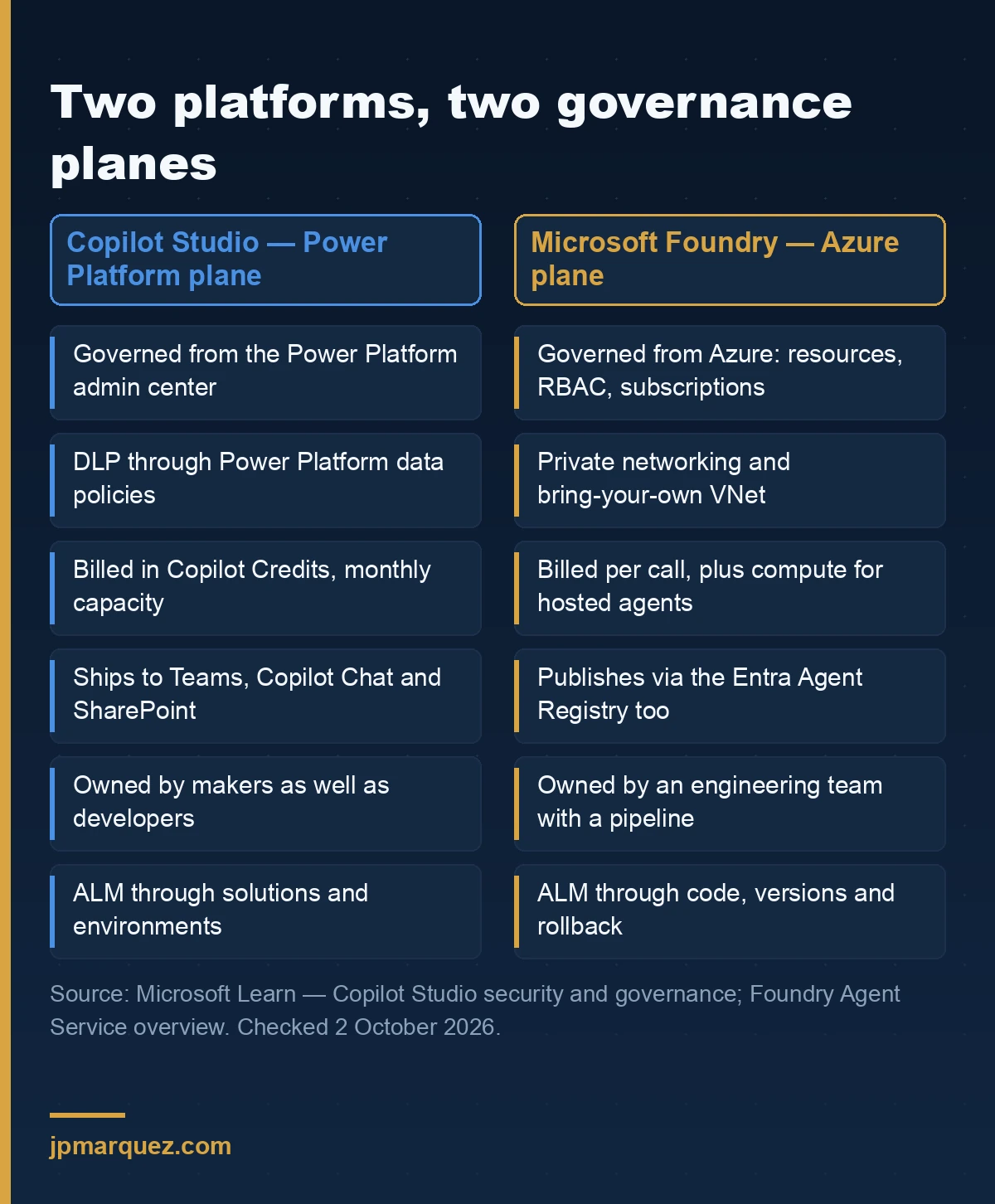
They are not two versions of the same product. Copilot Studio is an agent platform governed through Power Platform and Microsoft 365. Microsoft Foundry is an agent platform governed through Azure. The capability lists overlap heavily; the control planes barely overlap at all. That is the real difference, and it is the one that survives contact with your security team.
Copilot Studio: the Power Platform plane
An agent you build in Copilot Studio is a Power Platform citizen. Admins govern it from the Power Platform admin center using data policies, which is where you restrict maker and user authentication, knowledge sources, actions and connectors, HTTP requests, triggers, and even publication to specific channels — the full list is in the Copilot Studio security and governance documentation, and the underlying mechanism is standard Power Platform data policies.
Its application lifecycle runs on solutions and environments, with environment routing to drop new makers somewhere harmless by default. If you have ever run Power Apps at scale, none of this is new. That familiarity is a genuine advantage, and it is underrated.
Microsoft Foundry: the Azure plane
Microsoft Foundry — the platform formerly branded Azure AI Foundry — governs agents the way Azure governs everything else: resources, RBAC, virtual networks, subscriptions. Foundry Agent Service offers three agent types. Prompt agents are configuration only: instructions, a model, tools, and Foundry runs them. Voice-based prompt agents do the same for real-time spoken conversation. Hosted agents are your own container — built with Agent Framework, LangGraph, the OpenAI Agents SDK or your own code — that Foundry runs with a managed endpoint, autoscaling, and a dedicated Entra identity per agent.
There is a fourth path that gets forgotten: call the Responses API directly and you get an ephemeral agent whose definition lives in your application code rather than as a resource in Foundry. For teams who want their agent versioned in Git alongside everything else, that is often the honest answer.
Access control is Azure RBAC on the Foundry resource, and network isolation is configured the way you isolate any Azure workload: private networking for prompt agents, bring-your-own VNet for hosted agents, where each session runs in a VM-isolated sandbox attached to your network.
I wrote about what the rebrand did and did not change in Microsoft Foundry: what changed after the rebrand. Short version: the name moved, the Azure-shaped governance did not.
Which decision do you actually have to make first?
Before platform, there is a smaller decision inside Copilot Studio that is harder to undo: the harness. Copilot Studio now ships two authoring and runtime models, you choose one when you create the agent, and agents built on one harness cannot be transferred to the other. That is a one-way door, and most teams walk through it without noticing.
Standard harness vs GitHub Copilot harness
The standard harness is the model people know: explicit topics, triggers, branching conversation flows, configurable orchestration. The GitHub Copilot harness replaces that with a natural-language-first approach — you describe the agent, and enhanced orchestration decides when to use knowledge and when to call tools. Authoring collapses into one surface with four tabs: Build, Preview, Evaluate, Monitor. Instructions, knowledge, tools, skills, model, connected agents and memory all live in Build.
Microsoft is explicit that despite the name, this is a Copilot Studio framework, not the GitHub Copilot service, and customer data is not sent to GitHub Copilot when agents run.
My read: the GitHub Copilot harness is the better default for anything conversational over Microsoft 365 data, because the orchestration is stronger there and you stop maintaining flow logic that the model can infer. But if your agent's value is a deterministic process — the same five steps, in the same order, auditable — explicit topics in the standard harness are a feature, not legacy. Pick deliberately. You do not get to change your mind.
The same question, asked of Foundry
Foundry has an equivalent fork, and it is softer: prompt agent or hosted agent. Softer because a prompt agent that outgrows configuration can be rewritten as a hosted agent without leaving the platform, the resource model, or the identity. You keep the governance and replace the implementation. That asymmetry is worth real money and almost nobody prices it in.
How do the two platforms govern identity, network and audit?
Both can give an agent its own Entra identity, both can be network-isolated, both write audit records. The difference is who administers each of those, and that determines how fast you can answer a security question at 6pm on a Friday.
Identity
In Foundry, agent identity is native: hosted agents get a dedicated Entra identity automatically, and agents can authenticate to external MCP servers with managed identity or OAuth on-behalf-of passthrough. In Copilot Studio, agents become Entra identities once you onboard Microsoft Agent 365, which then lets you apply Conditional Access, role- and attribute-based access control, and access governance workflows across them.
Note the dependency. Copilot Studio's strongest identity and network story — including Entra network egress and ingress controls, now generally available — arrives through Agent 365, not through Copilot Studio alone. If Agent 365 is not in your plan, the honest comparison is Copilot Studio without it, and that is a materially weaker position. I went into what Agent 365 does and does not cover in the runtime layer Agent 365 misses.
Audit, and the Customer Lockbox gap nobody reads
Copilot Studio supports Customer Lockbox. It does not cover everything, and the exclusions are specific enough to matter: Copilot Studio security audit logging — agent invocation events, tool and action calls, policy enforcement decisions, runtime activity signals — flows through the Purview audit pipeline rather than the Copilot Studio service, and Lockbox does not apply to it. Agent 365 governance and audit events are excluded too.
If your compliance position is "Lockbox covers our data", that sentence is wrong for exactly the telemetry an auditor will ask about. Find out now, not during the audit.
Pre-publish checks
One Copilot Studio feature I consistently find teams are not using: the automatic security scan surfaces real-time risk findings while a maker configures knowledge, tools and actions, and warns before publishing when security defaults have been changed. It is on the agent page. Most makers click past it. Make reviewing it part of your release checklist — and if you want the full sequence of what publishing actually does, I broke it down in what happens when you publish a Copilot Studio agent.
What does each one actually cost you?
Different currencies, different failure modes. Copilot Studio meters agent work in Copilot Credits; Foundry meters inference, tools and — for hosted agents — container compute.
Copilot Credits, capacity, and the zero-rated exception
Copilot Credits became the common currency for Copilot Studio agents on 1 September 2025, replacing messages, and you obtain them through pay-as-you-go meters, prepurchase plans, or prepaid pack subscriptions. Two details from the standard harness licensing page decide budgets:
Capacity is enforced monthly and unused credits do not carry over. Exceed it and technical enforcement can result in service denial — this is not a soft overage.
And the exception that changes the arithmetic: if a user has a Microsoft 365 Copilot licence, using agents in Copilot Chat, Teams or SharePoint for classic answers, generative answers or Microsoft Graph tenant grounding is zero-rated. It does not count against your pack or meter. For an agent whose job is answering questions over Microsoft 365 content for already-licensed staff, that is close to free, and it is the single strongest commercial argument for Copilot Studio.
Watch the other direction too: on the GitHub Copilot harness, building, testing and evaluating agents can consume Copilot Credits, not just running them. A long tuning cycle has a bill. I covered the pattern of surprise consumption in the hidden cost of Copilot Studio agents.
Foundry's model
Prompt agents bill per-call inference plus tool usage with no infrastructure to manage. Hosted agents add container compute. There is no monthly capacity cliff and nothing expires, which some finance teams prefer and others hate, because it is harder to cap. If predictability matters more than efficiency, the prepaid Copilot Credit route is easier to govern.
So where should you build?
Four questions, asked bottom to top. Most arguments I sit through are two teams answering question four while disagreeing about question one.
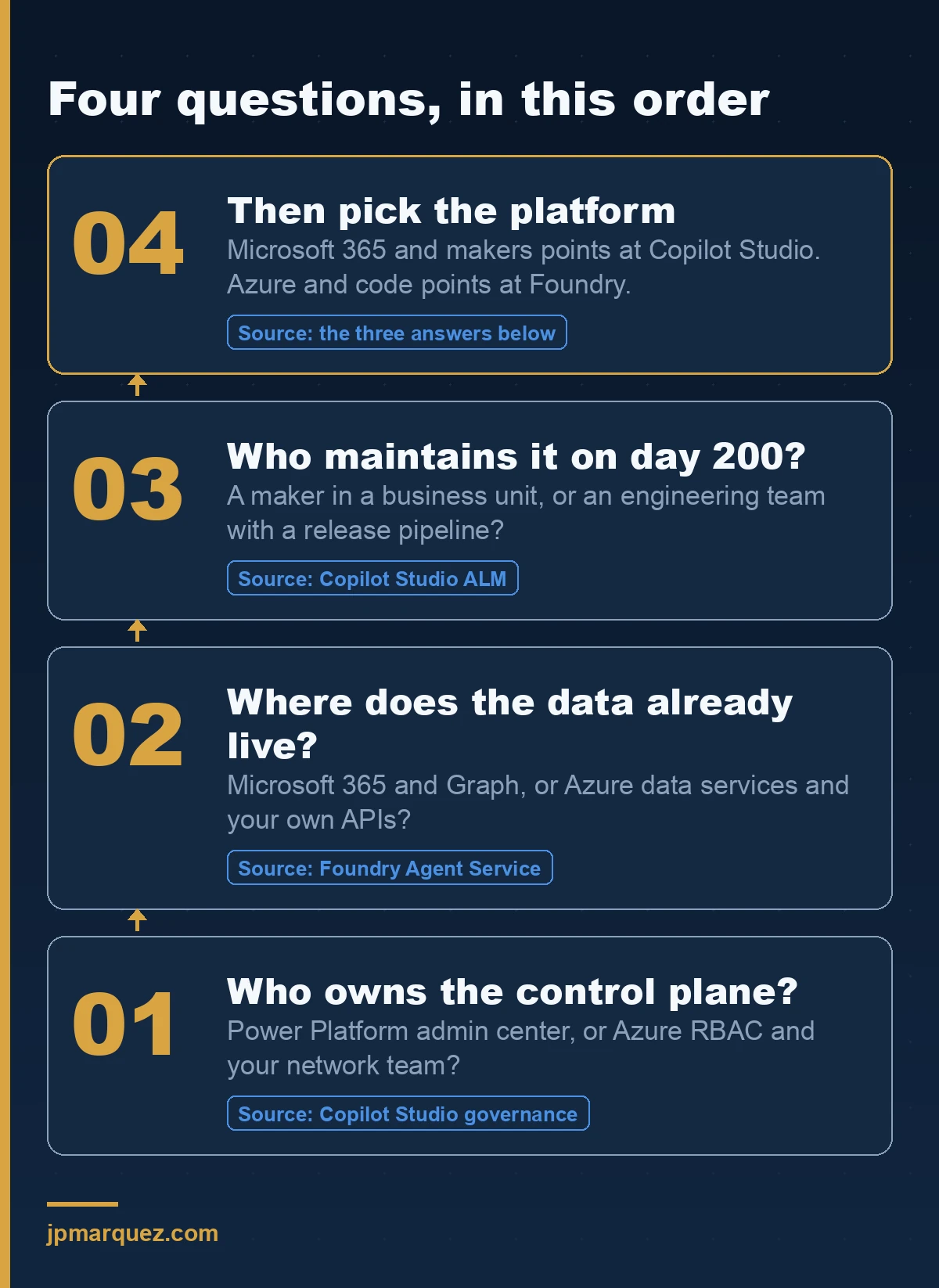
Work it through honestly and the answer is usually not close.
Build in Copilot Studio when
The agent's knowledge is Microsoft 365 content. Users will meet it in Teams, Copilot Chat or SharePoint. The people who will change it next quarter are business makers, not engineers. Your governance muscle is already in the Power Platform admin center. And your users hold Microsoft 365 Copilot licences, which makes the grounding scenarios zero-rated.
Build in Microsoft Foundry when
The agent needs code you wrote, or a framework you chose, or a specific model. It must sit inside your own virtual network. It talks to Azure data services and your own APIs more than it talks to Graph. It will be owned by an engineering team with a release pipeline. Or you need it reachable from channels outside Microsoft 365 — Foundry publishes to Teams and Copilot through the Entra Agent Registry, but it is not confined to them, and A2A v1.0 for agent-to-agent communication is generally available.
The case nobody plans for: both
Plenty of real architectures end up with a Copilot Studio agent as the surface users talk to and Foundry agents doing specialised work behind it. That is fine. Just decide it on purpose, and accept that you are now operating two governance planes and need an answer for how an incident gets triaged across them.
What do teams get wrong about this choice?
Three failure patterns, in the order I see them.
Treating it as a build-versus-buy question. It is not. It is a question about which admin centre your security and compliance obligations get satisfied in. Capability comparisons age in weeks; control planes do not.
Letting the licence decide. "We already have Copilot Studio" is a reason to look there first. It is not an architecture. The zero-rated grounding exception is a genuinely good commercial reason to prefer Copilot Studio — but only when the agent actually fits the scenario it applies to.
Deciding the harness by accident. Teams spend a fortnight comparing platforms, then pick the harness from a dialog box in four seconds. Given it cannot be changed afterwards, invert that ratio.
And the one I will defend hardest: if you cannot name the person who owns the control plane, you are not ready to pick a platform. Write the name down first. The tooling decision gets easy after that, and if it does not, the problem was never the tooling. The same discipline applies when moving anything to production, which is why I framed it as gates rather than a checklist in pilot to production: 5 gates for Microsoft AI agents.
Frequently asked questions
Is Microsoft Foundry the same as Azure AI Foundry?
Yes. Microsoft Foundry is the current name for the platform previously branded Azure AI Foundry, and Microsoft Learn URLs under the old path now redirect to the new one. The governance model, resource structure and Azure RBAC did not change with the rename.
Can I move an agent from Copilot Studio to Microsoft Foundry?
Not as a migration. They are different runtimes with different resource models, so moving means rebuilding the agent on the target platform. Treat the platform choice as durable. Inside Copilot Studio, the harness choice is also permanent: agents cannot be transferred between the standard harness and the GitHub Copilot harness.
Do I need Microsoft Agent 365 to govern Copilot Studio agents?
No, but it changes what you can do. Without it you govern through Power Platform data policies, Purview maker audit logs and Sentinel alerts. With it, Copilot Studio agents can be represented as Entra identities and governed with Conditional Access, role- and attribute-based access control, access governance workflows, and Entra network egress and ingress controls.
Which one is cheaper?
Neither, reliably. Copilot Studio uses Copilot Credits with monthly capacity that does not roll over, plus a zero-rated exception for Microsoft 365 Copilot licensed users doing classic answers, generative answers or Graph tenant grounding in Copilot Chat, Teams and SharePoint. Foundry bills per-call inference and tools, plus container compute for hosted agents. For Microsoft 365 grounding scenarios with licensed users, Copilot Studio is usually cheaper. For high-volume custom workloads, model it properly before committing.
Can a Copilot Studio agent call a Foundry agent?
Agents in both platforms can delegate. Copilot Studio supports connected agents for handing specialised tasks to other agents, and Foundry Agent Service supports the A2A protocol for agent-to-agent communication, with v1.0 generally available. The design question is not whether it works — it is which plane owns the audit trail when it does.