Prompt Injection Defense Patterns for Copilot Studio Agents
· 10 min read
By Juan Pedro Márquez
Here is the uncomfortable part most security reviews skip: a Copilot Studio agent does not have to be "hacked" to leak data. It just has to read a document an attacker controls. That is the whole trick behind prompt injection — the agent does exactly what it was told, by the wrong person, hidden inside content it was asked to summarize.
If you run agents in Microsoft 365, this is now your problem, not a research curiosity. Public write-ups through late 2025 and into 2026 showed real Copilot Studio agents coaxed into exfiltrating customer data through a single crafted message or a poisoned knowledge source. Microsoft's own security teams have published on prompt injection escalating to remote code execution in agent frameworks. The threat is not theoretical.
So let me be direct about the defense, because the marketing makes it sound solved. Copilot Studio agents are "secure by default," and that default is genuinely good — but it is a floor, not a finished job. Treating the built-in protection as the end of the conversation is how organizations end up in an incident report.
What is prompt injection, and why are Copilot Studio agents exposed to it?
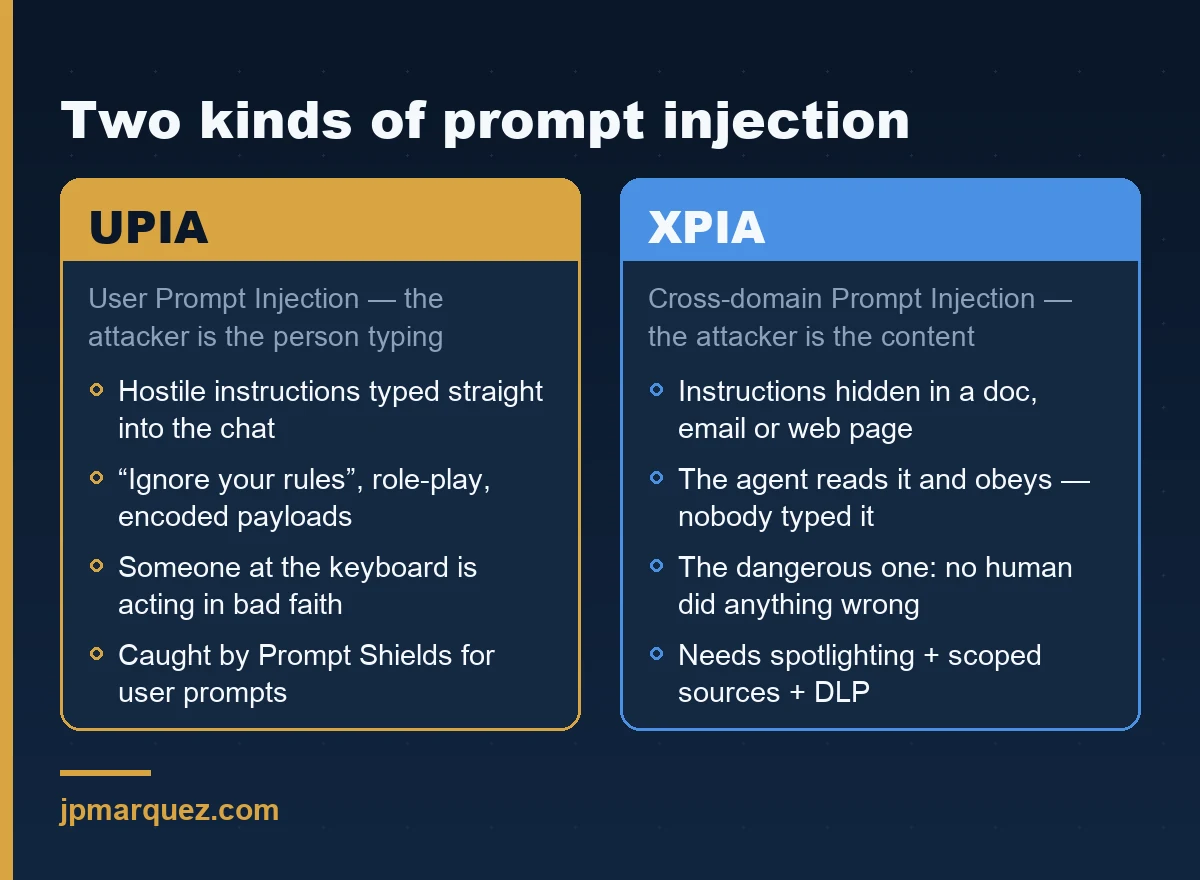
Prompt injection is an attack where malicious instructions are smuggled into the text an LLM processes, causing the agent to ignore its real instructions and follow the attacker's. With agents, it splits into two flavors: a user typing a hostile prompt directly, and hostile instructions hidden inside a document, email, or website the agent reads.
Microsoft labels these precisely. User Prompt Injection Attacks (UPIA) come from the person chatting with the agent. Cross-domain Prompt Injection Attacks (XPIA) come from content the agent ingests — a SharePoint file, a web page, an email body. XPIA is the dangerous one, because nobody at the keyboard did anything wrong.
Copilot Studio agents are exposed for a simple reason: they are useful precisely because they read your data and take actions. An agent that searches SharePoint, calls a connector, and answers in Teams has, by design, a path from untrusted input to privileged action. That path is the attack surface. The Copilot Studio security and governance documentation is the right place to anchor your mental model before you build anything.
Does Copilot Studio block prompt injection out of the box?
Partly, and it is better than people assume. Custom agents that use generative orchestration include built-in runtime protection against UPIA and XPIA, designed to block these attacks during the agent's run and reduce data exfiltration. Microsoft's content classifiers, grounding in permissioned data, and guardrails on out-of-scope actions all run by default.
But "block" here means "probabilistically detect and stop most known patterns." It does not mean "mathematically impossible." Classifiers miss novel phrasings. Encoding tricks and ASCII smuggling — invisible instructions hidden in text — are explicitly tracked as evasion techniques in Microsoft's own AI agent alert catalog. The honest framing: the default reduces risk; it does not retire it.
This is where I push back on a common deployment habit. Teams enable an agent, see "secure by default" in the docs, and ship. The default protects against the attacks Microsoft has already seen. Your agent's specific combination of knowledge sources, connectors, and channels is something only you can reason about.
What are the defense patterns that actually reduce risk?
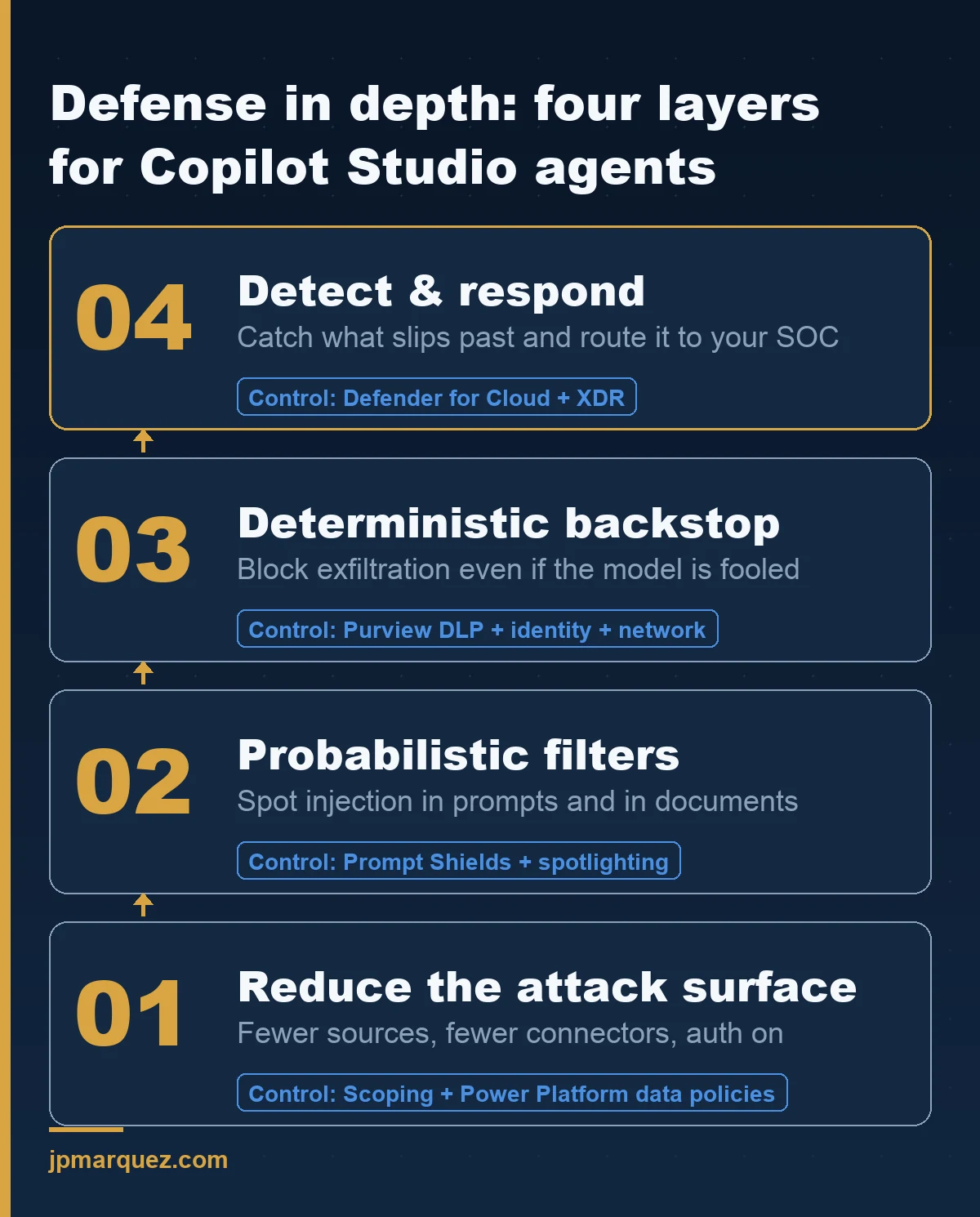
Layering. No single control is sufficient — Microsoft says this plainly in its guidance on defending against indirect prompt injection, and it is the single most important sentence in the whole topic. You combine probabilistic defenses (classifiers) with deterministic ones (policy, identity, network) so that when one layer misses, another catches.
Here is the stack I recommend, ordered by how much risk each removes for the effort involved.
Pattern 1 — Shrink the blast radius before you touch security settings
The cheapest defense is a smaller agent. An agent that can read three vetted SharePoint sites and call one connector is far easier to defend than one wired to "all company data" and a dozen connectors. Before configuring anything, ask what the agent genuinely needs. Most agents are over-provisioned on day one because it was faster to grant broad access than to scope it.
Key point: Scope knowledge sources to specific document libraries. Remove connectors the agent does not use in its core task. Every capability you remove is an attack path you no longer have to defend.
Pattern 2 — Require authentication and govern it with data policies
Open the agent's Settings → Security → Authentication and confirm it is not set to No authentication. The default for new agents is Authenticate with Microsoft (Entra ID), and you want to keep it. As the user authentication documentation warns, "No authentication" means anyone with the link can talk to your agent — and an unauthenticated agent that touches internal data is a standing liability.
Do not rely on every maker getting this right. Enforce it centrally. In the Power Platform admin center you can configure a data policy that blocks the "Chat without Microsoft Entra ID authentication" connector, so makers physically cannot publish an anonymous agent. The same data-policy surface lets you block knowledge sources, block raw HTTP requests, and block specific connectors used as tools — each of which closes an exfiltration route.
Pattern 3 — Use Prompt Shields and spotlighting for agents built on Azure AI
If your agent logic runs through Azure AI Foundry models, turn on Prompt Shields. Prompt Shields analyzes both direct user attacks and indirect attacks embedded in documents, classifying attempts to change system rules, role-play around restrictions, or smuggle encoded payloads.
Then enable spotlighting, a sub-feature described in the Prompt Shields content filtering docs. Spotlighting tags ingested documents so the model treats them as lower-trust than direct user and system prompts. It is off by default. It costs a few extra tokens. It is one of the highest-value toggles you are not using, because it directly attacks the XPIA problem: it tells the model "this content is data, not instructions."
Pattern 4 — Harden the system prompt, but never trust it alone
Microsoft's security benchmark recommends safety meta-prompts: explicit role definitions, instructions to prioritize system rules over user input, and refusal patterns for override attempts. Good hygiene. Write them.
And then assume they will be bypassed. A system prompt is a suggestion to a probabilistic system, not an access control. The same benchmark points to red-teaming with tools like PYRIT to find where your prompts crack. If your only defense against data exfiltration is a paragraph of instructions telling the model to behave, you do not have a defense. You have a wish.
Pattern 5 — Layer Purview so a successful injection still cannot move the crown jewels
This is the deterministic backstop, and it pays to understand how Purview governs AI workloads end to end before you scope the policy. Microsoft Purview for Copilot Studio applies sensitivity labels and Data Loss Prevention to agent interactions. A DLP policy scoped to the Microsoft 365 Copilot location can stop an agent from processing content carrying a specific sensitivity label, even when the agent was tricked into asking for it.
The point is sequencing. Prompt injection defeats the model's judgment. Purview does not depend on the model's judgment. When the classifier misses, a label-based block can still keep regulated data from leaving — and you keep an audit trail in Purview and, if you wire it up, Microsoft Sentinel.
Pattern 6 — Add external threat detection for high-stakes agents
For agents that touch sensitive systems, Copilot Studio now supports external threat detection. At runtime, every time the orchestrator considers invoking a tool, it calls an external endpoint that returns allow or block. You can plug in Microsoft Defender, a partner, or your own service.
One configuration detail that bites people: under Set error behavior, the default is "Allow the agent to respond" if the detection service does not answer within one second. For a genuinely high-risk agent, flip that to Block the query. Fail closed, not open. Note this is only available for generative agents using generative orchestration, and it is configured per environment — there is no tenant-wide switch, so new environments start unprotected until you turn it on — one more reason to treat environments and ALM as a governed pipeline, not an afterthought.
How do I monitor agents for prompt injection in production?
Assume some attacks will land and instrument for it. Microsoft Defender for Cloud's AI threat protection works with Prompt Shields to raise real-time alerts for jailbreak attempts, data leakage, and related threats, and feeds them into Defender XDR so your SOC sees agent incidents next to everything else.
The specific alerts matter. Defender's AI workload alert catalog includes detections for jailbreak attempts via direct injection and for ASCII smuggling — the invisible-instruction technique tied to indirect injection. Wire these into your existing incident process. An agent alert nobody routes to a human is just a log line.
A pattern I keep seeing, and what it costs
Across enterprise rollouts, the same shape repeats. An agent ships fast for a real business need. It is over-scoped because broad access was the path of least resistance. Authentication is fine, but spotlighting is off, Purview is "phase two," and external threat detection was never discussed. Nothing goes wrong for months — until someone points the agent at a mailbox or a shared library where an attacker can plant content.
In a recent engagement with an organization in a regulated sector, the fix was not exotic. We scoped the knowledge sources down, enforced authentication through a data policy so it could not regress, turned on spotlighting, and layered a Purview DLP policy on the two sensitivity labels that actually mattered. The agent did the same job. Its blast radius shrank by an order of magnitude. None of that required new licensing heroics — it required treating "secure by default" as the start.
The defensible position
If you take one thing: prompt injection is not a bug you patch, it is a property of giving language models access to untrusted text, so you defend it in depth or not at all. The built-in protections are real and you should use them. They are layer one of six, not the whole wall.
Build smaller agents. Enforce authentication centrally. Turn on the toggles Microsoft ships off by default. Put a deterministic control — Purview, identity, network — behind the probabilistic ones. Monitor as if a breach is a when. Do that, and an injection that slips past the classifier still runs into a wall it cannot talk its way through.
FAQ
Is Microsoft 365 Copilot itself vulnerable to prompt injection the same way custom agents are?
Microsoft 365 Copilot inherits strong tenant-level protections and the same content-safety stack, and it is more constrained than a custom agent because you are not wiring arbitrary connectors and knowledge sources into it. Custom Copilot Studio agents carry more risk precisely because makers can expand their reach. The defenses overlap, but custom agents need the extra layering described above.
Does enabling spotlighting or external threat detection break my agent's functionality?
Not in normal use. Spotlighting adds tokens and reclassifies ingested documents as lower trust, which is the behavior you want; the main caveat is that very large documents could approach input-size limits. External threat detection adds a sub-second runtime check before tool calls. Test in a non-production environment first, especially the error-behavior setting.
Can a system prompt alone stop prompt injection?
No. A hardened system prompt with explicit role definitions and override-refusal instructions raises the bar and is worth writing, but it is a probabilistic control inside the same model the attacker is manipulating. Treat it as one layer and always pair it with deterministic controls like DLP, authentication, and scoped access.
Where should an IT leader start if agents are already in production?
Start with an inventory and a scope review: which agents exist, what they can read, and which connectors they hold. Enforce authentication via a Power Platform data policy, turn on spotlighting where applicable, and apply a Purview DLP policy to your highest-sensitivity labels. Those four moves remove the most risk for the least effort, and none of them require rebuilding the agents. The six-guardrail agent governance checklist is a good structure for that first pass.