Multi-Agent Orchestration on Azure AI Foundry: Enterprise Patterns
· 11 min read
By Juan Pedro Márquez
Most enterprise AI projects do not fail because a single agent is weak. They fail because someone tried to make one agent do everything — search, reason, call six systems, enforce policy, and explain itself — and the result was a brittle thing nobody could debug. Multi-agent orchestration is the structural fix: break the work into focused agents and coordinate them.
Azure AI Foundry is where Microsoft expects you to build that on Azure. (If you are still weighing Foundry against the lower-code Copilot Studio path, this comparison of the two covers the trade-off.) And it changed in a way that matters, so let me start with the part that will save you from building on sand.
If your reference for "multi-agent on Foundry" is the Connected Agents tutorial, it is out of date. Connected Agents (classic) are deprecated and scheduled to retire on March 31, 2027. The current model is Foundry Agent Service plus workflows, the A2A tool, and the Microsoft Agent Framework. Build against the new model or you will be migrating before you finish.
What is multi-agent orchestration in Azure AI Foundry?
It is the practice of coordinating several specialized agents — each with a narrow job — to complete a task that would be unreliable for one over-loaded agent. A primary agent delegates to subagents (research, summarize, validate, act), and an orchestration layer manages who runs when and who talks to the user.
Foundry Agent Service is the managed foundation. The Foundry Agent Service overview describes it as a managed platform for building, deploying, and scaling agents using any supported framework and model. On top of that, Foundry gives you concrete ways to make agents collaborate rather than asking you to hand-code a router.
The mental shift is from "one clever agent" to "a small team of dull, reliable ones." Dull and reliable wins in production. A specialized agent with three tools and one job is testable, monitorable, and replaceable. A generalist with twelve tools is a mystery the first time it misbehaves.
How do I get agents to collaborate — A2A or workflows?
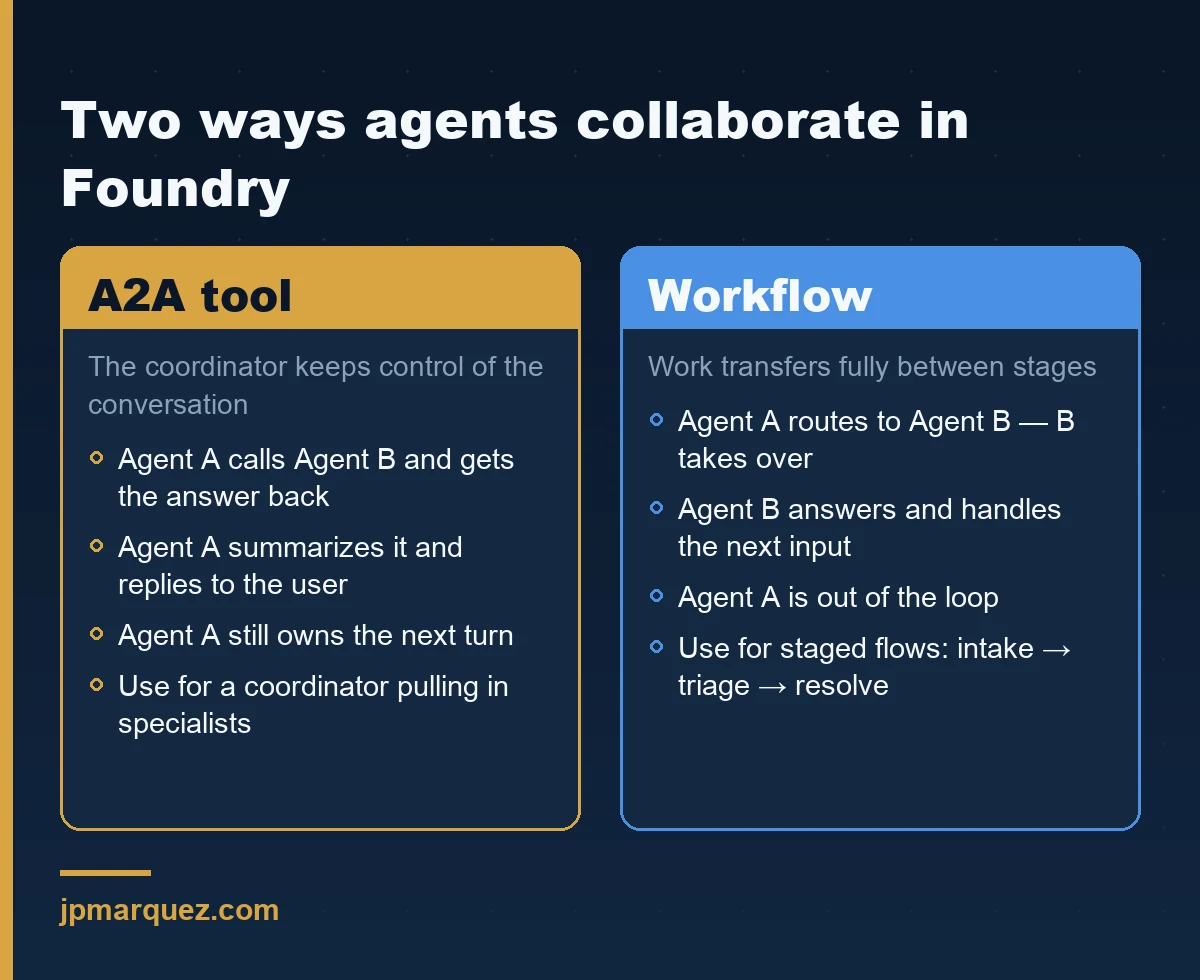
Two mechanisms, and the difference is about who keeps control of the conversation. Pick based on whether the primary agent should stay in charge or hand the user off entirely.
The Agent-to-Agent (A2A) tool lets one Foundry agent call another agent endpoint over the open A2A protocol. When Agent A calls Agent B through the A2A tool, Agent B's answer returns to Agent A, which summarizes it and responds to the user. Agent A keeps control and handles the next turn. Use this when you have a coordinator that should own the user relationship and pull in specialists as needed.
Foundry workflows are the other path. In a workflow, when Agent A routes to Agent B, Agent B takes full responsibility for answering the user — Agent A is out of the loop, and Agent B handles subsequent input. Workflows add a visual designer and YAML-based configuration, with versioning, change logs, and visual monitoring. Use this for staged processes where work genuinely transfers between stages, like intake → triage → resolution.
Key point: One caution from the migration notes: the old
agent.as_tool/ Connected Agents pattern is not available in the new Foundry Agent Service. If you are moving an existing design, the migration guide is mandatory reading, not optional.
Where does the Microsoft Agent Framework fit?
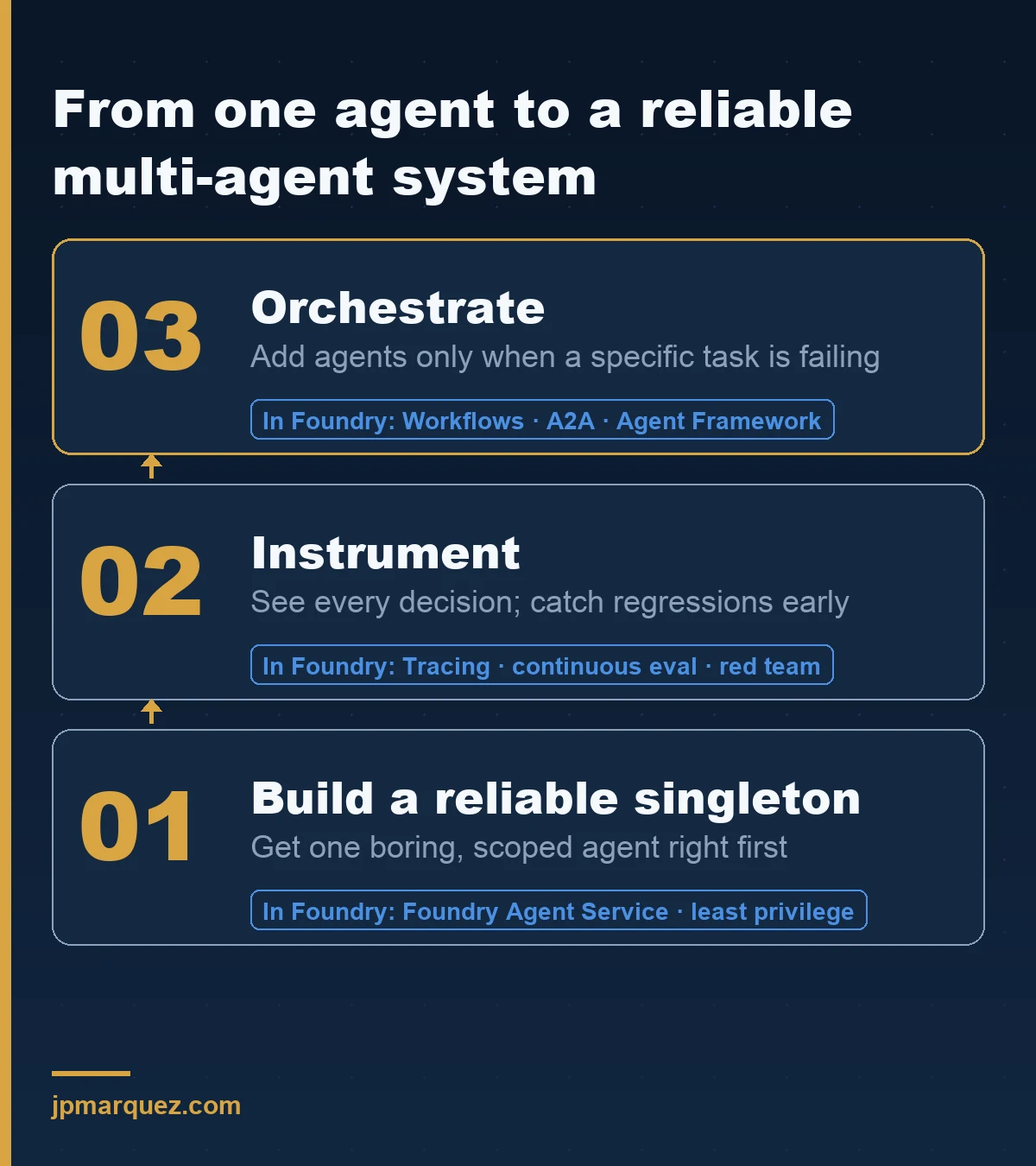
The Foundry Agent Service transparency note gives the recommended sequence, and it is good advice. Start by building solid singleton agents in Agent Service — get them reliable, scalable, and secure first. Then orchestrate them using a supported framework such as the Microsoft Agent Framework, an open-source SDK and runtime for multi-agent systems that is wire-compatible with the Responses API.
The intended path is two-stage: experiment with collaboration patterns in Agent Framework, and once a pattern proves its value, move it into Foundry Agent Service for production support and non-breaking changes. I like this model because it stops teams from over-engineering orchestration before they have a single trustworthy agent. Orchestration multiplies whatever you feed it. Feed it unreliable agents and you get unreliable systems, faster.
What is the right architecture for a multi-agent system?
Specialized roles with a clear coordinator. Microsoft's own example — a contract review assistant — is a clean template: a main orchestrator interprets the request and delegates, a clause-summarizer extracts and summarizes sections, and a compliance-validator checks the document against internal guidelines using file search and an internal rules API.
Notice what each subagent has: one responsibility, the minimum tools to do it, and a description narrow enough that its behavior is predictable. That is the design discipline that makes the difference. The architecture is not impressive because it has many agents. It is reliable because each agent is boring.
When you publish, identity becomes real. Each published agent receives its own Agent Identity and its own stable endpoint, and you reconfigure resource permissions per agent — shared development permissions do not carry over. That is a feature, not a chore: it means you can reason about exactly what each agent in the system is allowed to touch, instead of one over-privileged identity behind the whole thing.
How do I deploy a multi-agent system securely for enterprise?
Choose the right environment tier, and for anything touching sensitive data, choose Standard with private networking. The environment setup documentation lays out the options. Basic Setup gets you started fast but stores conversation history and vector data on Microsoft-managed resources. Standard Setup requires you to bring your own Azure Storage, Azure AI Search, and Azure Cosmos DB, so all agent data stays in your tenant — which is usually what compliance actually requires. Setting up that environment cleanly is its own exercise; the enterprise Azure AI Foundry setup guide walks through it end to end.
For real isolation, use Standard Setup with private networking. It delivers no public egress, subnet integration into your own virtual network, and private access to your resources — explicitly framed by Microsoft as helping prevent data exfiltration by keeping traffic inside your network. A few specifics worth knowing before you start:
- You inject a delegated subnet (
Microsoft.App/environments) sized /27 or larger — undersize it and provisioning fails. - Public network access is Disabled by default on the accounts and projects; you reach agents through private endpoints, a VPN gateway, or ExpressRoute.
- Private endpoints to Storage, AI Search, and Cosmos DB are not auto-created — you create those separately, and the most common failure mode is DNS not resolving to private IPs. Verify with
nslookupfrom inside the VNet. - Standard tiers support Customer Managed Keys; Basic does not.
The reason private networking matters specifically for multi-agent systems: more agents means more tool calls, more connectors, and more outbound paths. Each one is a potential exfiltration route. Confining the whole system to your network turns "trust every agent's egress" into "the network won't let data leave," which is a far stronger guarantee than per-agent good behavior.
How do I monitor and evaluate a multi-agent system in production?
You instrument it from the start, because a multi-agent system is exactly the kind of thing that is impossible to debug after the fact. Foundry's observability stack gives you three capabilities that work together: evaluation (quality, safety, and agent-specific metrics like tool-call accuracy and task completion), monitoring (token usage, latency, error rates via Application Insights), and tracing (OpenTelemetry-based execution flow across LLM calls, tool invocations, and agent decisions).
Tracing is the one I would not ship without. In a multi-agent system, "the answer was wrong" is useless on its own. You need to see which agent made which decision, what it passed to the next agent, and where the chain went sideways. Distributed tracing turns a black box into a sequence you can read. Foundry supports tracing for the Microsoft Agent Framework, LangGraph, and the OpenAI Agents SDK, so you are not locked into one stack.
For production, set up the Agent Monitoring Dashboard. It tracks operational metrics and lets you turn on continuous evaluation on sampled traffic, scheduled evaluations against benchmarks, and — this is the one most teams skip — red team scans that run adversarial tests for risks like data leakage and prohibited actions. A multi-agent system has more surface for prompt injection and unintended tool use than a single agent. Scheduled red teaming is how you catch regressions before an attacker does.
Microsoft's process for building agents across an organization ties this together at the governance level: configure traces and metrics early, standardize evaluations in a shared catalog, integrate them into CI/CD so quality does not drift as new versions deploy, and extend security testing to cover agent-specific threats.
What does multi-agent orchestration cost — in money and latency?
More than a single agent, on both axes, and you should price that in before you commit. Every hand-off is another model call, so a chain of four agents can mean four times the tokens and four times the round-trips of one agent answering directly. The monitoring dashboard surfaces token usage and latency per agent precisely because these add up faster than teams expect.
So the design question is not "can I split this into agents?" — almost anything can be split. It is "does each split earn its cost?" A subagent that meaningfully improves accuracy or unlocks a capability the monolith could not reach is worth its latency. A subagent added for architectural tidiness is pure overhead the user feels as a slower answer and finance feels as a bigger bill.
My rule of thumb: justify each agent against the metric it improves. If you cannot name the evaluation score a new agent moves, it does not belong in the system yet. Continuous evaluation makes this concrete — you can measure task completion and tool-call accuracy before and after a split and keep the change only if the numbers back it. Let the data decide the topology, not the diagram.
A pattern worth avoiding
The failure I see most often is "orchestration theater" — an elaborate multi-agent diagram on a slide, built before a single agent was reliable on its own. Teams add agents to feel sophisticated, then discover the system is slower, more expensive, and harder to debug than the monolith it replaced, with no quality gain.
In a recent build for an operations team, we deliberately did the opposite. We shipped one well-scoped agent, instrumented it with tracing and continuous evaluation, and ran it in production for weeks. Only when its weak point was obvious — it was bad at one classification step — did we split that step into a second specialized agent and coordinate the two. The multi-agent version earned its complexity. That sequence, single-agent-first, is the cheapest insurance you can buy against orchestration theater. It is the same discipline as gating any agent from pilot to production — the 5-gate framework formalizes exactly this progression.
The defensible position
Multi-agent orchestration is an answer to a reliability problem, not a sophistication contest — so add agents only when a specific task is failing, and instrument before you orchestrate. Foundry gives you the right tools: A2A and workflows for collaboration, the Agent Framework to prototype patterns, Standard private-networking setup to contain the system, and an observability stack to keep it honest.
Use the new model, not the deprecated Connected Agents. Build boring, reliable singletons first. Give each agent its own identity and least privilege. Confine the system to your network. Trace everything and red-team on a schedule. Do that and your multi-agent system will be the thing that survives a production incident review — not the thing that causes one.
FAQ
Should I use the A2A tool or a Foundry workflow for my multi-agent system?
Use the A2A tool when a coordinating agent should keep control of the user conversation and call specialists for sub-answers it then summarizes. Use a workflow when the work genuinely transfers between stages and a later agent should own the rest of the interaction. Many real systems combine both: a workflow for the macro process, A2A calls inside a stage.
Are Connected Agents still usable in Azure AI Foundry?
Connected Agents (classic) are deprecated and scheduled to retire on March 31, 2027, and the classic agent.as_tool pattern is not available in the new Foundry Agent Service. Existing workloads keep running for now, but new builds should use workflows or the A2A tool, and current designs should follow the official migration guide.
Do I need private networking for every multi-agent deployment?
No — Basic Setup is fine for prototypes and low-sensitivity scenarios. But any system handling regulated or confidential data should use Standard Setup so data stays in your tenant, and Standard with private networking when you need no public egress and want to prevent data exfiltration at the network layer. The decision should follow your data classification, not convenience.
How do I debug a multi-agent system when the final answer is wrong?
Lead with tracing. Foundry's OpenTelemetry-based tracing captures each agent's decisions, tool calls, and hand-offs, so you can see exactly where the chain failed instead of guessing. Pair it with continuous evaluation to catch quality drift on sampled production traffic, and use the monitoring dashboard's per-agent metrics to isolate which agent is the weak link.