Shadow AI in Microsoft 365: How to Find and Govern It
· 11 min read
By Juan Pedro Márquez
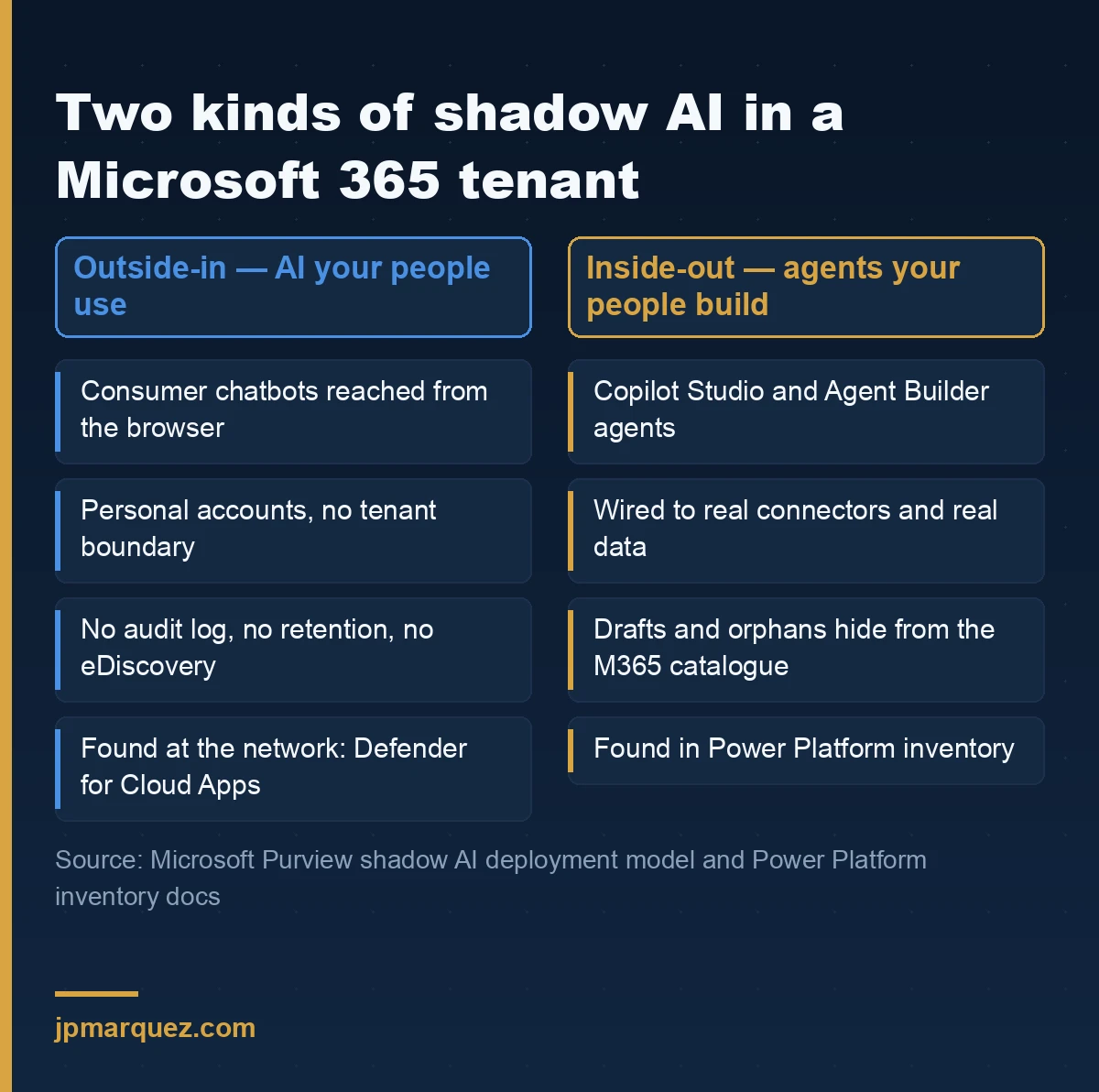
Shadow AI in Microsoft 365 is not one problem. It's two. There is the AI your people use outside the tenant — a browser tab, a personal account, a paste of something they shouldn't have pasted. And there is the AI your people build inside it: agents nobody registered, nobody owns, and nobody has retired.
Almost every governance programme I see is built for the first half. The second half is the one that will embarrass you in an audit, because those agents run with your data, your connectors, and — often — a departed employee's name in the owner field.
Here is the uncomfortable part. If you can tell me how many AI agents exist in your tenant, and you got that number from one admin centre, the number is wrong. Not slightly wrong. Structurally wrong, because no single surface counts all of them, and Microsoft says so in its own documentation.
What counts as shadow AI in a Microsoft 365 tenant?
Shadow AI is any AI capability in use without the knowledge, approval, or governance of IT and security. In a Microsoft tenant it splits cleanly in two: unsanctioned external AI services users reach through the browser, and internally built agents that were never registered, reviewed, or assigned an owner.
Microsoft's own deployment model for preventing data leak to shadow AI frames the risk as three outcomes: leak of sensitive information, non-compliance with regulation, and reputational harm. That framing is right, but it is written mostly around the external half. The internal half needs its own treatment.
Outside-in: the AI your people use
This is the familiar version. Someone drafts a board summary in a consumer chatbot because it's faster than waiting for a Copilot licence. The content leaves your boundary. You have no log, no retention, no eDiscovery hold, and no idea it happened.
Inside-out: the AI your people build
This is the version that grows quietly. Agent Builder and Copilot Studio put agent creation in the hands of business users — which is the point of the product, and mostly a good thing. But a maker can build an agent, wire it to a connector, share it with a team, and move to a different department, all without a single governance checkpoint firing.
If you have already worked through the six guardrails before shipping an agent to production, this article is the step that comes before it: knowing what already exists.
Why does every admin centre give you a different agent count?
Because each surface answers a different question. The Microsoft 365 admin centre answers "what can my users reach?" Power Platform inventory answers "what did my organisation build on Power Platform?" Those are not the same set, and neither is a superset of the other.
Microsoft documents the difference directly in Understand agent counts across admin surfaces:
| Power Platform inventory | Microsoft 365 admin centre | |
|---|---|---|
| Shows | Agents built on Power Platform | All agents available in the tenant, including those from Teams Store Platform, Agent Toolkit, Foundry, Fabric, SharePoint and more |
| Includes drafts | Yes | Published and shared only |
| Includes first-party / ISV | No | Yes |
| Scoped to | Environments, rolled up to tenant | Tenant |
Read the "includes drafts" row again. Power Platform inventory shows draft agents; the Microsoft 365 admin centre does not. A draft agent is not a harmless sketch — it can already be connected to a data source and already be running under a maker's identity. The surface most IT leaders quote from is precisely the one that hides them.
The Microsoft 365 admin centre view has the opposite bias: it includes agents your organisation never built. First-party Microsoft agents and ISV agents inflate the number relative to "how much did we create ourselves?"
Both numbers are correct. Neither is an inventory.
How do you discover the AI your people use outside the tenant?
Start at the network, because that is the only place you see traffic to services you never onboarded. Microsoft Defender for Cloud Apps is the primary tool, and Microsoft Entra Global Secure Access adds a second, more granular layer if you have it.
The shadow IT discovery tutorial is the practical starting point, and it opens with a statistic worth quoting to a steering committee: IT admins asked to guess how many cloud apps their employees use typically say 30 or 40, when the real average is over 1,000.
The three moves that get you a usable list
One — filter the cloud app catalogue to Generative AI. In the Defender portal, under Cloud Apps, open Cloud Discovery, then Discovered apps. Filter by app category. The Purview deployment model's discovery step walks this exact path.
Two — sort by risk score, not by user count. The Defender risk score assesses apps against more than 90 risk factors, from where the publisher is headquartered to whether the service provides an audit log of user activity. The app with 400 users may be fine. The app with four users and a risk score of 3 is the one to look at first.
Three — tag before you block. Marking apps sanctioned or unsanctioned is a governance decision, not a technical one. Do it deliberately, and do it before anyone touches a firewall rule.
If you run Global Secure Access, shadow AI discovery gives you application-level inventory and risk scoring against the same Defender catalogue, including SaaS MCP servers and AI model provider frameworks. Its companion, Generative AI Insights, goes further and uses TLS inspection to log actual prompt content and Model Context Protocol operations.
That second capability deserves a pause. Logging prompt content is powerful and it is also, in a European context, a works-council conversation and a privacy assessment before it is a technical rollout. Turn it on because you decided to, not because it was available.
How do you find the agents built inside your own tenant?
Three surfaces, queried in this order.
Microsoft 365 admin centre — the catalogue. Open Agents, then All agents. The agents admin guide documents the filters that matter, and one of them is doing the real work here: Missing an owner. That filter is your orphaned-agent list. Run it first, before anything else, and be ready for the number to be higher than you expected.
The second useful filter is Availability set to All users. Any agent reachable by everyone should have a named owner and a business justification. If it has neither, you've found something.
Power Platform inventory — what your makers built. Power Platform inventory gives a unified view of agents, apps, flows, environments and — in preview — the connectors each resource uses. Created, updated or deleted resources appear within about 15 minutes, and the whole grid exports to CSV.
Two details are worth knowing before you delegate this. Access is governed by Microsoft Entra roles, not Power Platform's own role-based access control, and the AI administrator and AI reader roles are scoped to AI resources only — agents, agentic apps, agent flows, environments and environment groups. Canvas apps, model-driven apps and cloud flows are out of scope for those two roles. That scoping is useful: you can give a governance analyst visibility into the agent estate without handing over the whole platform.
Copilot Studio agent inventory — the detail layer. The Copilot Studio agent inventory covers both unpublished and published agents and carries the metadata a reviewer actually needs: who created it, when it was last published, which channels it's deployed to, how it authenticates users, and what it can do. Changes typically surface within 20 minutes.
Two caveats, both documented and both easy to miss. The inventory reflects the structure of the published version — unpublished changes in a newer draft don't appear until publication. And agents created in the first version of Copilot Studio, the classic Power Virtual Agents bots, are not included at all; they live under Manage, Copilot Studio, Classic chatbots. If your tenant has been doing conversational AI since before the rebrand, that's a whole population sitting outside the inventory you just exported.
Do this with the API, not the portal
The portal is fine for a first look. For anything you intend to repeat, use the Power Platform inventory API or Azure Resource Graph. An inventory you regenerate on a schedule is a control. An inventory you export by hand once a quarter is a screenshot.
How do you turn four lists into one inventory?
Key point: By deciding, up front, what the finished artefact looks like. Four exports in a folder is not an inventory — it's homework.
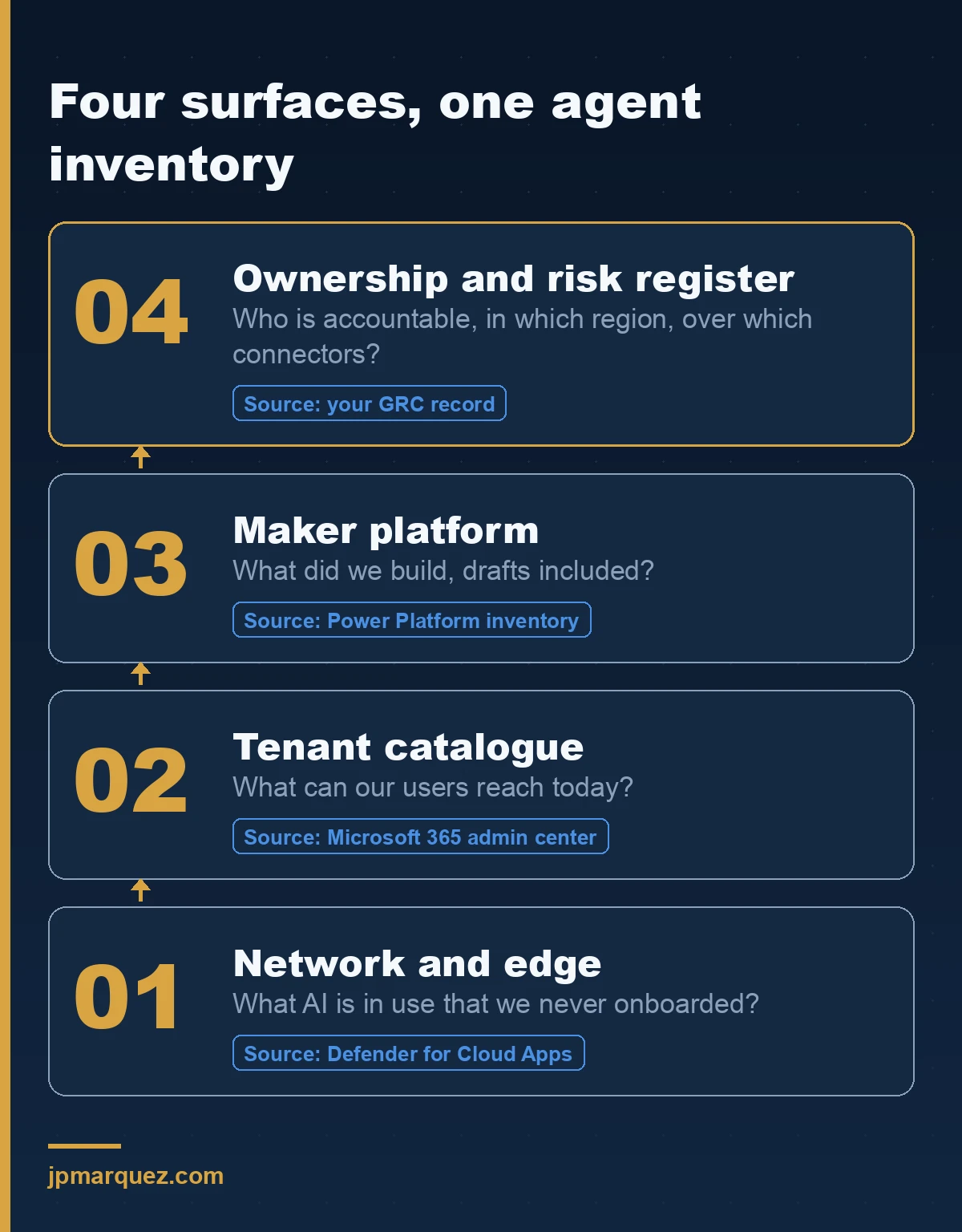
Each layer answers something the layer below it cannot. Network discovery tells you what left the building. The tenant catalogue tells you what your users can reach. The maker platform tells you what your organisation built, drafts included. Only the fourth layer — ownership, region, connectors, last activity — turns a list of names into something a risk committee can act on.
The join key is the owner. Not the agent name, not the environment. If an entry has no named human accountable for it, it is not governed, whatever the other three columns say. That is also why agent identity matters more than it looks: an agent with its own identity can be reviewed, attested and revoked like any other principal.
What do you do once you have the list?
Different halves, different levers.
For external AI apps, the blocking step of the Purview deployment model sequences it well: unsanction in Defender for Cloud Apps for organisation-wide blocking, Microsoft Entra Internet Access when you need specific users or groups treated differently, Adaptive Protection with Conditional Access so that users flagged as elevated risk by Insider Risk Management are restricted automatically, and Intune to stop installation on managed devices.
Note the honest caveat in Microsoft's own text: organisation-wide blocking prevents access through managed network connections. Unmanaged devices and personal networks are a separate problem. Blocking is a speed bump for the careless and no obstacle at all for the determined. Pair it with the data-side controls — that is what Purview DSPM for AI is for.
For internal agents, Agent Inventory in the Copilot Agent Kit gives you actions directly on the grid: View Details, Reassign, Quarantine and Unquarantine. Reassign and Quarantine work on up to 50 records at a time, and Quarantine applies to agents in Draft or Available status.
Reassign is the one to use most. An orphaned agent doesn't usually need to be killed; it needs a name against it. Quarantine is for the ones that fail review, and it's reversible, which makes it a far easier decision to sign off than deletion.
The number that goes to your risk committee
Report three numbers, not one.
Total agents available to users. Org-created agents on Power Platform, drafts included. Agents with no owner.
The third number is the only one that measures governance. The first two measure surface area. A tenant with 300 agents and zero orphans is in better shape than a tenant with 40 agents and 11 orphans, and any report that shows only a total hides exactly that distinction.
My working opinion, and I'll defend it in a steering committee: a single agent count is a governance smell. It means someone opened one portal, screenshotted a tile, and called it an inventory. Ask which portal. The answer tells you what the number excludes.
Frequently asked questions
Does Microsoft 365 admin centre show every agent in my tenant?
No. It shows agents available to users — first-party, ISV, and org-created agents that are published or shared. Draft agents built in Copilot Studio or Agent Builder don't appear there. For those, use Power Platform inventory, which explicitly includes drafts.
Can I find AI agents built outside Power Platform?
Partially. The Microsoft 365 admin centre includes org-created agents from other authoring surfaces — Teams Store Platform, Agent Toolkit, Foundry, Fabric, SharePoint and others — but only once they're published or shared. Anything still in development on those surfaces needs its own discovery path.
Do I need Global Secure Access to detect shadow AI?
No. Defender for Cloud Apps cloud discovery is enough for an application-level inventory with risk scoring. Global Secure Access adds network-level shadow AI discovery, and Generative AI Insights adds prompt-level and MCP-level logging on top. Treat the second layer as a deliberate decision with a privacy review attached, not as a default.
How often should the agent inventory be regenerated?
Power Platform inventory reflects changes within roughly 15 minutes and Copilot Studio agent inventory within about 20, so the data is close to live. The question is how often you review it. Monthly for the orphaned-owner list, quarterly for the full estate, and immediately whenever someone with maker permissions leaves the organisation.
What's the first thing to run if I only have an hour?
Microsoft 365 admin centre, Agents, All agents, filter Missing an owner. It takes minutes, it needs no new licence, and it produces the one list nobody in the organisation wants to be shown.