Microsoft Copilot EU AI Act Compliance: What IT Leaders Must Know | JP Márquez
· 10 min read
By Juan Pedro Márquez
📋 Quick Reference
Audience: IT Directors and CISOs managing Microsoft 365 Copilot deployments in EU organizations
Time to read: ~10 minutes
What you'll get: A clear breakdown of where Microsoft's EU AI Act compliance ends and your deployer obligations begin — with actionable steps for each gap
When enterprise IT leaders ask whether Microsoft 365 Copilot is "EU AI Act compliant," they are asking the wrong question. Compliance is not a property of the product alone — it is a result of how the product is deployed, configured, and governed within your specific organizational context.
Microsoft has published comprehensive AI Act compliance commitments. But the EU AI Act regulates AI providers and deployers separately. Understanding where Microsoft's responsibility ends and yours begins is the practical question every IT director must answer before August 2, 2026.
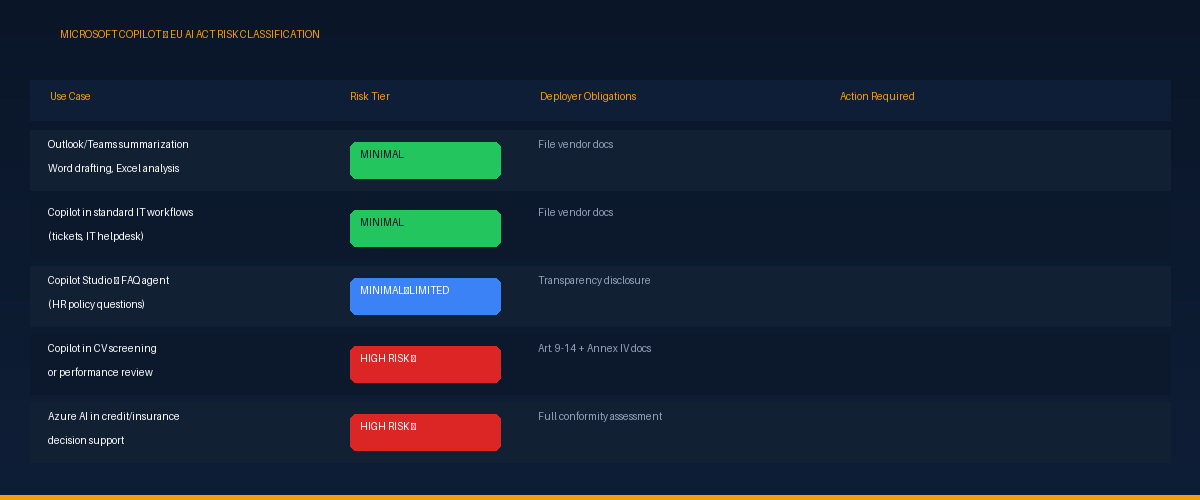
How Microsoft Classifies Copilot Under the EU AI Act
Microsoft categorizes Microsoft 365 Copilot primarily as a general-purpose AI system used in productivity contexts — not as a high-risk AI system under Annex III. This classification holds for standard Copilot use cases:
- Email drafting and summarization in Outlook
- Meeting transcription and action items in Teams
- Document drafting and editing in Word and PowerPoint
- Data analysis assistance in Excel
- Code assistance in development environments
For these standard uses, your compliance burden as a deployer is significantly lower. The complexity arises when Copilot moves into regulated business processes.
⚠ The critical test: If your organization uses Copilot or Copilot Studio to screen job applications, assess employee performance, inform credit decisions, or evaluate students — the risk classification changes, regardless of the underlying technology being a Microsoft product.
What Microsoft Provides: The Vendor Compliance Layer
Microsoft has made extensive public commitments to EU AI Act compliance. Understanding what they cover helps you identify what remains your responsibility.
Transparency Notes
For every Azure AI service, Microsoft publishes Transparency Notes — documents describing the system's intended uses, limitations, and fairness considerations. These form a critical part of the technical documentation basis that deployers need for Annex IV compliance.
Review Microsoft AI Transparency Notes for each Azure AI service your organization uses. They are available for Azure OpenAI Service, Azure AI Content Safety, Azure AI Language, and other services.
Data Residency and Privacy Controls
For EU enterprises, Microsoft provides data residency commitments that keep Copilot-processed data within EU data centers when configured correctly. Microsoft 365 Copilot privacy and data protection documentation covers what data is processed, where, and how prompts and responses are handled.
This documentation directly supports your Article 10 (data governance) compliance narrative — file it as evidence, and supplement it with your organizational data governance layer.
Audit Logging via Microsoft Purview
Microsoft provides comprehensive audit logging for Copilot interactions through Microsoft Purview. This gives organizations the evidence trail needed to demonstrate human oversight — a core Article 14 requirement.
Action required: Copilot audit logging is not enabled by default in all tenants. Verify it is active in your environment and that the retention period aligns with your compliance requirements before August 2.
Responsible AI Framework
Microsoft's internal responsible AI framework covers six principles — fairness, reliability and safety, privacy and security, inclusiveness, transparency, and accountability. The Azure Machine Learning Responsible AI dashboard provides model-level assessment tooling that supports your risk management documentation under Article 9.
What Remains Your Responsibility as a Deployer
Even with Microsoft's comprehensive compliance posture, deployers have independent obligations under the EU AI Act. Here is what your organization must address:
1. Complete AI System Inventory
You cannot demonstrate compliance for AI systems you haven't inventoried. Before August 2, your organization needs a list of every AI system in use — across all departments, including business unit-adopted SaaS tools with AI features enabled by default.
For Microsoft environments: Microsoft Defender for Cloud Apps provides discovery for shadow AI and unauthorized SaaS. Microsoft Entra conditional access policies can control which AI services employees access.
2. Risk Classification for Each Deployment Context
The Copilot product itself may be minimal-risk. A Copilot Studio agent built to screen job applications may be high-risk. The deployment context determines the classification.
For each Copilot use case in your organization, assess: does it fall within any Annex III category? If so, what are your Article 9, 10, 11, and 14 obligations for that specific use case?
3. Technical Documentation for High-Risk Deployments
If any of your Copilot or Azure AI deployments are classified as high-risk, you need Annex IV technical documentation. This cannot be assembled from vendor documentation alone — it must include your organization's specific deployment description, the intended purpose in your business context, risk mitigation measures specific to your use case, and test results relevant to your deployment.
4. Human Oversight Procedures
For any high-risk AI use case, you need documented procedures that demonstrate humans can and do review, override, and stop AI outputs. This requires defined roles for human reviewers, documented override procedures, evidence that reviewers are trained on the system's limitations, and an audit trail showing review occurred.
Copilot Studio: Where Compliance Gets Complex
Microsoft 365 Copilot in standard productivity use is straightforward from an EU AI Act perspective. Copilot Studio is not.
Copilot Studio enables organizations to build custom AI agents that can take actions, access data, and inform decisions. The compliance profile depends entirely on what the agent does:
- Agent answering FAQ questions from a SharePoint knowledge base → minimal risk
- Agent screening incoming HR applications and ranking candidates → likely high-risk
- Agent monitoring employee productivity and flagging underperformers → requires careful assessment
If your organization is building Copilot Studio agents for HR, finance, or other regulated processes, EU AI Act compliance must be part of the design process — not a retrofit. Review Copilot Studio Responsible AI documentation and ensure governance is built in from the start.
A Three-Step Assessment Framework
- Inventory: List every Microsoft AI touchpoint — Copilot in M365, Azure OpenAI deployments, Copilot Studio agents, Power Automate flows with AI components, third-party apps using Azure AI APIs.
- Classify: For each inventory item, map to Annex III categories. For most M365 Copilot productivity uses, the result is minimal risk. For anything touching HR, finance, or education decisions, assess more carefully.
- Document or mitigate: For minimal-risk items, file the relevant Microsoft Transparency Notes and add to your AI inventory. For high-risk items, initiate Annex IV documentation, define human oversight procedures, and assign a governance owner.
Key Microsoft compliance resources:
→ Azure AI Transparency Notes — vendor documentation foundation
→ M365 Copilot Privacy Docs — data residency and processing
→ Microsoft Purview — audit logging (enable immediately)
→ Copilot Studio Responsible AI — agent governance
→ Azure ML Responsible AI Dashboard — model risk assessment
Frequently Asked Questions
Is Microsoft 365 Copilot a high-risk AI system under the EU AI Act?
In standard productivity use, no. Drafting, summarizing, and search don't fall into the Annex III high-risk categories. But classification depends on how you deploy it — wire Copilot into hiring, credit, or other regulated decisions and the risk tier changes. Classify your use case, not the product.
If Microsoft is compliant, am I automatically compliant?
No. Microsoft is the provider; you are the deployer, and the Act splits obligations between them. Vendor compliance covers the platform. Inventory, classification, technical documentation, human oversight, and incident response remain yours. Treating a vendor attestation as full coverage is the most common compliance mistake.
What makes Copilot Studio more complex than standard Copilot?
Custom agents change your role. The moment you build an agent with its own instructions, data, and actions, you take on more deployer responsibility — sometimes edging toward provider-like obligations. Custom logic, autonomy, and access to regulated processes all push the risk classification upward and demand their own documentation.
Where do I start?
Build the inventory first. You cannot classify or document AI you haven't listed. Catalogue where Copilot and any custom agents operate, then classify each use case, then document. Inventory before classification, classification before paperwork — in that order.
The Bottom Line
Microsoft Copilot in standard productivity use cases is not a high-risk AI system under the EU AI Act. Microsoft's compliance posture is strong, and the vendor-level documentation they provide is genuinely useful for enterprise compliance programs.
What it is not is a complete compliance solution. The deployer obligations — inventory, classification, technical documentation, human oversight procedures, incident response — remain yours to fulfill. The organizations in the strongest position on August 2 are those that have treated EU AI Act compliance as a governance program, not a vendor checklist.