Microsoft 365 Copilot Extensibility: The Decision Tree
· 10 min read
By Juan Pedro Márquez
There are now four ways to extend Microsoft 365 Copilot, and most teams pick the wrong one first. They reach for a custom engine agent because it sounds powerful, spend six weeks rebuilding orchestration and compliance that a declarative agent would have handed them for free, then quietly wonder why the project slipped. Or they go the other way: bolt an API plugin onto everything and watch answer quality fall off a cliff the moment the agent crosses ten functions.
The extensibility model isn't hard. The decisions around it are. This is the decision tree I walk enterprise teams through before a single line of manifest gets written.
What are the four ways to extend Microsoft 365 Copilot?
There are four: Copilot connectors to bring external content into Microsoft Graph, declarative agents that reuse Copilot's own orchestrator and models, API plugins that let a declarative agent call a REST API or MCP server to take action, and custom engine agents where you bring your own model and orchestration. Each adds capability — and cost.
Think of them as a ladder, not a menu. You start at the lowest rung that solves the problem and only climb when a hard requirement forces you up. Most enterprise scenarios are solved one or two rungs lower than the team's first instinct.
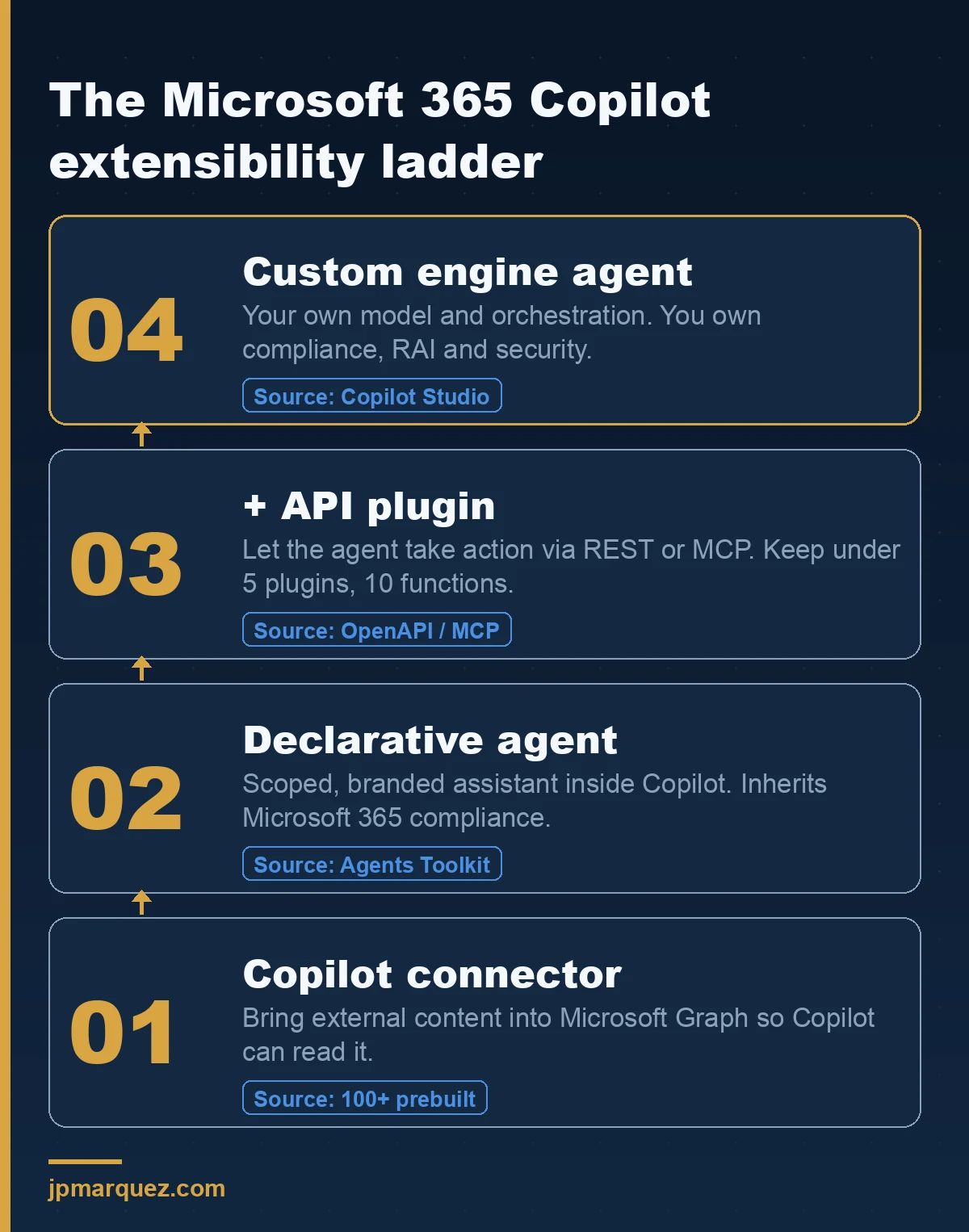
A connector indexes line-of-business content — Confluence, ServiceNow, Salesforce — so Copilot can reason over it alongside SharePoint and Outlook. There are more than 100 prebuilt Copilot connectors, and a Connectors API for the rest. If your problem is "Copilot can't see our knowledge base," you may not need an agent at all. You need a connector.
A declarative agent is the next rung: a scoped version of Copilot with its own instructions, a curated set of knowledge sources, and optional actions. It runs inside the Microsoft 365 Copilot UI, looks and feels like Copilot, and — this is the part teams undervalue — inherits Microsoft 365 Copilot's security, compliance, and Responsible AI controls without you doing anything.
When should you use a declarative agent instead of a custom engine agent?
Use a declarative agent when the work fits inside Copilot's orchestrator and you want Microsoft 365's compliance, Responsible AI, and security to apply automatically. Move to a custom engine agent only when you genuinely need a different model, proactive triggers, channels outside Microsoft 365, or orchestration Copilot can't express.
That word only is doing a lot of work. The official agents overview lays out the trade-off plainly, and it's worth internalising the one line most teams skip: declarative agents inherit Microsoft 365 compliance, RAI, and security standards; custom engine agents must ensure their own. That single sentence is the difference between a two-week build and a two-quarter one.
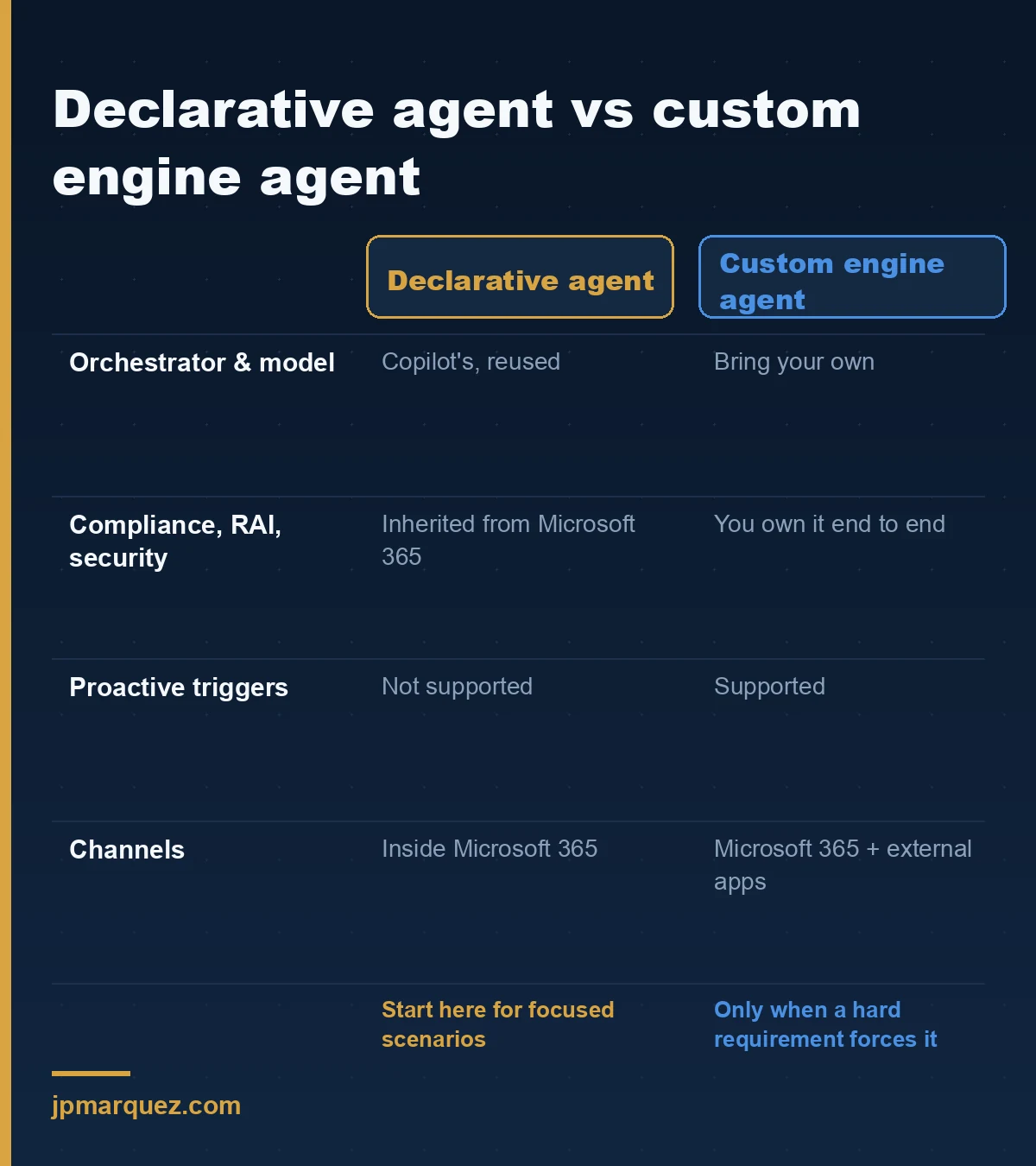
Here is the honest version, the one I'd say on a call: a custom engine agent is the right answer far less often than people want it to be. It earns its complexity when you need proactive behaviour (the agent acts without a user prompt), when it has to live in channels beyond Microsoft 365, or when a regulated workload demands a specific model and orchestration you control end to end. Outside those cases, choosing custom engine usually means signing up to rebuild identity, data protection, and content safety that you were getting for free one rung down.
A declarative agent, by contrast, is designed for individual, focused scenarios inside Copilot. It can't trigger itself, and its customisation is bounded by Copilot's orchestrator. If those limits aren't blocking your use case, they're not limits — they're free infrastructure.
What's the difference between an API plugin, a connector, and an action?
A connector brings knowledge into Microsoft Graph so Copilot can read it. An API plugin lets an agent do things — call a REST API or MCP server to create, update, or delete. An action is a single operation exposed by a plugin (close ticket #1234); a plugin is the set of operations (close, create, resolve). Knowledge versus action is the line that matters.
The extensibility FAQ is precise about this, and the precision matters because teams conflate the terms and then can't reason about cost. If Copilot only needs to answer from your data, that's a connector — knowledge ingested into Graph. If a user needs to ask the agent to act on an external system, that's an API plugin wired in as an action.
One detail trips up nearly everyone: API plugins are only supported as actions inside declarative agents. They are not enabled in Microsoft 365 Copilot on their own, as the extensibility ecosystem doc spells out. So "add an API plugin" always implies "inside a declarative agent." There's no shortcut around the agent.
There's also a Power Platform flavour. Both Power Platform connectors and API plugins call a REST API described by an OpenAPI definition — but Power Platform connectors are used from Power Platform (including Copilot Studio), while API plugins ship inside a Teams or Microsoft 365 app package alongside the declarative agent. Same underlying REST call, different packaging and governance surface. Which you pick depends on where the agent lives, not on what the API does.
How many plugins and functions can one declarative agent handle before quality drops?
Up to five plugins are always injected into the prompt; beyond five, the agent uses semantic matching against each plugin's description to decide what's relevant. A plugin can expose unlimited functions, but past roughly ten functions, answer quality degrades because of the model's token window. Design for small surfaces, not big ones.
This is the most actionable number in the whole plugins documentation, and it's the one I see ignored most. Teams expose a sprawling API — thirty operations, because "why not, it's already built" — and then file a support case when the agent calls the wrong one. The model isn't broken. You handed it a haystack and asked for a needle.
Two practical consequences. First, when you go past five plugins, the description field becomes load-bearing — semantic matching runs on the description, not the individual functions, so a vague description means a plugin that never gets selected. Second, keep each plugin's function count lean and its token footprint small; the input and output windows truncate large content, and the functional limit will keep shifting as models improve. Build for the constraint, not for the demo.
If you're generating plugin packages, the Microsoft 365 Agents Toolkit (in Visual Studio or VS Code) and Kiota both scaffold from an existing OpenAPI description or MCP server — you're not hand-writing manifests.
Where does Copilot Studio fit — and when is it overkill?
Copilot Studio is how you build custom engine agents (and richer Power Platform–style agents) with low-code and pro-code tooling. It fits when you need connector governance, complex workflows, multi-channel publishing, or orchestration beyond Microsoft 365. For a focused "answer from our docs and file a ticket" scenario, it's usually more platform than the problem needs.
The planning guide gives the cleanest mental model with its use-case table: an IT support assistant is a connector (ServiceNow). A healthcare compliance assistant pulling SharePoint policies plus live regulatory updates is a declarative agent + API plugin. A manufacturing predictive-maintenance agent ingesting IoT telemetry and alerting through Teams is a custom engine agent. The pattern is consistent: the more the scenario leaves the boundaries of Microsoft 365 — its data, its UI, its orchestration — the further up the ladder you go.
Copilot Studio also brings its own governance posture, which the choose-between guide describes: structured ALM across dev/test/production, connector governance, environment-level DLP and role-based access, and admin approval before an agent reaches the org catalogue. That's exactly what you want for a departmental or enterprise-wide agent — and exactly the overhead you don't want for one person's document assistant.
What does the extensibility choice mean for governance and admin control?
It changes who's accountable for compliance. Declarative agents inherit Microsoft 365 Copilot's data protections, and admins govern their distribution from the Microsoft 365 admin center. Plugins are enabled by default in licensed tenants but admins can disable them per user or group and approve individual plugins. Custom engine agents shift compliance ownership to you.
This is the governance angle that rarely makes it into the architecture diagram, and it should be the first slide. Per the agents FAQ and the ecosystem doc, plugin capability is on by default in every Copilot-licensed tenant — so the question isn't "how do we turn this on" but "do we know what's already reachable, and have we scoped it." Admins control which plugins are approved and which users can use them through Integrated Apps in the admin center. If nobody has looked at that surface, you have ungoverned action-taking enabled right now.
Choose declarative, and Microsoft carries most of the compliance weight and you configure guardrails. Choose custom engine, and you own Responsible AI practices, data protection, and content safety end to end. Neither is wrong. But pricing the governance work into the decision — instead of discovering it in a security review three weeks before launch — is the difference between a clean go-live and an awkward one.
A decision tree you can actually use
Walk it top to bottom and stop at the first yes:
- Does Copilot just need to read your content? Use a Copilot connector. No agent.
- Do you need a scoped, branded assistant inside Copilot, grounded in specific sources? Use a declarative agent.
- Does it also need to take action in an external system? Add an API plugin to that declarative agent — keep it under five plugins and ten functions where you can.
- Do you need a different model, proactive triggers, non-Microsoft-365 channels, or orchestration Copilot can't express? Now — and only now — build a custom engine agent in Copilot Studio.
In a recent engagement where a team was convinced they needed a custom engine agent for an internal compliance assistant, the actual requirements were "ground answers in our policy library" and "raise a tracking item." That's rung two plus one plugin. We delivered it as a declarative agent with a single API plugin, inheriting the tenant's compliance posture, in a fraction of the timeline the custom build would have taken. The instinct to start at the top of the ladder is the most expensive instinct in this whole space.
FAQ
Can I use an API plugin without a declarative agent? No. API plugins are only supported as actions within declarative agents; they aren't enabled in Microsoft 365 Copilot on their own. If you want plugin actions, you build a declarative agent to host them.
What's the difference between a declarative agent and a custom engine agent in one line? A declarative agent reuses Copilot's orchestrator and models and inherits Microsoft 365 compliance; a custom engine agent brings its own model and orchestration and owns its own compliance, RAI, and security.
Do I need an agent or just a connector? If Copilot only needs to answer from external content, a connector is enough — it ingests data into Microsoft Graph. You need an agent when you want a scoped experience, specific instructions, or the ability to take actions.
Are plugins safe to leave on by default? Plugin capability is enabled by default in Copilot-licensed tenants, but admins can disable it per user or group and approve individual plugins through Integrated Apps in the Microsoft 365 admin center. Treat "on by default" as a prompt to review scope, not a reason to ignore it.
How many functions should a plugin expose? Keep it lean. Quality starts to degrade past roughly ten functions because of the model's token window, and with more than five plugins, selection runs on the plugin description via semantic matching — so a tight description and a small function set both matter.
The extensibility model rewards restraint. The teams who ship fastest aren't the ones who reach for the most powerful option — they're the ones who climb exactly one rung at a time, and stop the moment the problem is solved.