EU AI Act High-Risk Classification: 30-Day Audit Guide
· 11 min read
By Juan Pedro Márquez
📋 Quick Reference
Audience: IT Directors and Compliance leads responsible for EU AI Act readiness
Time to read: ~11 minutes
What you'll get: A complete 30-day audit framework for classifying your enterprise AI systems — with specific guidance for Microsoft environments
The hardest part of EU AI Act compliance is not understanding the regulation. It is building the inventory.
Most enterprise IT leaders I work with have a reasonable understanding of the EU AI Act's risk tiers. What they do not have is a complete, accurate list of the AI systems running across their organization — and without that list, no compliance program is possible.
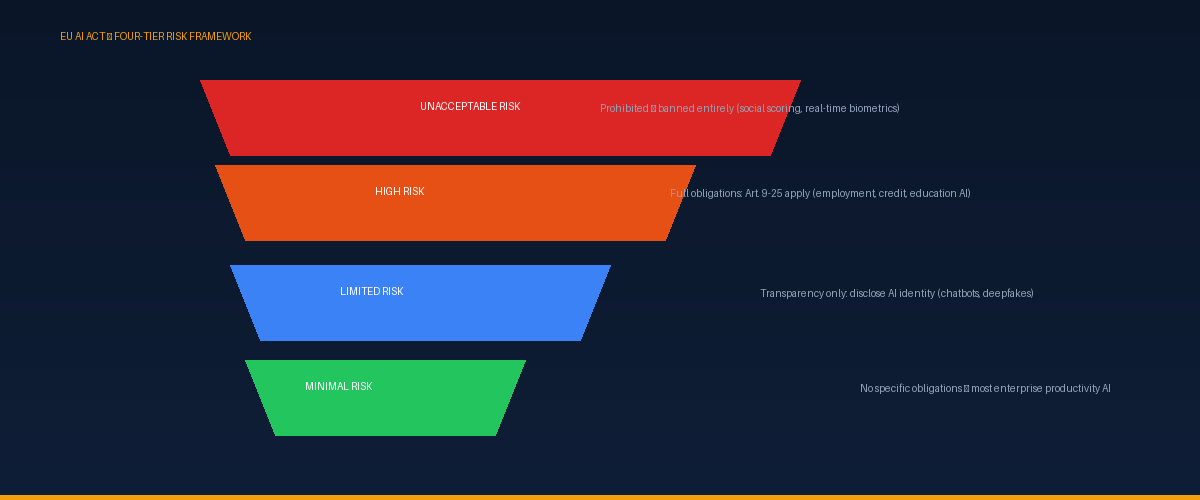
The EU AI Act Four-Tier Risk Framework
Before running your audit, you need to understand the framework you're classifying against:
Tier 1: Unacceptable Risk — Prohibited
These AI uses are banned entirely across the EU: social scoring by public authorities, real-time remote biometric identification in public spaces, AI that exploits psychological vulnerabilities or manipulates behavior through subliminal techniques. For most enterprise IT departments, none of your systems fall here — but if they do, stop deployment immediately.
Tier 2: High Risk — Full Obligations Apply
This is the critical tier for enterprise compliance. High-risk AI systems must comply with the full set of obligations in Articles 9–25, including risk management systems, technical documentation, human oversight, and conformity assessment. High-risk systems are defined in Annex III.
Tier 3: Limited Risk — Transparency Only
AI systems with specific transparency obligations — primarily chatbots and deepfake generators. Chatbots must disclose they are AI. Obligations are narrow but specific.
Tier 4: Minimal Risk — No Specific Obligations
The vast majority of enterprise AI falls here: spam filters, recommendation engines, AI-assisted productivity tools. No specific EU AI Act obligations beyond existing applicable law.
The 8 High-Risk Categories (Annex III) — What Matters for Enterprise
Of the 8 Annex III categories, three are most directly relevant to enterprise IT environments:
Category 4: Employment, Workers Management, and Self-Employment
This is the highest-priority category for enterprise IT leaders. Covered systems include AI for recruitment (CV screening, application filtering, interview evaluation), AI for performance assessment and monitoring, AI informing promotion, task assignment, or termination decisions, and AI-based workforce scheduling that materially affects working conditions.
If Microsoft Copilot, Power Automate, or any other AI tool touches these processes in your organization, it requires a risk assessment — regardless of the underlying technology.
Category 3: Education and Vocational Training
AI that determines access to educational institutions, evaluates learning outcomes, monitors students during exams, or assesses required education level. E-learning platforms with AI assessment features and HR learning management systems with AI-driven certification requirements fall here.
Category 5: Access to Essential Private Services
AI in credit scoring, insurance risk assessment, life and health insurance pricing, and essential social services eligibility decisions. Financial services organizations deploying AI in these areas have significant compliance obligations.
Categories 1, 2, 6, 7, 8 (biometrics, critical infrastructure, law enforcement, migration, justice) are primarily relevant to public sector organizations or specific industry verticals. Most enterprise IT environments can deprioritize these after confirming no deployment falls within them.
Your 30-Day AI Audit Plan
Days 1–5: Build Your Complete AI Inventory
The goal is a complete list of every AI system your organization uses or deploys. AI is embedded in more places than IT typically tracks:
- Microsoft 365 Admin Center: Review all connected apps and services via the Microsoft 365 admin center
- Azure Subscription: Review all Azure AI services, Azure OpenAI deployments, Azure Machine Learning workspaces
- Power Platform: Power Automate flows with AI components, Power Apps with AI Builder, Copilot Studio agents
- Third-party SaaS: Survey business unit leaders — HR platforms, CRM, ATS systems, finance tools often have embedded AI enabled by default
- Shadow AI: AI tools adopted individually without IT involvement — use Microsoft Defender for Cloud Apps to discover these
Output: A spreadsheet with each AI system, its vendor, the business process it supports, categories of data processed, types of decisions informed, and the department owner.
Days 6–12: Classify Each System Against Annex III
For each inventory item, work through three classification questions:
- Does it fall under Annex III? Check each of the 8 categories. For most productivity AI (Copilot summarization, Teams transcription), the answer is no.
- If possibly high-risk, what is the AI's decision role? There is a meaningful difference between AI that provides information (a hiring manager uses Copilot to summarize a CV) and AI that directly informs a structured decision (an ATS system scores and ranks candidates that managers routinely accept without review).
- Is it compliant at the provider level? For Microsoft AI services, review the relevant Azure AI Transparency Note. Verify whether your vendor has registered in the EU AI systems database.
Days 13–20: Gap Analysis
For each high-risk AI system identified, assess against the core Article requirements:
| Requirement | Documentation exists? | Owner assigned? |
|---|---|---|
| Art. 9 — Risk management system | Yes / No / Partial | |
| Art. 10 — Data governance documentation | Yes / No / Partial | |
| Art. 11 — Technical documentation (Annex IV) | Yes / No / Partial | |
| Art. 14 — Human oversight procedures | Yes / No / Partial | |
| Art. 72 — Post-market monitoring | Yes / No / Partial |
For Microsoft-managed services, check what Microsoft provides via Responsible AI documentation and fill in what the deployer layer requires.
Days 21–28: Close Critical Gaps
Focus remediation effort based on risk. Priority sequence:
- High-risk systems with no documentation → Start Annex IV documentation immediately using a structured template covering the 7 required sections
- High-risk systems with no human oversight procedure → Define the override process, assign reviewers, enable audit logging via Microsoft Purview
- High-risk systems with no governance owner → Assign ownership. Without a named owner, documentation decays within months
Days 29–30: Review and Register
Review inventory and classification decisions with Legal and Compliance. Identify systems that may require third-party conformity assessment. Brief executive sponsor on compliance posture and residual gaps.
Microsoft Tools That Accelerate the Audit
Recommended Microsoft toolstack for EU AI Act compliance:
→ Microsoft Purview Compliance Portal — central hub for M365 compliance management and Copilot audit logging
→ Azure Policy — define and enforce governance policies across Azure AI deployments
→ Microsoft Defender for Cloud — security posture management including AI workloads
→ Azure Monitor — operational telemetry for post-market monitoring obligations
→ Entra ID Access Reviews — verify only authorized users access high-risk AI capabilities
What to Do After the Audit
The audit produces two outputs: a classified AI inventory and a gap list.
- If all your AI is minimal-risk: Maintain the inventory, document your classification rationale, and establish a review process for new AI deployments.
- If you have high-risk AI deployments: Prioritize documentation and governance. Focus on Annex IV documentation and human oversight procedures first — these take the most time to produce correctly.
I've built this framework — classification questions, Annex IV documentation template, and a week-by-week 30-day compliance sprint — into a practical pack for enterprise IT teams using Microsoft environments.
*Related reading: [EU AI Act and Microsoft 365 Copilot: The Compliance Plan](/blog/eu-ai-act-microsoft-365-copilot-compliance-plan) · [AI Governance Fundamentals for Enterprise Microsoft 365](/blog/ai-governance-fundamentals-enterprise-microsoft-365)*