DLP for Microsoft 365 Copilot: What It Blocks
· 10 min read
By Juan Pedro Márquez
Most tenants I look at have a sensitivity label taxonomy and no idea what it does to Copilot. The labels are there. They are applied. And Copilot still summarises the salary review deck, because a label that only classifies changes nothing about what a model can read.
The control that actually stops Copilot mid-answer is a DLP policy — and it is a different policy location, with different rules, than the DLP you already run on Exchange and SharePoint.
Here is how the pieces fit, what each one really blocks, and the six places I have watched this quietly not work.
What does DLP for Microsoft 365 Copilot actually block?
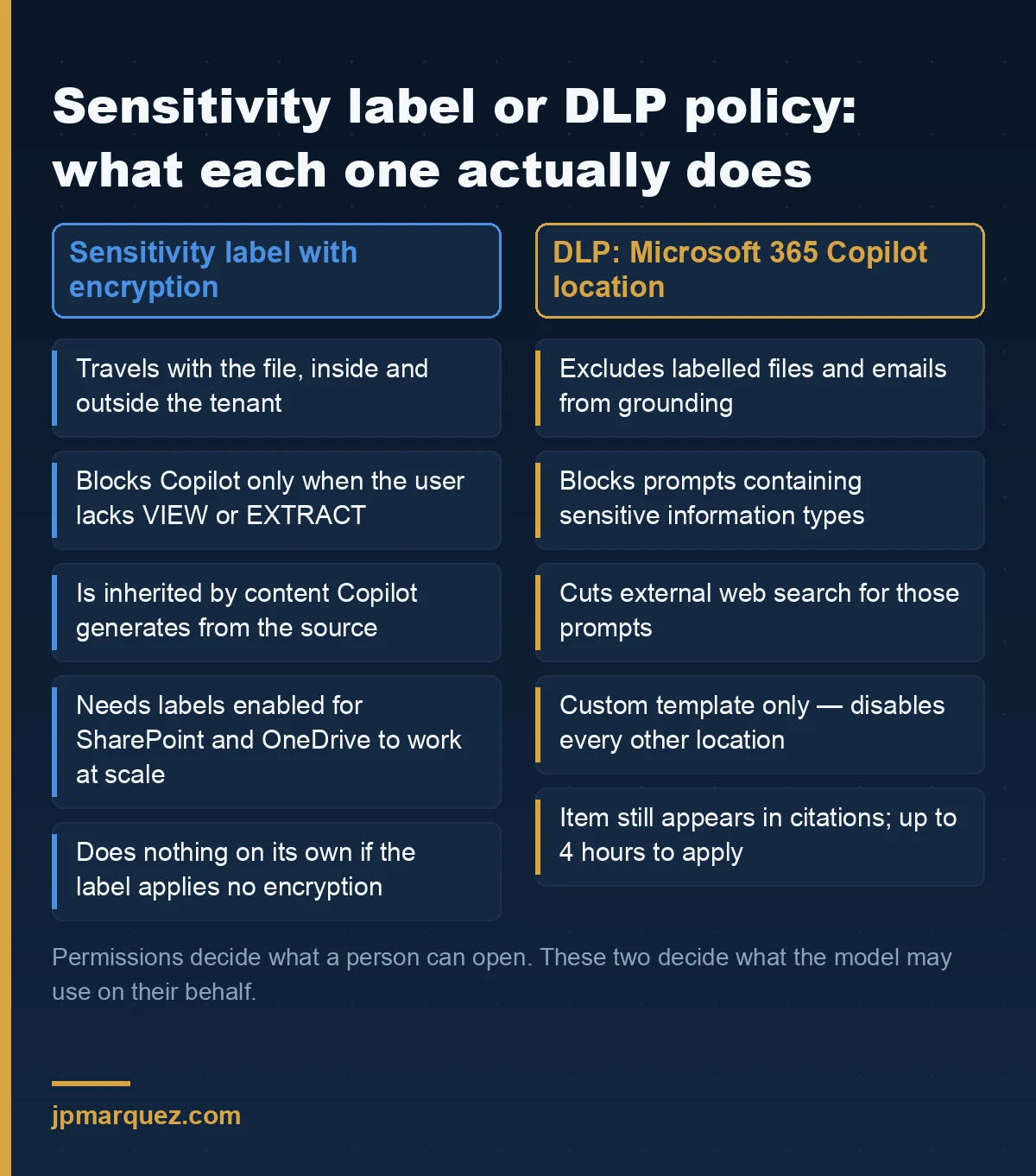
The Microsoft 365 Copilot and Copilot Chat DLP location stops Copilot from processing content: it can exclude files and emails carrying a chosen sensitivity label from grounding, block a prompt that contains a sensitive information type, block external web search for that prompt, and — in preview — exclude email received from outside your domains. It does not change anyone's permissions.
That distinction is the whole article. Permissions decide what a user can open. This policy decides what the model is allowed to read on their behalf, which is a narrower and much newer question. Microsoft documents the four behaviours in DLP for Microsoft 365 Copilot and Copilot Chat, and the supported conditions are short enough to memorise:
| Condition | Action | What the user sees |
|---|---|---|
| Content contains > Sensitivity labels | Prevent Copilot from processing content | Item still appears in citations; its content is not used |
| Content contains > Sensitive information types | Prevent Copilot from processing content > Processing prompts | Copilot refuses to answer the prompt |
| Content contains > Sensitive information types | Prevent Copilot from processing content > Performing Web Searches | Answer still comes back, grounded internally only |
| Email is received from > External users | Prevent Copilot from processing content | External mail dropped from grounding and citations |
The last one is worth a second look. It evaluates sender metadata against your accepted domains — the body is never inspected — and it exists because an email from outside is the cheapest prompt injection vector in the building. If you have read our prompt injection defense patterns for Copilot Studio agents, this is the same threat model arriving in the M365 Copilot surface, with a tenant-level switch instead of an agent-level one.
Why don't sensitivity labels alone stop Copilot from reading a document?
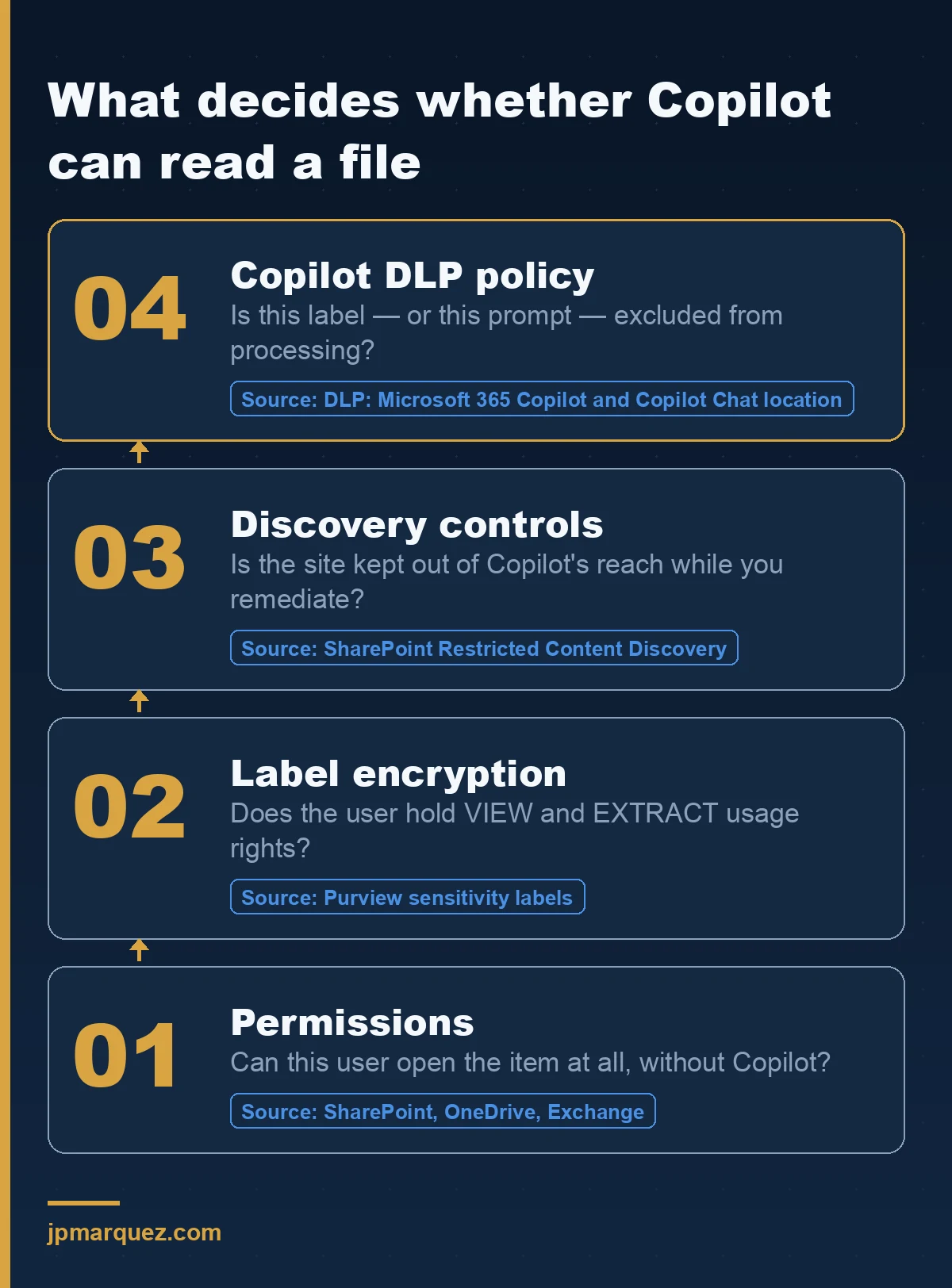
Because a label without encryption is metadata. Copilot honours a label's protection only when that label applies encryption, and then only through usage rights: the user needs both VIEW and EXTRACT for Copilot to return the content. A Confidential label that merely stamps a footer changes the header of the document and nothing about the grounding.
This is the single most common gap I find. Someone rolls out five labels, marks four of them Confidential, and assumes the AI is now fenced. It is not. Go and check which of your labels apply encryption, and which of those grant EXTRACT to the groups that use Copilot every day. Microsoft describes the behaviour in Purview data security protections for Microsoft 365 Copilot and in the Copilot data protection architecture.
The prerequisite nobody reads
There is a line in the documentation that decides whether any of this works at scale: if sensitivity labels are not enabled for SharePoint and OneDrive, the encrypted files Copilot can act on are limited to data in use from Office apps on Windows. Enable labels for those services first — the instructions are here — or your label-based controls only exist on half the estate.
Encryption without a label still counts
Items protected by Azure Rights Management without a label — Message Encryption, IRM — are still checked for VIEW and EXTRACT. But there is no automatic inheritance of protection for anything new. S/MIME email is never returned by Copilot. Password-protected documents are unreachable unless already open in the same app. And items encrypted with Customer Key or BYOK are eligible to come back in a response, which surprises people who assumed their own key was a barrier. It is a storage control, not an AI control.
Label inheritance is the part users notice
When someone drafts in Word referencing a labelled file, the new document inherits the source label and its protection. With several sources, the highest-priority label wins. This is the one behaviour that teaches the taxonomy to your users without a training session, and it is a good reason to get label priority order right before you get the DLP policy right.
How do you build the policy without breaking Copilot for everyone?
Start in simulation, scope to one label, and expect a four-hour feedback loop. The Copilot location is only available in the Custom template, and the moment you select it every other location in that policy is disabled — so this is a standalone policy, not a rule you bolt onto the DLP you already run.
The order I use:
- Pick one label, not the taxonomy. Usually the one that maps to a real regulatory obligation — personal data, or board-level material. One label, one rule, one blast radius.
- One condition per rule. You cannot put content contains sensitive info types and content contains sensitivity labels in the same rule. Two rules in the same policy is fine; the same rule is not. This is where most first attempts fail validation.
- Turn on simulation mode, and leave it running for at least a week of real prompts. DLP alerts, notifications and simulation are all supported here.
- Budget four hours. Policy updates can take that long to appear in the Copilot experience. If you change a rule and test it ten minutes later, you are testing the old rule and drawing the wrong conclusion.
- Check your permissions first. Editing this location needs one of a specific set of roles — Purview Data Security AI Admin, Entra AI Admin, Compliance Administrator among them. Notably, Data Security AI Admin can edit the policy but cannot read the prompts and responses, which is exactly the separation an auditor wants to see.
An honest note on scope: no admin units. If you run a multi-country tenant and expected to pilot this on one subsidiary through an administrative unit, you cannot. Your pilot boundary has to be the label or the SIT, not the population.
Where does this control quietly fail?
In six places, all documented, none obvious from the policy editor. I have watched at least four of them turn a "we're covered" into a much longer meeting.
- Files uploaded straight into a prompt are not scanned. DLP inspects the text you type, not the attachment you drag in. A user who cannot get Copilot to summarise a labelled file from SharePoint can often download it and upload it back.
- Citations still show the item. The content is not used in the answer, but the item can still appear in the citation list. If your compliance story depends on the existence of a document being invisible, this control does not deliver that.
- Emails only from 1 January 2025. Anything older is out of scope for the label-based rule.
- Calendar invites are not supported. For organisations that put sensitive commercial detail in meeting bodies — a lot of them do — this is a real hole.
- Word, Excel and PowerPoint evaluate at file open. Apply a label mid-session and nothing changes until the file is opened again. In the same apps, some experiences that do not touch file content are not blocked in the interface at all.
- The blocked-prompt message is vague in preview. Blocking sensitive information types in prompts is still rolling out, and in Word, Excel and PowerPoint the user may not be told clearly that an organisational policy stopped the request. The block holds; the explanation does not. Expect help desk tickets and write the answer before you turn it on.
None of these make the control worthless. They make it a layer. Which is why the layer underneath still matters: content that should never have been reachable in the first place is a permissions problem, and Restricted Content Discovery is the SharePoint lever that keeps a site out of Copilot's reach while you fix it. My opinion, unchanged after a year of these deployments: Restricted Content Discovery is a stopgap with an expiry date. If it is still on twelve months after go-live, you are paying for Copilot to not find things, and someone should own the remediation plan instead. The secure and governed data foundation blueprint is the prescriptive version of that plan, and our SharePoint readiness guide covers the metadata work it depends on.
How do you prove to an auditor that it worked?
Through the unified audit log and DSPM for AI, not through the policy page. Prompts and responses are captured as audit events, including which files were referenced and the sensitivity label on each. That is your evidence chain, and it is the same chain that answers a regulator asking what the model saw.
Three things to wire up on day one:
Auditing on, verified. Confirm it from DSPM for AI rather than assuming — the audit logs for Copilot and AI activities page lists exactly which events land where.
A data risk assessment running weekly. DSPM for AI ships a default weekly assessment plus one-click policies, including Protect items with sensitivity labels from Microsoft 365 Copilot and agent processing — which builds the policy described in this article for you. Use it to start, then rebuild it by hand once you understand what it created. We walked through the full rollout in our DSPM for AI guide.
Retention and eDiscovery decided, not discovered. Copilot prompts and responses live in the user's mailbox and are discoverable with the Copilot activity condition. Decide the retention posture deliberately, because the default is "keep everything a user ever asked", and that is a decision whether or not anyone made it.
For the third-party side of the problem — the browser tab, not the tenant — Endpoint DLP is a separate control that warns or blocks users pasting sensitive content into external AI sites. Different policy, different location, documented here. Do not confuse the two in a steering committee slide; they protect against opposite directions of travel.
Frequently asked questions
Does DLP for Microsoft 365 Copilot change what users can open?
No. Every prompt runs in the security context of the user, so they must already have permission to the content. The policy only excludes items from being processed in the response. A user blocked from having Copilot summarise a file can still open that file directly if their permissions allow it.
Can I use sensitive information types and sensitivity labels in one rule?
Not in the same rule. You can create one rule for each condition inside the same policy, but combining content contains sensitive info types with content contains sensitivity labels in a single rule is not supported. Splitting them is the fix, and it also gives you cleaner alerting.
Does this apply to Copilot Studio agents too?
Not through this location. Copilot Studio has its own security and governance controls, and agents inherit the protections of their parent AI app. Treat agent governance as a separate workstream — our Microsoft 365 agent governance checklist covers the guardrails that belong there.
How long before a new DLP rule takes effect in Copilot?
Up to four hours. Test after that window, not before, or you will conclude the policy does not work when it simply has not propagated. Simulation mode is supported, so run the rule in simulation across a full week before enforcing it.
Do I need a specific licence for the Copilot DLP location?
It is part of the Microsoft Purview DLP capability set covered by the Microsoft 365 security and compliance licensing guidance rather than a separate SKU. Check the service description against what your tenant already carries — most organisations deploying Copilot at scale are on a plan that includes it, and discover the gap in labelling effort rather than licensing.
The short version
Permissions decide what a person can reach. Encryption plus EXTRACT decides what Copilot can read on their behalf. The Copilot DLP location decides what Copilot is allowed to use even when both of those say yes. Three different controls, three different owners in most organisations, and the failure I see most often is assuming the first one covers the other two.
Pick one label. One rule. Simulation for a week. Then look at the audit log and see whether reality matches the slide.