Copilot Studio ALM: Pipelines, Environments, Solutions
· 10 min read
By Juan Pedro Márquez
The agent works. It's grounded, the answers are good, the demo lands. Then someone asks the question that stalls more Copilot Studio projects than any technical limitation: "Great — how do we move it to production without breaking it?" And the room goes quiet, because the agent was built straight in a single environment, by hand, with no way to promote it that doesn't involve rebuilding it.
This is the gap between a Copilot Studio demo and a Copilot Studio deployment. It's not a modelling problem. It's an application lifecycle management problem, and Copilot Studio inherits the entire Power Platform ALM discipline — the good, the strict, and the few sharp edges nobody mentions until you hit them.
What is ALM for Copilot Studio, and why can't you skip it?
ALM is the set of processes, people, and tools that govern an agent from idea through development, testing, deployment, and eventual decommissioning. In Copilot Studio it isn't optional polish — it's how you get reliable releases, enforce governance, and avoid editing live agents in production. Skip it and every change becomes a risk.
The official ALM strategy guidance frames the benefits in language a CIO recognises: reliable releases, governance and compliance, scalability, quality at speed, business continuity. Strip the framing away and the core promise is simple — a predictable, repeatable way to ship agents instead of hand-editing the one that real users depend on.
The foundation is an environment strategy. A healthy setup needs at least three environments: development and test as sandbox type, production as production type. A maker builds in development, promotes to test, and only after testing passes does the agent reach production. Each environment should be locked down with a Microsoft Entra security group so only its members can touch it.
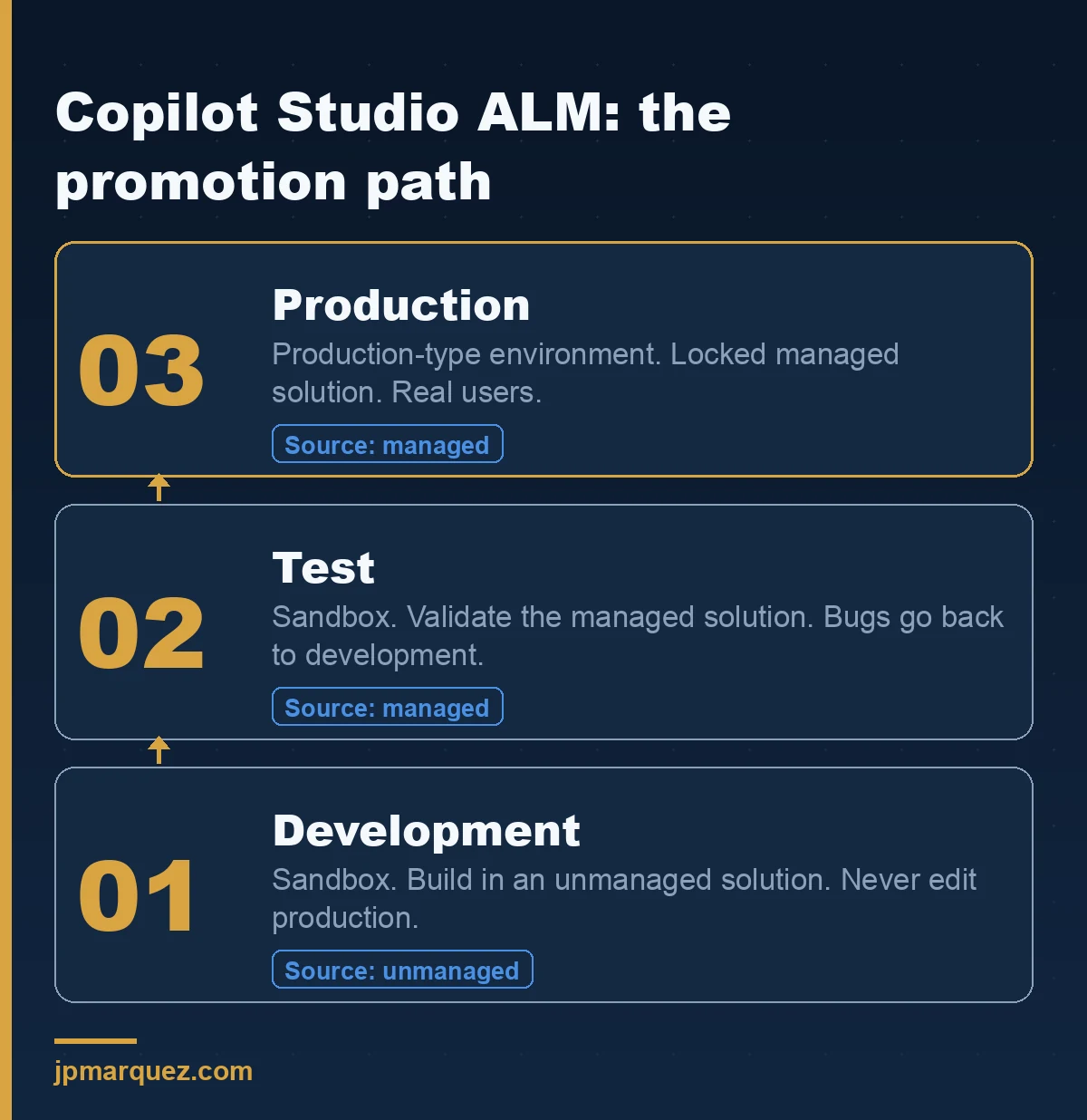
That ring structure is the whole point. Bugs get fixed in development and re-promoted — never patched in production. If your team is editing the live agent, you don't have an ALM process; you have a liability with good intentions.
Why is everything in Copilot Studio tied to a Power Platform solution?
Because solutions are the mechanism that makes ALM possible. When you create an agent in Copilot Studio, it's created inside a Power Platform solution — a container that lets you transport the agent and its components across environments through export and import. Without solutions, there's nothing to move; you'd be rebuilding by hand every time.
This is the concept the Power Platform ALM overview builds everything on. A component is anything you can customise — agents, tables, columns, flows, charts, plugins. A solution groups them. Dataverse stores all of it, including the deployment pipelines themselves, which is why every environment participating in ALM must have a Dataverse database. No Dataverse, no ALM.
Copilot Studio surfaces this directly in the product. Solution management — generally available since December 2024 — lets you create agents inside solutions, set a preferred solution, and deploy with Power Platform pipelines in a single click, all without leaving the agent-building canvas, as the solution management release note describes. One caveat worth internalising from the create and manage solutions guide: the solution explorer inherits your security role privileges. You can only do in Copilot Studio what your Power Platform role already allows. Permissions are not a separate system you can ignore here.
What are the ALM golden rules for Copilot Studio agents?
Seven rules carry most of the weight: never customise outside a development environment, always work inside solutions, use a custom publisher and prefix, create separate solutions only when components must deploy independently, use environment variables for anything that changes between environments, export and deploy as managed solutions everywhere except development, and automate when you can.
These come straight from the ALM guidance, and the one that saves the most pain is the managed/unmanaged distinction. You develop in unmanaged solutions — they're editable. You deploy managed solutions to test and production — they're locked, layered, and removable as a unit. Mixing these up is the single most common ALM mistake I see: a team customises directly in test, the layers tangle, and now nobody can cleanly roll anything back.
The publisher-and-prefix rule sounds cosmetic and isn't. A consistent custom publisher prefix is how you tell your components apart from Microsoft's and from other teams' across a shared tenant. Set it once, at the start. Retrofitting it later is miserable.
Which deployment tool should you use: pipelines, GitHub Actions, or Azure DevOps?
Copilot Studio supports three. Pipelines in Power Platform are built-in, set up in minutes, and aimed at citizen developers. GitHub Actions for Power Platform suit dev and admin teams already living in GitHub. Azure DevOps is the enterprise-grade option with full CI/CD and source control. Match the tool to the team, not to the logo.
The ALM guidance comparison is refreshingly blunt about the trade-off, and it comes down to setup complexity versus control. Power Platform pipelines are low setup and centralised visibility — perfect for getting a real promotion process running this week. Azure DevOps is high setup and high expertise but gives you everything: source control via Repos, full pipeline control, Dataverse Git integration.
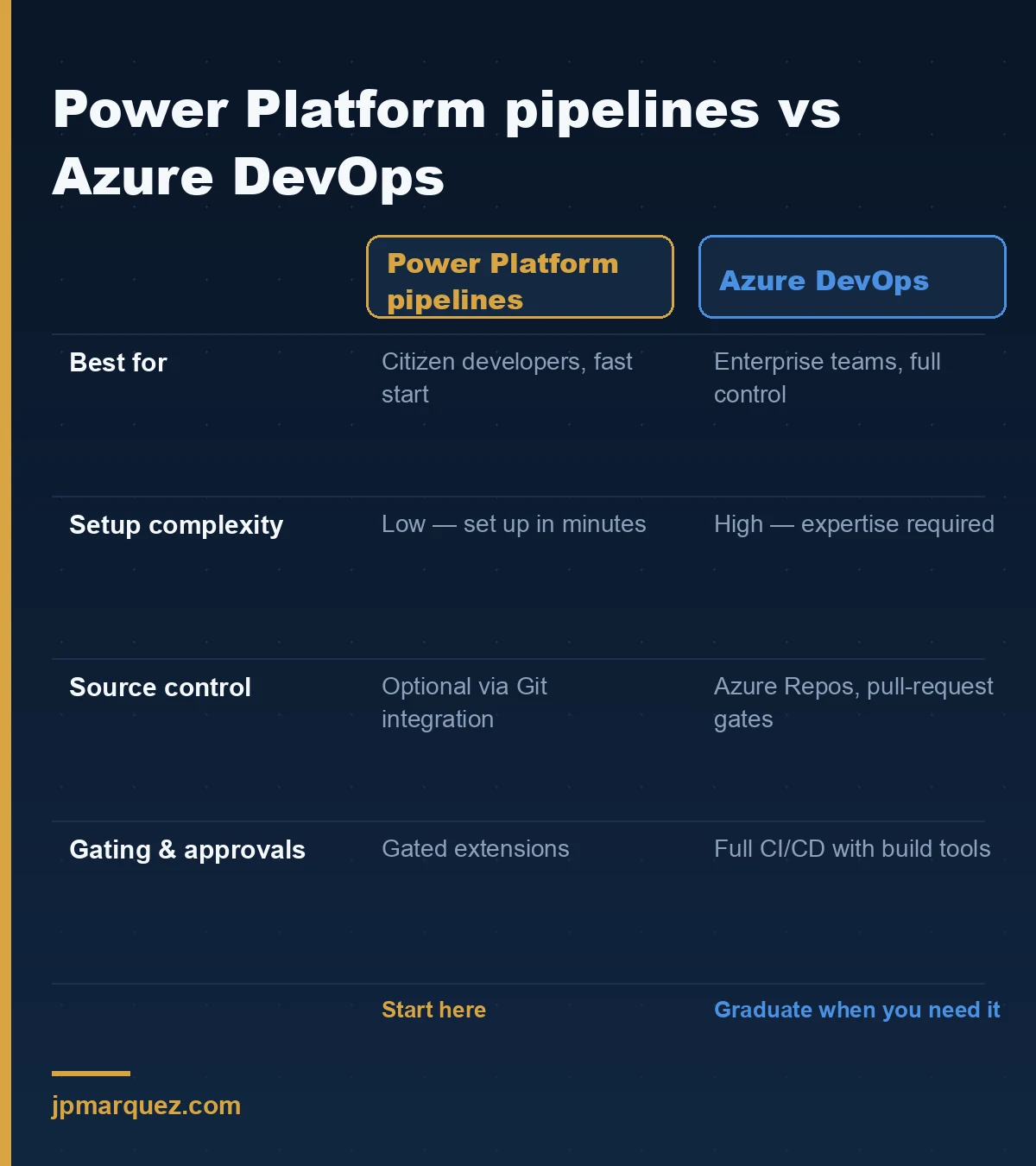
My honest recommendation: most organisations should start with Power Platform pipelines and graduate to Azure DevOps only when they actually need branch policies, pull-request gates, and source-controlled solution unpacking. Reaching for Azure DevOps on day one — because it's the "proper" enterprise choice — usually buys you weeks of YAML and service-principal configuration before you've shipped a single agent. Earn the complexity; don't pre-pay for it.
How do Power Platform pipelines actually deploy an agent?
You select an unmanaged solution in your development environment, choose a stage like Deploy to Test, and the pipeline runs preflight validation — checking for missing dependencies and common failures — before promoting the same managed artifact to the target. Stages run in order; you can't push to production before test.
The mechanics in the run pipeline guide include two safeguards that matter for governance. First, deployment stages are sequential and locked: version 1.0.0.1 cannot reach production until it has passed through test, and the exact same managed artifact is what gets promoted — no chance to sneak an untested change past QA. Second, if your solution uses connection references or environment variables, you're prompted to supply them per environment, exactly as with a manual import.
Behind the scenes there's a platform host or custom host model, and access is governed by two security roles — Deployment Pipeline User (run pipelines shared with them) and Deployment Pipeline Administrator (full configuration control). A pipeline needs at least one development environment and one stage, and supports up to seven stages.
For regulated workloads, the gated extensions are the feature to know. You can insert custom steps into the deployment: a pre-export validation step, a pre-deployment approval, and — the one I push hardest for in enterprises — delegated deployment, which runs the deployment under a service principal or stage owner's identity instead of the maker's. That means makers can request a production deployment without ever holding access to the production environment. Separation of duties, enforced by the platform, not by a policy document nobody reads.
What breaks after you deploy a Copilot Studio agent?
Some Copilot Studio settings aren't solution-aware, so they don't travel with the deployment and need manual post-deployment steps in each downstream environment. The usual suspects: Azure Application Insights configuration, manual authentication settings, Direct Line and web channel security, deployed channels, and sharing with makers or end users.
This is the gotcha list from the ALM guidance, and it's the one that turns a "successful" deployment into a confusing afternoon. The agent promotes cleanly, the solution import shows green — and then telemetry is silent because Application Insights didn't carry over, or users can't reach the agent because the channel security and sharing weren't reconfigured in production.
In a recent first-production rollout, a team had a genuinely good agent and a clean pipeline, and still spent the go-live morning chasing "why can't anyone use it." The answer was entirely on this list: channels and sharing don't deploy. Build a post-deployment checklist from these five items and run it in every environment. It's the cheapest insurance in the whole process, and it's the step that separates teams who've shipped once from teams who ship repeatably.
How do environment variables and connection references keep secrets out of your agent?
Environment variables let one agent move across environments unchanged except for the few external references — URLs, keys, data-source parameters — that legitimately differ between dev, test, and production. Instead of hard-coding those values, you parameterise them, and supply the right value per environment at deployment time.
The environment variables overview explains the model that makes this clean: the variable definition is a managed solution object in the target, while the value is an unmanaged record. You ship the definition; you provide the value where the solution lands. Critically, you should not bake production values into the solution — that defeats the entire purpose. Two operational details worth remembering: a changed value can take up to an hour to fully publish to apps and flows, and for automated CI/CD you can pre-populate connection references and environment variables via a deployment settings file so nobody types secrets into a UI.
Connection references do the same job for connections — they decouple the credential from the flow or action, so migrating a solution doesn't drag a dev connection into production. Together they're what let the same managed artifact run safely in three environments. Combined with source control through native Git integration, you finally have agents you can version, review, and roll back like real software.
FAQ
Do I need Dataverse for Copilot Studio ALM? Yes. Solutions and in-product pipelines are stored in Dataverse, so every environment participating in ALM must have a Dataverse database. Without it, there's no solution mechanism and no pipeline.
Can I edit an agent directly in production? You shouldn't. The first ALM golden rule is never to customise outside a development environment. Fixes go into development and are re-promoted through test to production, so the production agent is always a known, tested artifact.
What's the difference between managed and unmanaged solutions? Unmanaged solutions are editable and used in development. Managed solutions are locked, layered, and deployed to test and production as a unit you can cleanly upgrade or remove. Deploy managed everywhere except development.
Why can't I deploy straight to production with pipelines? Pipeline stages are sequential by design. A solution version must pass through earlier stages — like test — before it can reach production, and the same managed artifact is promoted forward, which prevents untested changes from bypassing QA.
What settings don't deploy with the solution? Several Copilot Studio items aren't solution-aware: Application Insights settings, manual authentication, Direct Line and web channel security, deployed channels, and sharing. These need manual post-deployment configuration in each environment.
The teams that get Copilot Studio to production reliably aren't the ones with the cleverest agents. They're the ones who treated ALM as a day-one decision — three environments, solutions from the first save, a promotion path nobody can shortcut. Build the pipeline before you build the agent. It feels slower for a week and pays back every week after.