Copilot Cowork in Production: 5 Checks Before Rollout
· 8 min read
By Juan Pedro Márquez
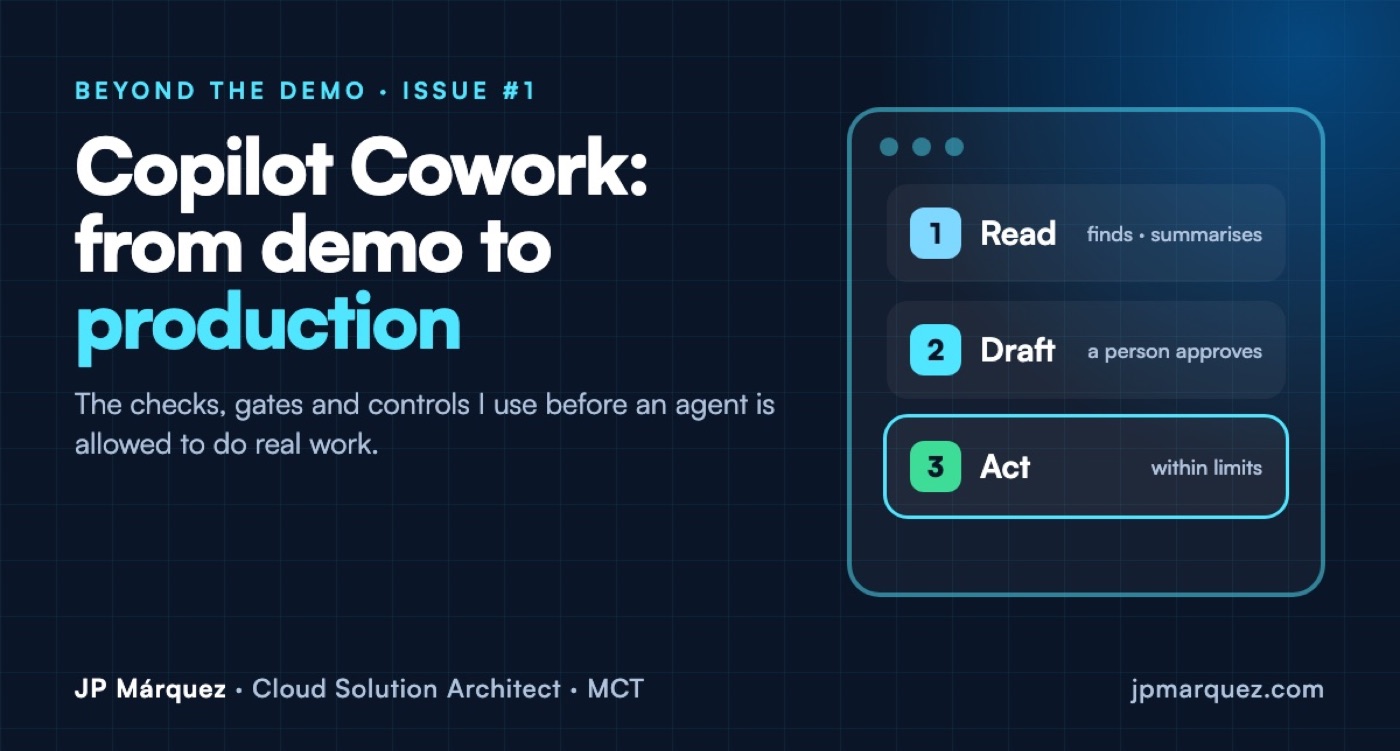
Short answer: before Copilot Cowork does real work in your tenant, check five things: who has access (your spending policy is your access policy), who pays, what it can see in SharePoint, which actions it may take without a human click, and how you will measure value. Then roll it out in three stages: Read, Draft, Act.
Copilot Cowork became generally available for work and school accounts at Ignite 2026. Unlike Copilot Chat, it does things: Microsoft's own description says it can send emails, schedule meetings, create documents and post in Teams on your behalf, and run scheduled or event-driven tasks. That changes the risk, the cost and the conversation with your security team.
This is the checklist I use, with real screens from a Microsoft 365 demo tenant (tenant details removed) so you know exactly where to look.
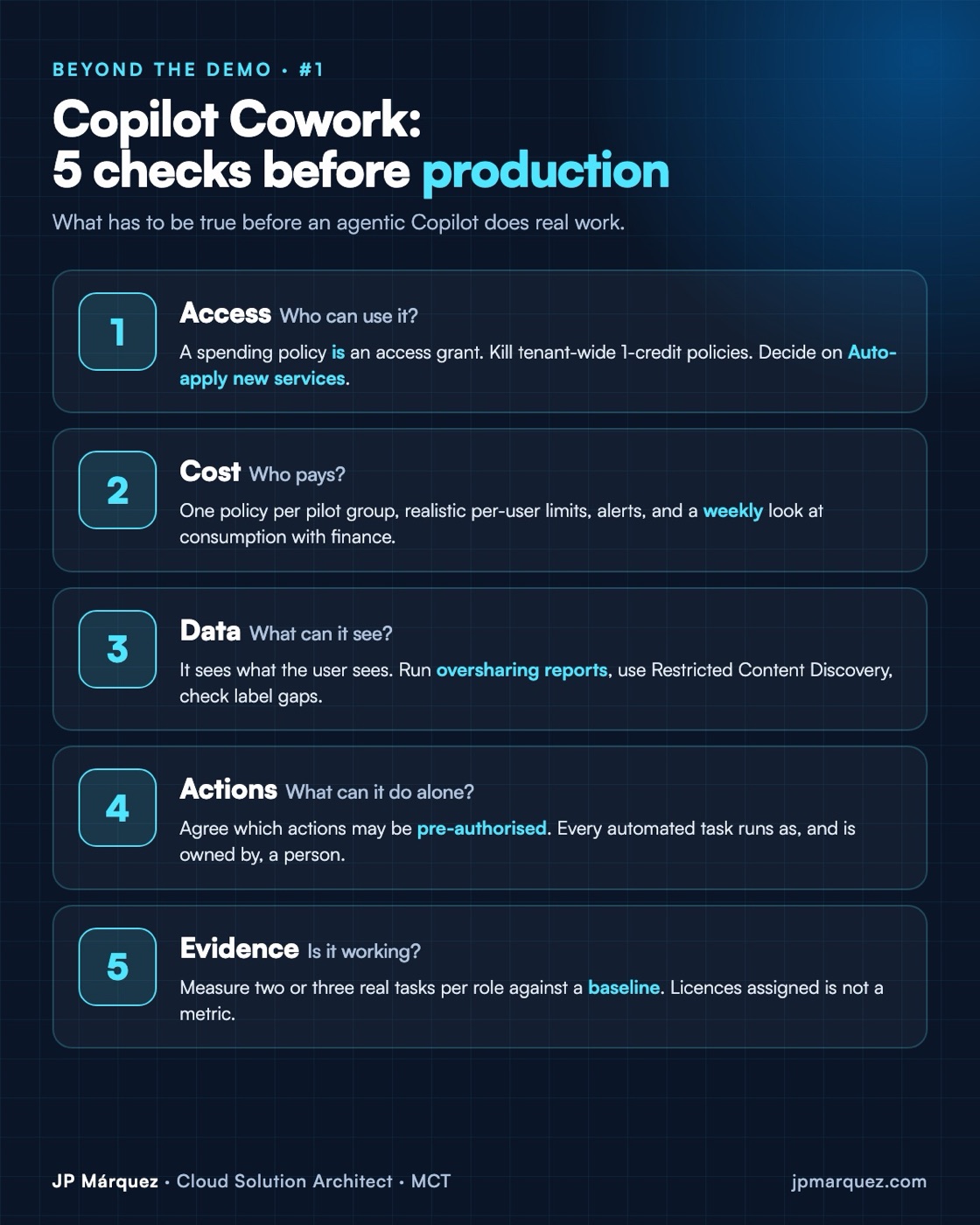
1. Access: your spending policy is your access policy
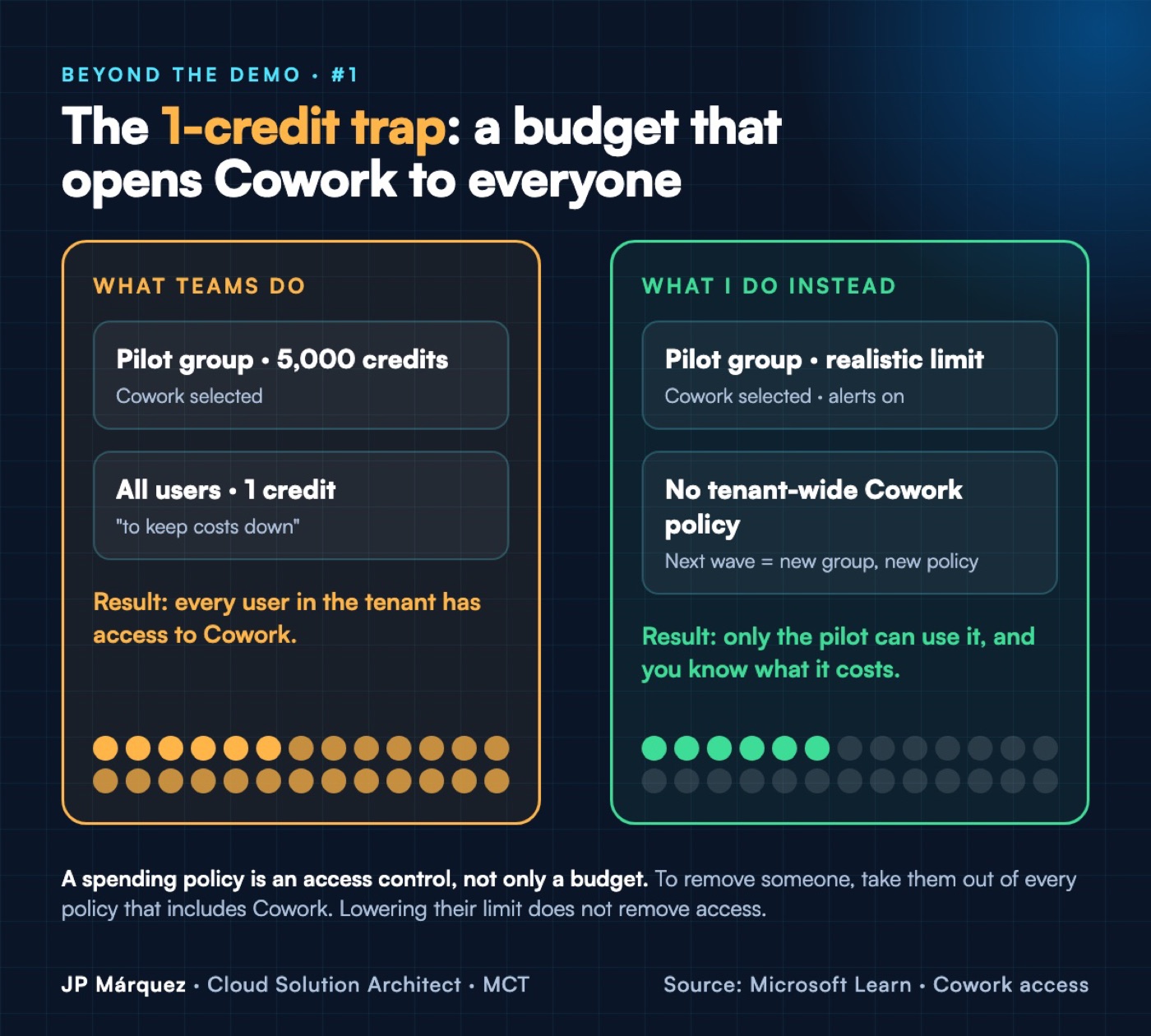
This is the one most teams get wrong. Cowork needs a Microsoft 365 Copilot licence plus usage-based billing in Copilot Credits, and access is granted through spending policies in the Microsoft 365 admin center (Copilot › Cost management). Microsoft's documentation is explicit: "A spending policy is an access control, not only a budget."
The consequence: a tenant-wide "All users" policy with a 1-credit limit, created to "keep costs down", gives everyone access to Cowork. Lowering a limit doesn't remove access either. To take someone out, you remove them from every policy that includes Cowork.
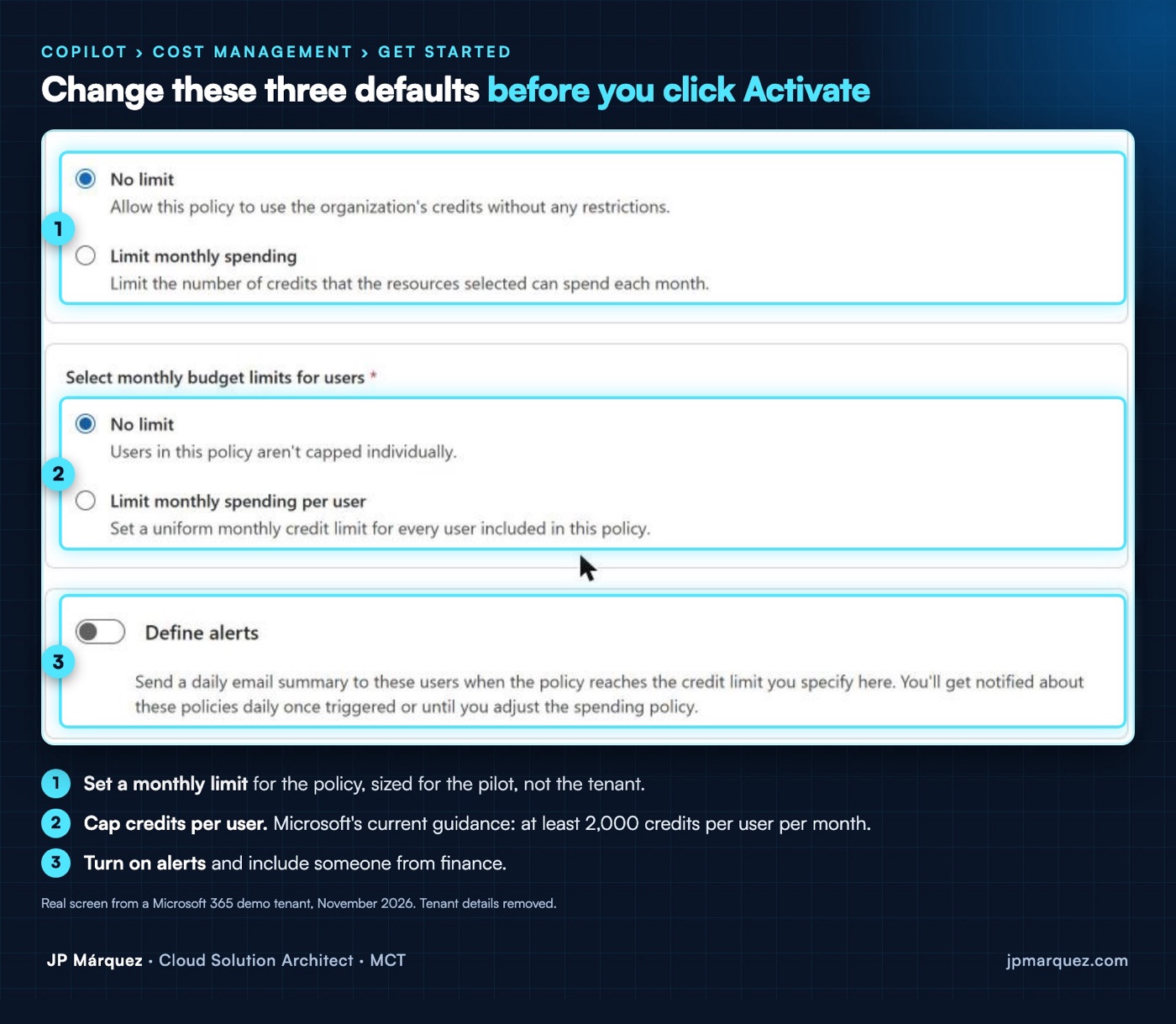
When I opened Cost management in a demo tenant and clicked Get started, this is the default policy the admin center proposed:
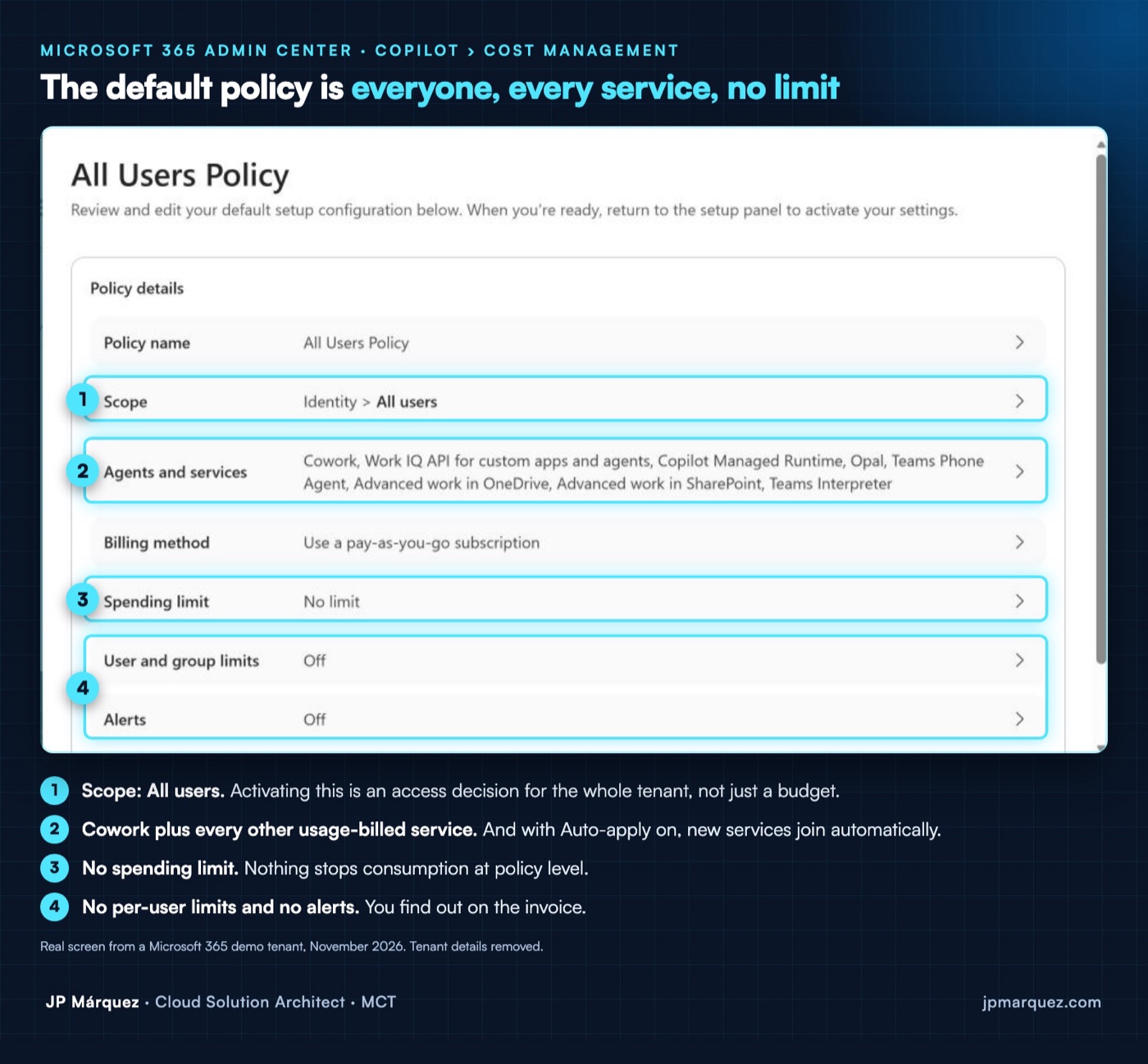
Scope: all users. Cowork plus every other usage-billed service. No spending limit, no per-user limits, no alerts. It works, but it is a tenant-wide rollout, not a pilot.
Two more settings to check on day one:
- Auto-apply new services is on by default, so new services join your existing policies automatically. Decide deliberately whether you want that.
- The discovery setting only controls visibility. Users can request access, and an admin approves it. Visible is not the same as enabled.
2. Cost: decide who pays before anyone uses it
Credits are consumed by model responses, tool and skill calls, image generation and browser tasks. Before the pilot starts:
- One policy per pilot group, scoped to an Entra ID group, with its own limit and billing method, so finance can see the cost by department.
- Realistic limits. Microsoft's current guidance is at least 2,000 credits per user per month. Set them too low and people lose access until the 1st of the month. Moving a user to another group doesn't reset what they've used.
- Alerts and a weekly look at the Consumption tab (by policy, user, group and service). Give finance a reader role.
3. Data: Cowork sees exactly what the user can see
Cowork doesn't create new permissions; it uses the ones you already have. If a site is shared with "Everyone except external users", Cowork will happily build a document from it. That isn't a Copilot problem. It's a SharePoint problem that Copilot makes visible.
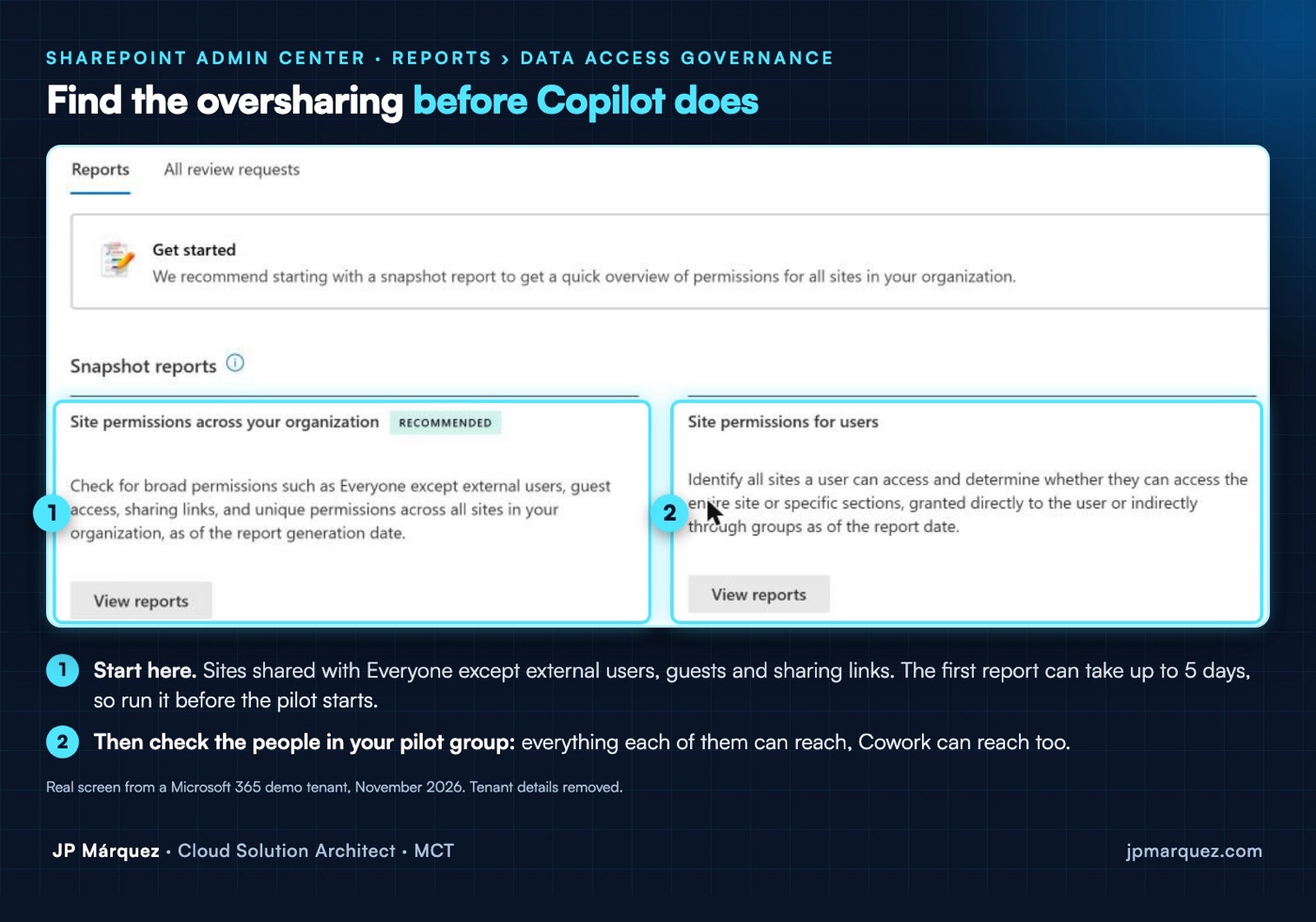
- Run the Data Access Governance reports in SharePoint Advanced Management. The first report can take up to five days, so start it before the pilot.
- Start site access reviews with the owners of the most exposed sites.
- Use Restricted Content Discovery on sensitive sites while you fix them. It keeps them out of Copilot and agentic experiences without breaking anyone's access.
- Know your sensitivity label gaps: label inheritance covers new Word, Excel, PowerPoint, Outlook and PDF content that Cowork creates, but not labels with user-defined permissions or files over 50 MB.
4. Actions: decide which clicks stay human
By default Cowork asks for approval before it sends an email, posts a message or changes a shared system. Two details matter in production:
- Automated tasks run as the user who created them and see only that user's data. They need an owner when that person changes role or leaves.
- Users can pre-authorise actions when they create an automated task. Agree which actions may be pre-authorised (drafting into a personal folder) and which must always wait for a click (anything that leaves the organisation).
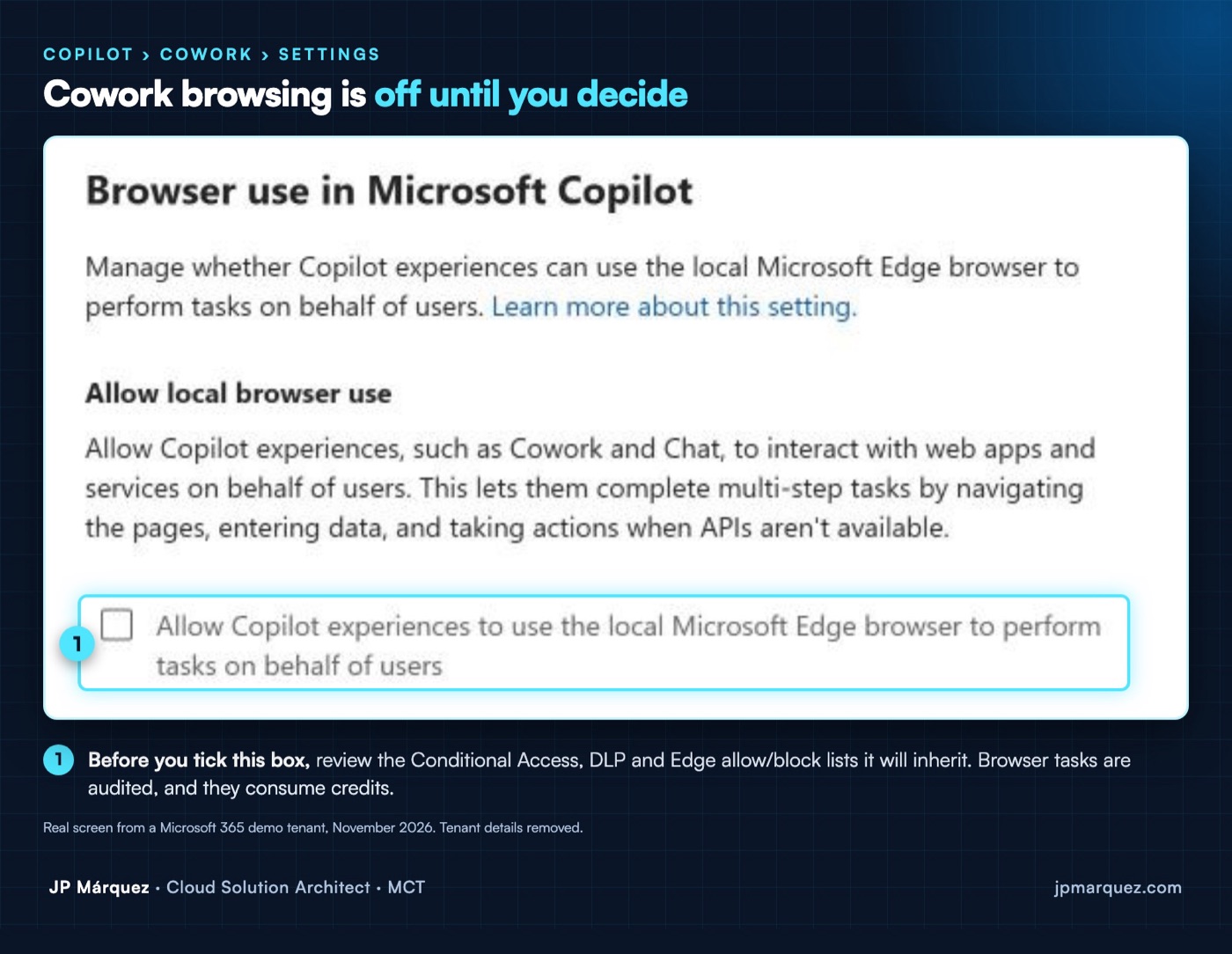
If you enable browser use, Cowork runs in Edge on the user's device and inherits your Conditional Access, DLP and Edge allow/block lists. It is off by default:
5. Evidence: measure the task, not the licence
"Licences assigned" tells you nothing. Pick two or three repeatable tasks per role (the weekly status report, the meeting follow-up, the first draft of a proposal) and measure them before and after: time taken, how much the draft is edited, how often it's used. The Cowork usage report gives you a starting point; your own baseline gives you the story for the steering committee.
The rollout: Read → Draft → Act
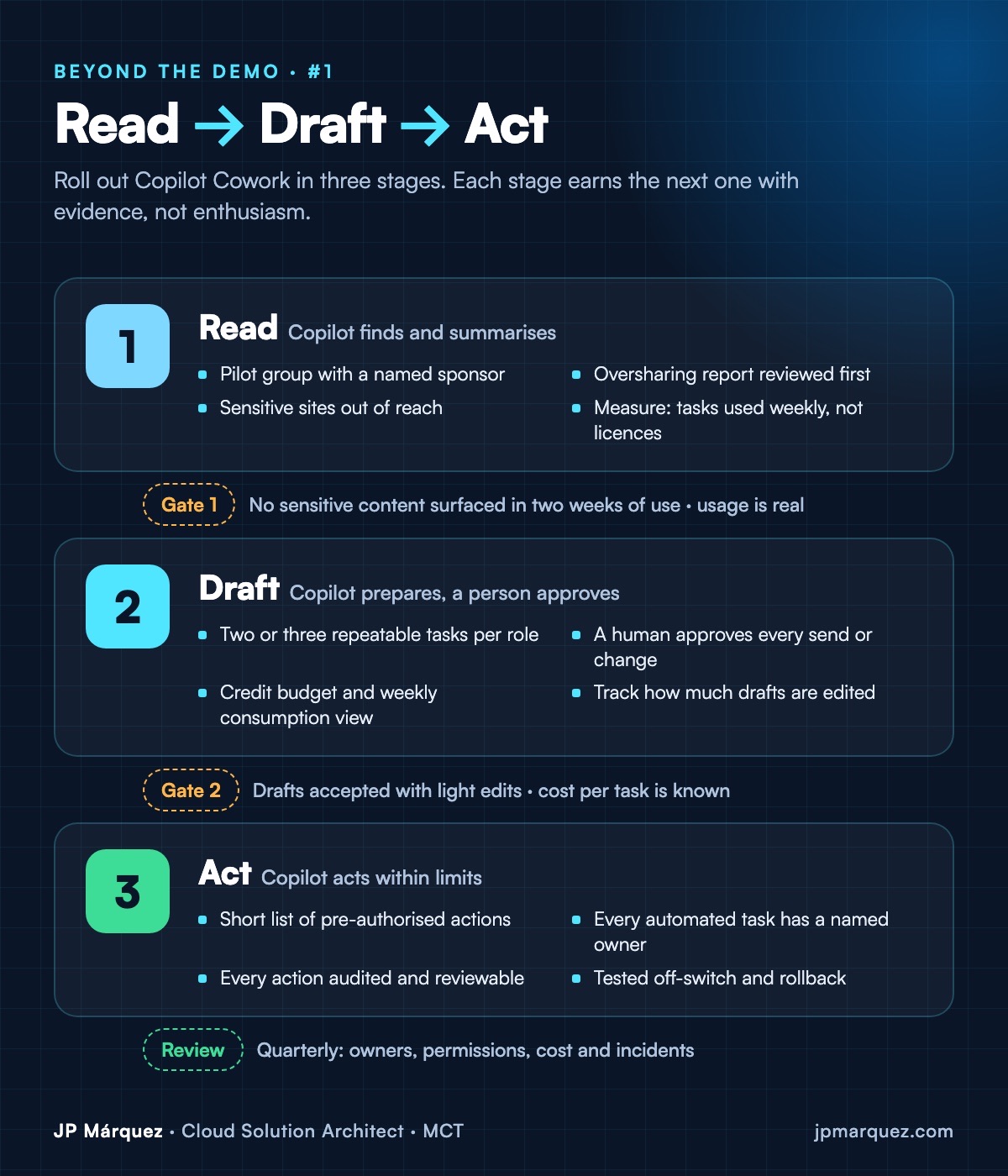
- Read: a pilot group with a named sponsor. Cowork finds, summarises and prepares drafts. Sensitive sites stay out of reach. Gate: real weekly use, and no sensitive content surfacing where it shouldn't.
- Draft: Cowork prepares, a person approves every send or change. Credits are budgeted and reviewed weekly. Gate: drafts accepted with light edits, and a known cost per task.
- Act: a short list of pre-authorised actions, a named owner for each automated task, every action audited, and a tested way to pause it. Then: a quarterly review of owners, permissions, cost and incidents.
Chat or Cowork? Why the governance question changes
| Copilot Chat | Copilot Cowork | |
|---|---|---|
| What it does | Answers, summarises and drafts inside a conversation | Plans and carries out multi-step tasks for the user |
| Can it act? | No: you copy, paste and send | Yes, after approval; users can pre-authorise actions in automated tasks |
| When it runs | When you ask | On demand, on a schedule or when an event happens |
| How it is paid | Microsoft 365 Copilot licence | Microsoft 365 Copilot licence plus Copilot Credits |
| The question for IT | What can it see? | Who can use it, what can it do alone, and what does it cost? |
That last row is the whole article. With Chat, oversharing was the main risk. With Cowork, access, cost and actions join it.
A 30-day pilot plan
Before day one. Start the Data Access Governance reports (they can take up to five days). Create an Entra ID group for the pilot: people who own repeatable tasks, not just enthusiasts. Create one spending policy for that group with a policy limit, a per-user limit and alerts. Apply Restricted Content Discovery to your most sensitive sites. Record a baseline for two or three tasks per role.
Week 1: Read. Cowork finds, summarises and prepares drafts. Run a short weekly session where the pilot group shares what worked and what surprised them. Collect real examples, not opinions.
Week 2: review. Look at the Consumption tab with finance and at the oversharing findings with the site owners. Move to Draft only the tasks that passed the Read gate.
Week 3: Draft. Cowork prepares, a person approves every send or change. Track how much the drafts are edited. Agree the short list of actions that may be pre-authorised in automated tasks, and who owns each automated task.
Week 4: decide. Take three numbers to the steering group: weekly use per task, cost per task and the incidents you found. Then decide: extend to a second group, adjust the limits, or stop. All three are good outcomes if you can explain them.
Mistakes to avoid
- Treating discovery as enablement. Making Cowork visible doesn't give anyone access, and giving access doesn't make anyone use it.
- The 1-credit tenant policy. It is an access grant to everyone, not a way to keep people out.
- Measuring licences. Assigned licences say nothing about value. Measure tasks.
- Switching on browser use without reading your Edge lists. Cowork inherits them, gaps included.
- Automated tasks without an owner. They run as their creator. Plan for the day that person moves on.
The one-minute version for your leadership team
If you only have a minute with your CIO or CFO, say this. Cowork is the first Copilot that does work, not just answers. That makes three decisions yours before anyone else's: who gets it, what it may do without asking, and how much it may spend. The admin center's default answers are "everyone", "whatever the user pre-authorises" and "no limit". Our pilot changes all three: one group, a short list of approved actions, and a monthly budget with alerts. In thirty days we will come back with use per task, cost per task and the incidents we found, and recommend whether to extend it.
Monday checklist
- List every spending policy that includes Cowork and who it actually covers.
- Delete or rescope any tenant-wide "1 credit" policy.
- Decide on Auto-apply new services.
- Set per-user limits, alerts and a finance reader role.
- Run the oversharing reports; apply Restricted Content Discovery to your most sensitive sites.
- Check label inheritance gaps (user-defined permissions, files over 50 MB).
- Agree which actions can be pre-authorised in automated tasks.
- Pick two or three tasks per role and record a baseline.
The full version, with a spending-policy worksheet, a pre-authorisation table and a measurement sheet, is in the free Copilot Cowork Production Readiness Kit below.
Frequently asked questions
Is Copilot Cowork generally available?
Yes, for work and school accounts. Microsoft announced general availability at Ignite 2026; Cowork for personal accounts is in preview, and GCC has differences (every action needs approval and Purview is not yet supported).
Does a Microsoft 365 Copilot licence include Cowork?
You need the Microsoft 365 Copilot licence plus usage-based billing in Copilot Credits. Access is granted through spending policies in Copilot › Cost management.
How do I stop someone using Cowork?
Remove them from every spending policy that includes Cowork. Lowering their credit limit does not remove access.
Can Cowork see files a user shouldn't see?
Cowork only sees what the user can already see. If SharePoint is overshared, Cowork will surface it, which is why the Data Access Governance reports and Restricted Content Discovery come before a wider rollout.
How many credits should I give each user?
Microsoft's current guidance is at least 2,000 credits per user per month, and says it may change. Start with the pilot group, watch the Consumption tab weekly and adjust.
Should I leave Auto-apply new services on?
During a pilot, I would turn it off. It is on by default, and it means any new usage-billed service Microsoft releases joins your existing policies automatically, for the same people and within the same budget. Once your policies are scoped to the right groups and you review consumption every week, you can decide whether the convenience is worth it.
Who should own Cowork in the organisation?
Three owners, not one: IT owns access and settings, finance owns the credit budget, and a business sponsor owns the outcome for each pilot group. Without the business sponsor, the pilot measures activity instead of value.
Sources: Microsoft Learn (Copilot Cowork overview, access and admin governance; Copilot Credits usage-based billing; Purview for Copilot Cowork; SharePoint Advanced Management), accessed 19 November 2026, and the Microsoft Copilot blog on Ignite, 17 November 2026. Screens are from a Microsoft 365 demo tenant with tenant details removed. Features change often; check the documentation for your tenant.