Copilot Chat Governance: What Every User Already Has
· 12 min read
By Juan Pedro Márquez
Every user in your Microsoft 365 tenant with an E3, E5, F3 or Business licence already has Microsoft Copilot Chat. It is pinned, it is grounded on the web, it logs every prompt into Exchange, and it can run agents against your SharePoint the moment someone with a billing role clicks through a pay-as-you-go wizard. Governing it is not a future project. It is the Copilot deployment your organisation already made without noticing.
That is the whole argument. The rest is how I would defend it in front of a CIO.
I keep meeting IT directors who file Copilot Chat under "the free one" and move on to the licensing conversation. Then, three months later, someone in Legal asks whether prompts about a merger went to Bing, and nobody in the room can answer. The controls exist. They are just spread across three admin centres, and the defaults are not the ones a European regulated organisation would have chosen.
What is Microsoft Copilot Chat, and who already has it?
Microsoft Copilot Chat is the baseline AI chat experience included with most Microsoft 365 and Office 365 subscriptions at no extra cost. It uses the same orchestrator as the licensed Microsoft Copilot, offers enterprise data protection for prompts and responses, and is grounded on the web by default rather than on your organisational data. If a user has an Entra account and a qualifying licence, they have it today.
Two naming changes matter for anyone searching the documentation. Microsoft 365 Copilot is now called Microsoft Copilot, and Microsoft 365 Copilot Chat is now Microsoft Copilot Chat. The overview on Microsoft Learn still references both names during the transition, and so will your admin centre for a while.
Which licences include it
The eligibility list is long, and that is the point. Microsoft 365 E3 and E5, F1 and F3, Business Basic, Standard and Premium, Office 365 E1, E3 and E5, the education and government SKUs, and even the standalone Teams licences. The "(no Teams)" and "EEA (no Teams)" variants count too.
In practice: if you are reading this from a European enterprise, the answer to "how many of my users have Copilot Chat" is "all of them".
How users can tell which Copilot they have
The Microsoft 365 apps and the Copilot app show an in-product label. Copilot Chat (Basic) means no add-on licence and no Copilot inside Word, Excel, PowerPoint or OneNote. Microsoft 365 Copilot (Basic) means no add-on licence but standard access to Copilot inside those apps. Microsoft 365 Copilot (Premium) or (Pro) means the full add-on with priority access.
The word "standard" hides something you should tell your users before they complain. Basic access is subject to service capacity. When capacity is tight, Copilot tells the user and waits; it does not fail the task, but it can be slow. The documentation says so in plain words. Your service desk should know that before the first ticket arrives.
What does Copilot Chat actually know about my organisation?
Without a Microsoft Copilot licence, Copilot Chat is not grounded on your Microsoft Graph. It answers from the web, from whatever the user pastes or uploads, from the context of the app it is running in, and from agents that have been explicitly given access to tenant data. There is no semantic index across your mailboxes and SharePoint in the Basic experience.
This is the part most governance conversations get backwards. People worry about Copilot Chat "reading everything". The real exposure runs the other way: users pushing organisational content into a web-grounded chat.
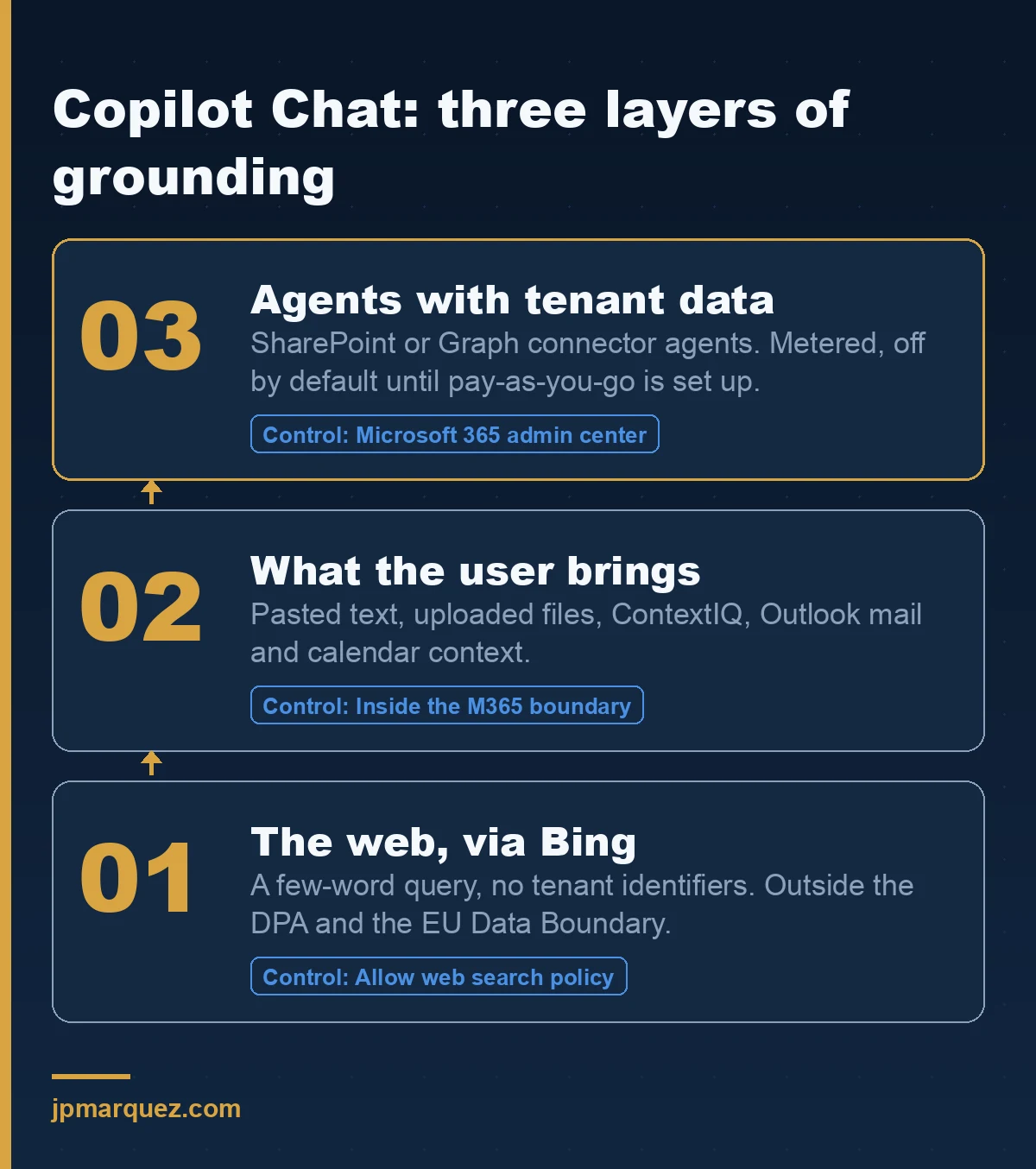
Layer 1: the web, via Bing
When web search is on, Copilot Chat parses the prompt, generates a short search query of a few words, and sends it to the Bing search service. The web search documentation is precise about what is not sent: the full prompt (unless it is very short), entire uploaded files, entire pages summarised in Edge, and any Entra identifiers such as username, domain or tenant ID.
What it also says, and what your DPO will care about: Bing operates separately from Microsoft 365. Those generated queries are covered by the Microsoft Services Agreement and the Privacy Statement, with Microsoft acting as an independent controller, not by the Data Protection Addendum. The EU Data Boundary does not apply to web search queries. That single sentence is the reason the web search toggle deserves a documented decision rather than a default.
Layer 2: what the user brings
Copy and paste. Drag a file into the chat box. Type / and pick a file from the ContextIQ menu. Open Copilot Chat inside Outlook, where even unlicensed users get grounding on their own emails, calendar, meetings, chats and limited OneDrive and SharePoint file content.
None of this bypasses your permissions. All of it happens inside the Microsoft 365 service boundary. But every one of these paths is a user decision, and user decisions are exactly what your sensitivity labels and DLP policies were built to catch. I covered the label and DLP side in DLP for Microsoft 365 Copilot: what it blocks; the same rules apply to Copilot Chat.
Layer 3: agents with tenant data
This is the layer that changes the risk profile. According to the agents documentation for Copilot Chat, declarative agents grounded on instructions and public websites run at no cost, and they are available by default through your existing store settings. Agents that touch shared tenant data — SharePoint, Graph connectors — are billed on metered consumption and are off by default for Copilot Chat users.
Off by default. Until an admin with the Billing, AI or Global Administrator role sets up pay-as-you-go. Then a Copilot Chat user with no licence at all can run an agent grounded on a SharePoint library, and you pay per message.
How should I configure the four controls that matter?
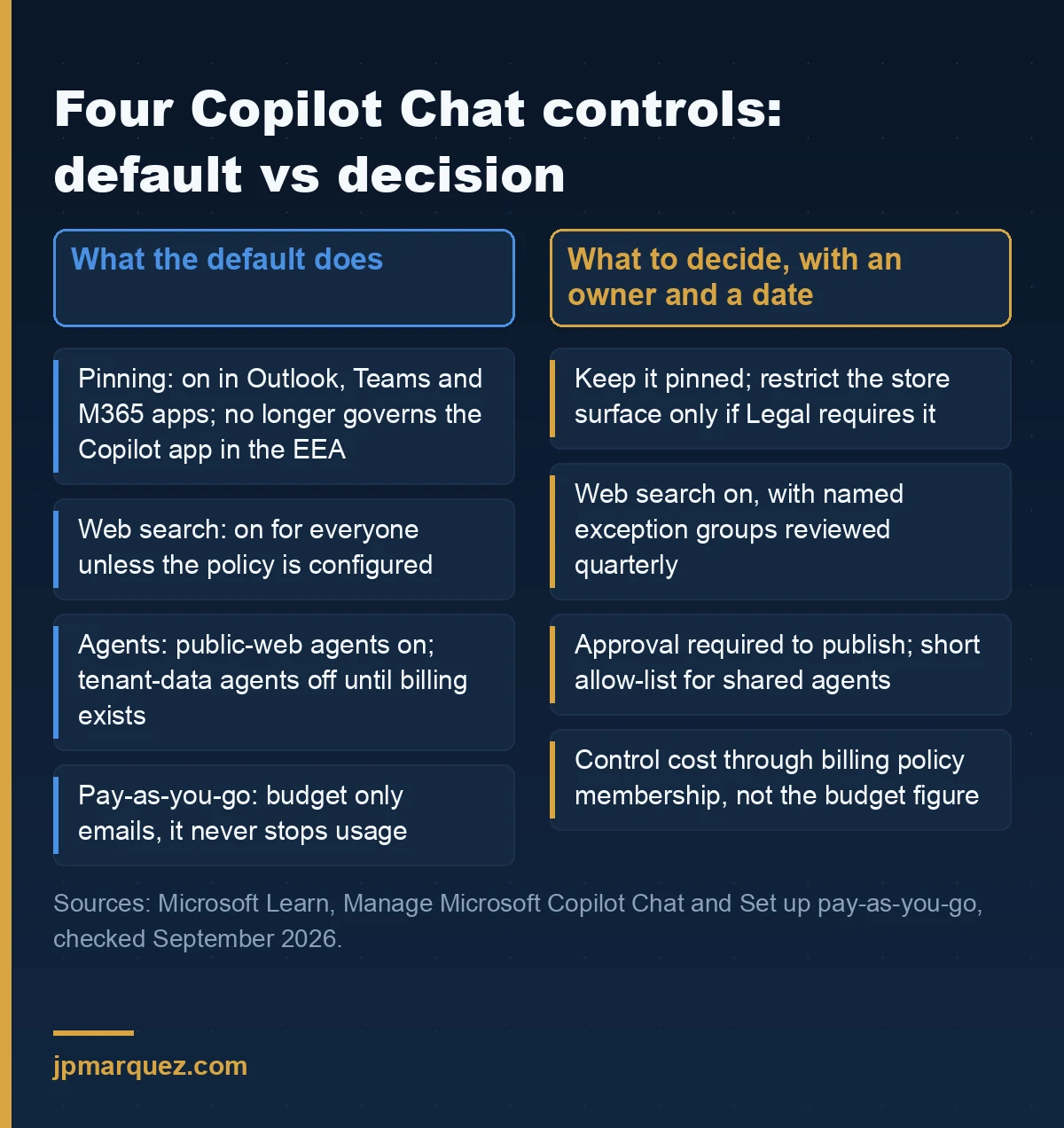
Four settings decide how Copilot Chat behaves in your tenant: pinning, web search, agent access, and pay-as-you-go billing. Each one lives in a different place, each one has a default that favours availability over restriction, and each one should be an explicit, dated decision in your governance record.
Pinning: stop treating it as an off switch
The Pin Microsoft Copilot Chat setting in the Microsoft 365 admin center controls whether Copilot Chat is pinned in Outlook, Teams and the Microsoft 365 apps navigation bar. For tenants with a primary location in the EEA or Switzerland, since 25 July 2025 that setting no longer governs the Microsoft Copilot app itself; for the rest of the world, the same change landed on 28 January 2026. Chat is simply visible in the app now.
And even with pinning off, users can acquire Copilot Chat from the app store unless you restrict that surface specifically. The pinning documentation is clear about this.
My position: unpinning Copilot Chat to "buy time" is the worst available option. You lose visibility, you lose the audit trail, and the users who wanted an AI assistant go to a consumer chatbot where none of your terms apply. Pin it, label it, and put the effort into the three controls below.
Web search: decide it, group by group
The Allow web search in Copilot policy lives in Cloud Policy service for Microsoft 365, and it is also surfaced in the settings section of the Copilot Control System page in the admin centre. It works at tenant level with exceptions for groups and users, and it also governs web search for licensed Copilot users.
If you leave it unconfigured, web search is on. If you turn it off, no query reaches Bing and Copilot Chat answers from the model alone. There is a blunter route — disabling optional connected experiences in Office — but that switches off far more than Copilot, and I would not recommend it to anyone.
What I recommend: on for the tenant, off for the specific groups whose prompts are the ones Legal would ask about. M&A, board support, R&D under NDA. Small groups, explicit list, reviewed quarterly. Do not try to enforce any of this at the network layer. Microsoft states it does not support selective domain, URL or IP blocking for Copilot Chat, and in my experience it breaks Outlook before it breaks Copilot.
Agents: the registry is the control plane
Agents for Copilot Chat are managed in the Microsoft 365 admin center under Integrated apps, in what Microsoft now calls the Agent Registry. You can enable, disable, assign, block or remove an agent, and agents published by your organisation go through admin approval before users see them in the store.
Two details from the documentation that people miss. First, Researcher and Analyst are part of the core chat experience and do not fall under agent settings, so blocking "all agents" does not touch them. Second, shared agents built in Agent Builder or Copilot Studio can be shared by their creator through several channels, which is how most of the unowned agents I find got there.
A quick story, anonymised. During a Power Platform governance workshop at a European utility, we opened the Power Platform admin center inventory on the second day. Third tab. A Copilot Studio agent, running in a production-adjacent environment. No owner. No DLP review. Nobody in the room knew it existed. That agent is exactly the object a pay-as-you-go policy would start metering the day someone connected it to Copilot Chat. I wrote about finding these in Shadow AI in Microsoft 365: how to find and govern it; the agent registry is where the finding turns into a decision.
Pay-as-you-go: a budget that only sends email
Setting up pay-as-you-go for Copilot Chat is a wizard in the Microsoft 365 admin center under Copilot > Billing & usage > Pay-as-you-go services. You need an Azure subscription in the same tenant, a resource group, and Owner or Contributor on both. You create a billing policy, add users or groups, optionally set a budget, then connect the policy to the Microsoft Copilot Chat service. You can have up to 50 billing policies. The alternative path is the Power Platform admin center, where you can also allocate prepaid capacity packs.
Read the budget warning twice. Setting a budget triggers email notifications as spend approaches the limit. It does not enforce the budget. Usage continues after it is exceeded. That is by design, to avoid interrupting users, and it means your cost control is the membership of the billing policy, not the number in the budget box.
If you have already been through the Copilot Studio credit model, none of this will surprise you; I broke down the mechanics in the hidden cost of Copilot Studio agents. The new part is that Copilot Chat turns every eligible user into a potential consumer of that meter.
Is Copilot Chat safe for confidential data?
Yes for prompts and responses, with the same contractual protections as your Exchange mail and SharePoint files, and no for the web search leg, which sits outside the Data Protection Addendum. Prompts and responses are processed inside the Microsoft 365 service boundary, are not used to train foundation models, and are logged in Exchange for audit and eDiscovery, as the privacy and protections page spells out step by step.
The green shield next to New chat is the visual signal that enterprise data protection applies. Under EDP, Copilot respects your identity model and permissions, inherits sensitivity labels, applies retention policies, supports audit of interactions and follows your admin settings. GDPR, ISO/IEC 27018 and the EU Data Boundary are all listed as commitments.
Three caveats I put in every review.
One: the EU Data Boundary does not cover web search queries. Two: the same footnote states that Anthropic models are currently excluded from the EU Data Boundary and from in-country processing commitments. If your tenant has a residency requirement, the model selector is now a governance setting, not a user preference. Three: HIPAA-style commitments do not extend to web queries either, because Bing is outside the Business Associate Agreement.
What Purview sees
Copilot Chat interactions land in the unified audit log like any other Copilot interaction, and retention policies for Copilot apply to the prompts and responses stored in the user's mailbox. If you have rolled out Data Security Posture Management for AI, Copilot Chat activity shows up in the same reports as licensed Copilot; I walked through that rollout in Purview DSPM for AI: fix oversharing before Copilot.
That last point deserves emphasis. DSPM for AI is usually justified by the licensed Copilot project. It is worth switching on for Copilot Chat alone, because Copilot Chat is where your unlicensed 90% are pasting things today.
Copilot Chat or the Microsoft Copilot licence: what changes?
The licence buys organisational grounding: Copilot reads across your Microsoft Graph with semantic indexing, works inside Word, Excel, PowerPoint and OneNote, includes agents without a separate meter, and gets priority access to models. Copilot Chat gives you web grounding, file upload, image generation, model selection, agents on a meter, and the same enterprise data protection, at no extra cost.
| Capability | Copilot Chat (included) | Microsoft Copilot (add-on licence) |
|---|---|---|
| Grounding | Web, uploaded content, Outlook context | Microsoft Graph with semantic index |
| In Word, Excel, PowerPoint, OneNote | Not in the Basic experience | Yes, full experience |
| Agents with tenant data | Metered, off by default | Included with the licence |
| Model access | Standard, capacity dependent | Priority |
| Enterprise data protection | Yes | Yes |
| Audit, retention, labels | Yes | Yes |
The trap I see in budget meetings is treating this table as "Chat is the trial, the licence is the product". It is more useful to treat Copilot Chat as the production baseline for everyone and the licence as a targeted upgrade for the roles where Graph grounding pays for itself. That framing also changes the governance order: you secure the baseline first, then you expand, which is the sequence I argued for in the Copilot Control System.
A 30-day plan for a European tenant
Week one is discovery. Pull the Copilot usage report from the admin centre and note how many Copilot Chat users you have versus licensed ones. Check whether any pay-as-you-go billing policy already exists under Billing & usage. Open the Agent Registry and list every agent with a state of enabled. Ask who owns each one.
Week two is decisions. Web search: on, with named exception groups. Pinning: on. Agents: approval required for anything published to the organisation; a short allow-list for shared agents. Model selection: if you have a residency requirement, document which models are acceptable and communicate it. Each decision gets an owner and a date.
Week three is Purview. Confirm Copilot interactions are in the audit log, confirm the retention policy for Copilot covers Chat, and switch on DSPM for AI even if you have no licensed Copilot yet.
Week four is people. A one-page note to all staff: what the green shield means, what goes to Bing and what does not, how to attach a file safely, and where to request an agent. The note, not the policy, is what changes behaviour.
Then repeat the discovery step every quarter. Copilot Chat's defaults have changed twice in twelve months, and they will change again.
Frequently asked questions
Is Microsoft Copilot Chat free for enterprise users?
Copilot Chat is included at no extra cost with most Microsoft 365 and Office 365 subscriptions, including E3, E5, F3, Business plans and Office 365 E1. Agents that access tenant data are the exception: they are billed on metered consumption through a pay-as-you-go policy or prepaid capacity.
Does Copilot Chat send my prompts to Bing?
Not the prompt itself. When web search is enabled, Copilot Chat generates a short query of a few words from the prompt and sends that to Bing without user or tenant identifiers. The prompt and the response stay inside the Microsoft 365 service boundary. You can turn web search off per tenant, group or user.
Can I block Copilot Chat completely?
You can unpin it from Outlook, Teams and the Microsoft 365 apps, and you can restrict its acquisition from the app store, but the pinning setting no longer governs the Microsoft Copilot app for EEA tenants since July 2025. Microsoft does not support network-level blocking. Governing the four controls is more reliable than trying to remove it.
Are Copilot Chat conversations covered by the EU Data Boundary?
Prompts and responses are covered under enterprise data protection. Web search queries sent to Bing are explicitly excluded, and the documentation currently states that Anthropic models are excluded from the EU Data Boundary and in-country processing commitments. Treat model selection as a governance decision if residency applies.
Do unlicensed users get any organisational grounding?
Only in specific contexts. Copilot Chat in Outlook can ground on the user's own emails, calendar, meetings, chats and limited file content. Outside those experiences, organisational content only enters through what the user pastes or uploads, or through a metered agent that an admin has enabled.