Agent Builder vs Copilot Studio: Which One, When
· 11 min read
By Juan Pedro Márquez
Short answer: use Agent Builder when one person or one team needs a question-and-answer agent over content they can already see. Use Copilot Studio the moment the agent has to do something in another system, reach the whole organisation, or survive its author changing jobs. The tool matters less than where the agent's governance lives — and the two tools put it in two different admin centres.
Most organisations I talk to frame this as a capability question. Which one is more powerful? Which one is cheaper? That framing produces the wrong rollout plan.
Here is the pattern I see repeat. IT leaves Agent Builder switched on because it ships inside the Microsoft 365 Copilot app and looks harmless. Six months later there are a few hundred agents, a handful of them shared with the entire tenant, and nobody in the Power Platform team has heard of any of them — because none of them ever touched the Power Platform admin center. Then someone presses "Copy to Copilot Studio" on the popular one, and now there are two.
Nothing broke. Nothing was configured wrong. The tools did exactly what they were designed to do. The gap was that nobody decided, up front, which agents belong where.
This article is that decision, written the way I walk architecture and governance teams through it.
What is the difference between Agent Builder and Copilot Studio?
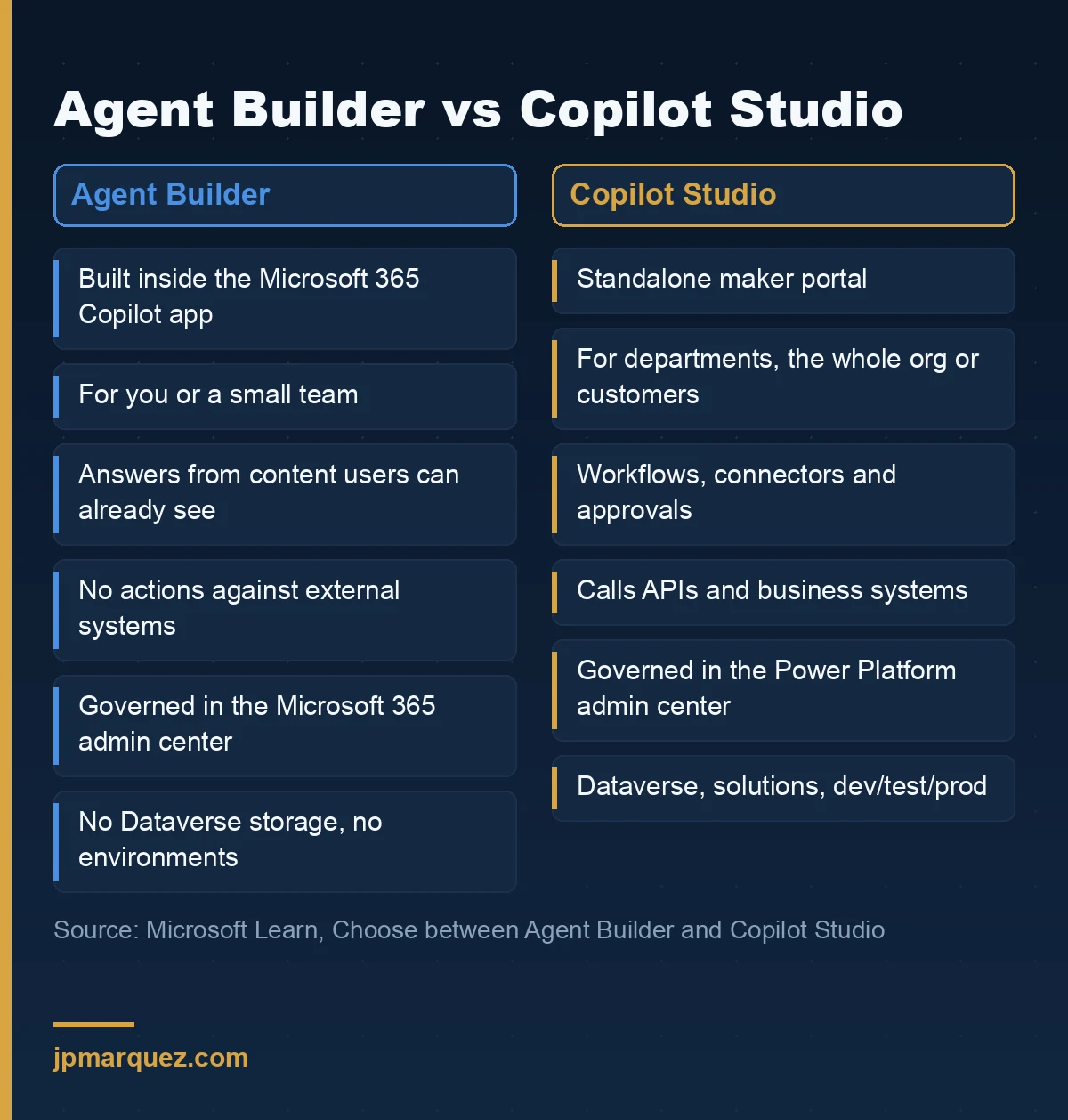
Agent Builder is the authoring surface inside the Microsoft 365 Copilot app for building declarative agents in natural language. Copilot Studio is a standalone maker portal for agents with workflows, connectors, environments and lifecycle controls. Agent Builder is managed from the Microsoft 365 admin center; Copilot Studio from the Power Platform admin center.
Microsoft's own comparison of Agent Builder and Copilot Studio frames it by audience, deployment scope, functionality and governance needs. That is the right list. I would only reorder it: governance first, because it is the one you cannot fix later without rebuilding.
Agent Builder: an agent for you and the people next to you
The Agent Builder overview is explicit about scope. You build from microsoft365.com/chat, office.com/chat or the Teams desktop and web clients. Not from mobile. You give it instructions, point it at SharePoint files, folders and sites, Copilot connectors or the web, test it, and share it.
What it deliberately does not do matters more:
- No actions against external services. Agent Builder doesn't author actions that call other systems. If the agent needs to create a ticket or update a record, the documentation sends you to Copilot Studio.
- No customer-managed keys. Agents built in Agent Builder don't support CMK. If your security baseline requires CMK for anything that holds business instructions, that alone decides it.
- No Teams group or 1:1 chats. The agent works in the Copilot experience, not dropped into a team conversation.
- No Dataverse storage consumption. Agents built here don't eat into your tenant's Dataverse entitlement. That sounds like a footnote. It is actually why these agents are invisible to anyone who governs Power Platform by looking at environments.
Copilot Studio: an agent the organisation owns
Copilot Studio is where agents get environments, solutions, connectors, data policies, versioning, analytics and publishing channels beyond Microsoft 365. The trade-off is that someone has to run it. Environments need owners. Connectors need policies. Publishing to the organisation's catalogue goes through admin approval.
If you want the detail of what that publishing step actually does, I covered it in what happens when you publish a Copilot Studio agent.
When should you use Agent Builder instead of Copilot Studio?
Use Agent Builder when three things are true: the audience is you or a small team, the agent only answers from content those people can already open, and losing it tomorrow would be an inconvenience rather than an incident. If any one of those is false, start in Copilot Studio.
That third test is the one people skip. I call it the "author leaves" test. An Agent Builder agent belongs to its owners. If the only owner moves on, the agent still exists, still answers, and has nobody accountable for its instructions. For a project FAQ that is fine. For an HR policy agent shared with four thousand people it is not.
Good Agent Builder candidates
- A project FAQ agent grounded on the project's SharePoint site.
- A writing or presentation coach that applies your internal style guide.
- An onboarding helper for one team, pointing at that team's documentation.
Notice the pattern: all three are read-only and scoped to content the users already have permission to see. Agent Builder applies a "no new privileges" principle. The agent respects existing Microsoft 365 permissions. If a user can't open the SharePoint site, the agent won't surface it to them.
That principle is a strength and a trap at the same time. A strength, because Agent Builder cannot leak what users couldn't already reach. A trap, because if your SharePoint permissions are already too broad, a well-written agent just makes the oversharing faster to find. I have yet to see an Agent Builder problem that wasn't, underneath, a permissions problem that predated the agent.
Signals you have outgrown Agent Builder
- The agent needs to write somewhere: a ticket, a CRM record, an approval.
- More than one department wants it, or someone asks for org-wide sharing.
- Security asks for staged releases, rollback, or usage analytics.
- The data it needs sits outside Microsoft 365 and would require a connector you don't control.
Who should be allowed to build and share agents?
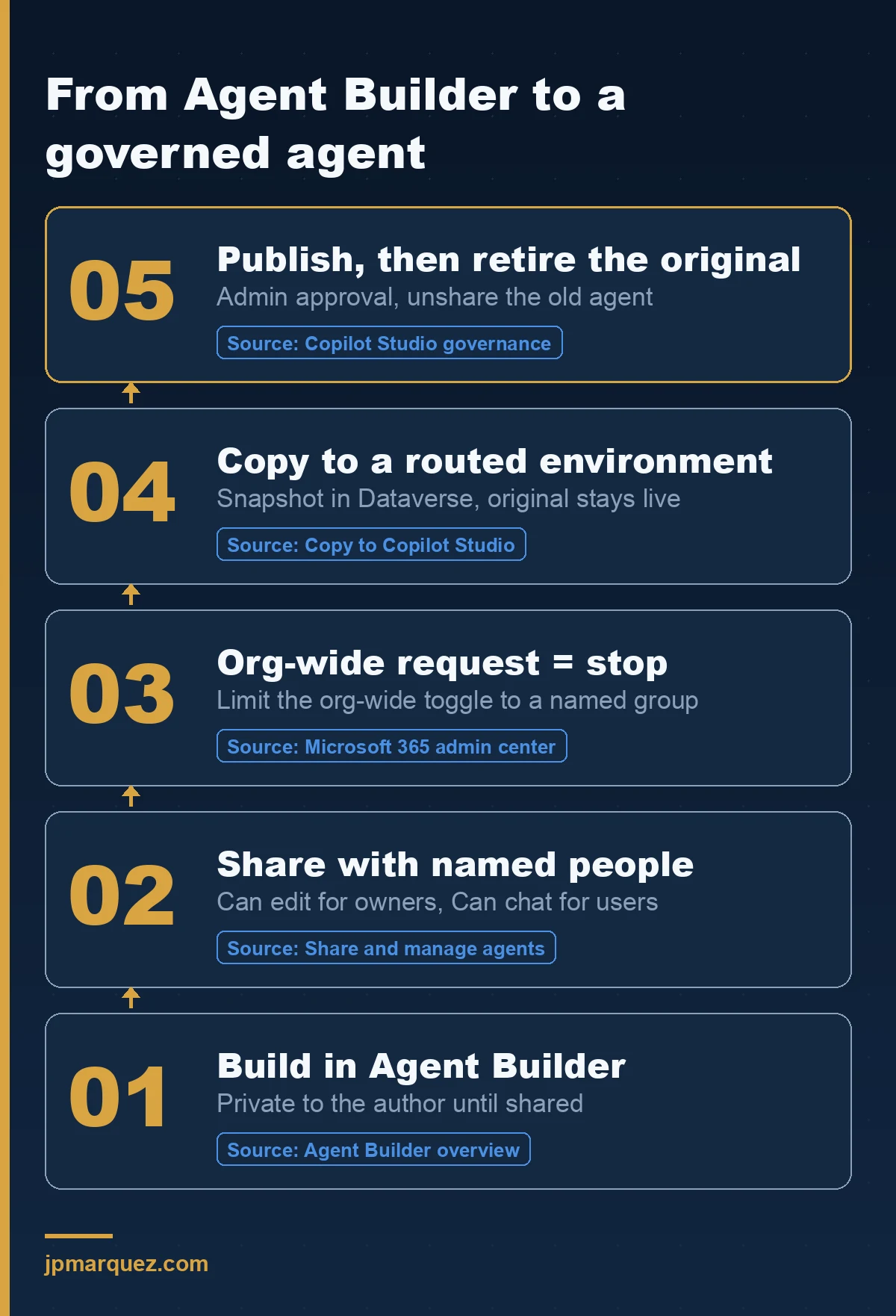
Let almost everyone build. Restrict who can share with the whole organisation. Authoring an Agent Builder agent for yourself creates very little risk; publishing one to every employee is a distribution decision. Control the distribution step, not the creativity step, and route anything organisation-wide through Copilot Studio.
This is the opinion I hold most firmly in this article, so let me defend it.
Blocking Agent Builder outright feels safe. In practice it pushes the same people towards consumer tools or towards building in Copilot Studio's default environment without any guidance, which is worse. The useful control is narrower.
The sharing control that actually matters
Sharing and managing agents built in Agent Builder works with two roles. Can edit makes someone an owner with full rights. Can chat lets them use the agent. Groups can only be added as chat users; owners must be individual people.
Then there is a toggle: Org-wide sharing for chat access. Turn it on and the agent appears in the Agent Store for everyone in the tenant.
Admins control who can use that toggle in the Microsoft 365 admin center, with three options:
| Setting | Effect | When I'd use it |
|---|---|---|
| All users (default) | Anyone can share an agent with the whole organisation | Almost never in an enterprise |
| Specific users or groups | Only named people can share org-wide | The usual target: a small, accountable group |
| No users | Org-wide sharing disabled | Strict tenants; forces org-wide agents through Copilot Studio |
Two details from the documentation that catch people out.
First, the default is All users. If you have never opened that setting, every licensed user in your tenant can already publish an agent to everyone.
Second, changes to the setting apply only to new sharing actions. Agents that were already shared org-wide stay shared until someone updates them manually. Tightening the policy on Monday does not clean up last quarter.
That is why I start every Agent Builder governance conversation with an inventory, not a policy. The Microsoft 365 admin center agent management page lets admins view the agent inventory and enable, disable, assign, block or remove agents. If you have not done that inventory yet, my guide to finding shadow AI in Microsoft 365 walks through the order I use.
The Copilot Studio side has its own, separate limits
On the Power Platform side, Copilot Studio sharing controls are a Managed Environments feature. You decide whether makers can grant Editor or Viewer rights, and to how many people. Editor can only be given to individual users. Rules can take up to an hour to start being enforced, and they only apply to agents that require authentication.
And here is the sentence I make every admin read twice. Microsoft's documentation on copying agents states that the sharing limit control in the Microsoft 365 admin center is different from the sharing limit control in the Power Platform admin center.
Two controls. Two admin centres. Usually two different teams. If those teams have never compared settings, your effective policy is whichever one is looser.
What happens when you copy an agent to Copilot Studio?
Copying creates a new, independent Copilot Studio agent from a snapshot of the Agent Builder one. The original keeps working in Microsoft 365 Copilot, later edits to it don't flow across, and every copy operation creates another new agent. It is a fork, not a migration — plan the cutover yourself.
The button lives in the More options (…) menu: Copy to Copilot Studio. The copy documentation lists what comes across: name, description, instructions, suggested prompts, icon, SharePoint files, folders and sites used as knowledge, and websites used as knowledge.
What does not come across, and what to do about it:
| Agent Builder configuration | After copying |
|---|---|
| Copilot connectors (enterprise knowledge) | Set up connectors again in Copilot Studio |
| Scoped Copilot connectors | Not currently supported in Copilot Studio |
| Embedded files | Upload them again |
| Teams chats and meetings as knowledge | Add the Power Platform connector for Teams |
| Emails as knowledge | Add the Power Platform connector for Outlook |
| Create documents, charts and code | Enable code interpreter in agent settings |
| Image generation | Not currently supported in Copilot Studio |
The duplicate problem nobody plans for
Because the original stays live, you now have two agents with the same name, the same instructions and the same knowledge. Users who were shared on the original keep chatting with it. Nothing tells them a governed version exists.
The documentation is honest about this: after you publish the copy, you decide whether to delete the original and communicate migration steps to the people it was shared with. In other words, the cutover is a change you manage, not something the platform does for you.
My rule: whoever presses Copy owns the retirement of the original, and the copy isn't "done" until the original has been unshared or removed. Write that into your agent request process before the first copy happens, not after the fifth.
Prerequisites that stop the copy
- The person copying needs a Copilot Studio licence or a Microsoft 365 Copilot licence, and the Dataverse entitlement enabled in their Microsoft 365 licence.
- The target environment needs a Dataverse data store, a supported data location, and the right security roles for that person.
- Data policies, connector policies and sharing limits on that environment are checked before the copy proceeds.
Where do copied agents land, and who governs them?
Copied agents land in whichever Power Platform environment the maker selects, stored in Dataverse and managed through a solution. If you have not set up environment routing, that choice is usually the default environment — which is exactly where you don't want an organisation-wide agent to live.
Environment routing is a premium governance feature that sends makers to their own personal developer environment instead of the default one. When it is on, the routed environment is preselected during the copy. Note the warning that sits next to it: developer environments can be cleaned up automatically after inactivity, so a maker who copies an agent and goes quiet can lose access to it.
So routing solves "everything lands in default", but it creates a second question: how does an agent get from someone's personal developer environment to production? That is ALM, and it is the reason Copilot Studio exists. I wrote up the environment and pipeline pattern in Copilot Studio ALM: environments, solutions and pipelines.
For the broader view of what Copilot Studio governs at environment level — data policies, connector controls, auditing — Microsoft's Copilot Studio security and governance page is the reference I hand to security teams.
How does licensing differ between Agent Builder and Copilot Studio?
Both are included for users with a Microsoft 365 Copilot licence. Without that licence, organisations can enable Copilot Studio pay-as-you-go billing, consumed as Copilot Credits, to unlock grounding on organisational data. Agent Builder is also usable without either for agents grounded only on web knowledge.
That last point is easy to miss. Users with no Copilot licence at all can still build web-grounded agents. Capabilities then depend on the licence of the person using the agent, not just the author: the sharing documentation warns that users who lack the licence required for an agent's configured capabilities may hit errors.
What I tell finance and procurement:
- Agent Builder is not a separate purchase decision for licensed Copilot users. The decision is governance, not cost.
- Copilot Studio becomes a cost conversation once agents run at scale on credits. Read the Copilot Studio billing and licensing documentation before you promise a budget, and re-check it each quarter; the models have changed more than once.
- Copying an agent to Copilot Studio has its own licence prerequisite (above). Check it before you tell a business owner their agent can be "upgraded".
A decision rule you can hand to the service desk
Put the decision in five questions, in this order, and stop at the first "yes":
- Does the agent need to write to or call any system? → Copilot Studio.
- Will more than one department use it, or does anyone want org-wide sharing? → Copilot Studio.
- Does it need staged releases, rollback or usage analytics? → Copilot Studio.
- Does your baseline require customer-managed keys or Teams group chat use? → Copilot Studio.
- None of the above? → Agent Builder, shared with named people or groups.
It is deliberately blunt. A service desk can apply it without an architect in the room, which is the point. The architect's job is the exceptions.
Two practical notes before you roll it out. Agent Builder availability depends on where your Power Platform default environment sits; the regional availability list covers Europe, the UK, Switzerland, Norway, Sweden, France and Germany among others. And it needs *.api.powerplatform.com reachable through your proxy, which a surprising number of locked-down networks still block.
If you are deciding between Copilot Studio and a pro-code route instead, that is a different question, covered in Copilot Studio vs Microsoft Foundry.
Frequently asked questions
Is Agent Builder the same as Copilot Studio lite?
Microsoft has used both names for the in-app experience. Today's documentation calls it Agent Builder, and the older "Copilot Studio lite" URL redirects to the Agent Builder overview. It builds declarative agents inside the Microsoft 365 Copilot app; the full Copilot Studio is a separate portal.
Can I move an Agent Builder agent to Copilot Studio without rebuilding it?
Yes, with Copy to Copilot Studio. Instructions, prompts, icon, SharePoint knowledge and websites carry over. Connectors, embedded files, Teams and email knowledge need to be reconfigured. The original agent stays live, so you must retire it and tell its users.
Do Agent Builder agents show up in Power Platform governance?
Not before they are copied. They don't consume Dataverse storage and are managed from the Microsoft 365 admin center under Copilot > Agents. Once copied, the new agent lives in a Power Platform environment and falls under that environment's data policies and sharing limits.
Should we disable Agent Builder for everyone?
Usually not. Disabling authoring pushes users elsewhere. Restrict org-wide sharing to a named group instead, inventory what is already shared, and require anything organisation-wide to go through Copilot Studio with an owner and a lifecycle.